


New Participant
November 21, 2017
Answered

Full-Justify text in InDesign

  • November 21, 2017
  • 8 replies
  • 6683 views

Is there no easy way to full-justify paragraphs in InDesign? If you select text and "full justify" it, it looks terrible.

I know I'm not the first person to ask but I'm hoping I'll get a more efficient solution than what I've seen when this question has been asked previously. I love InDesign except for this flaw.
    This topic has been closed for replies.
    Correct answer SJRiegel

    I think you have your terms confused. Your top image is left-aligned, not left-justified.

    Left-justified will set all lines except the last one to justified, and will left-align the last one.

    I think you will be happier with those results than with full-justify (which spreads your words out to justify all lines, and can result in large gaps if the last line would have been short.

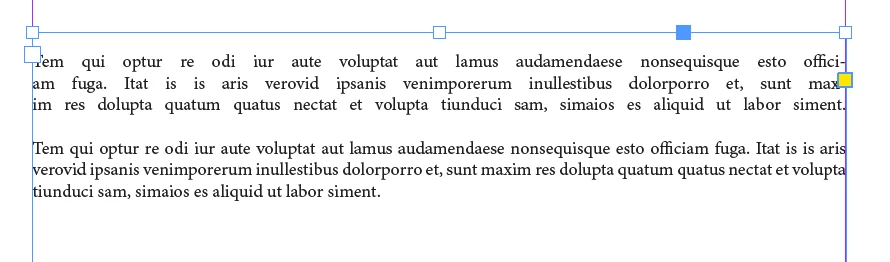
    Example: Here are two identical paragraphs - the first one full-justified and the second one left-justified. The top one has very noticible unnatural gaps, but the bottom one does not.

    8 replies

    manal shanableh
    Braniac
    November 22, 2017

    I have posted my answer twice and dont how to delete one of them.

    anyways, this force line break makes the full-justify looks like this.

    manal shanableh
    Braniac
    November 22, 2017

    Hi,

    Its simple, go to Type > Show Hidden Characters

    you will notice the the blue characters and notice what is the sign at last of sentence, select it and replace it with a space.

    also you can copy it, and press cmd F (find and change) past it in find what and change to press space and change all

    this character name is: forced line braek it looks like you copy the text from browser.

    hyltonlAuthor
    New Participant
    November 21, 2017

    You guys are my heroes! Your replies helped me better understand this issue, and get it resolved. Happy Thanksgiving to those of you in the USA.

    manal shanableh
    Braniac
    November 22, 2017

    Hi,

    Its simple, go to Type > Show Hidden Characters

    you will notice the the blue characters and notice what is the sign at last of sentence, select it and replace it with a space.

    also you can copy it, and press cmd F (find and change) past it in find what and change to press space and change all

    this character name is: forced line braek it looks like you copy the text from browser.

    hyltonlAuthor
    New Participant
    November 21, 2017

    Thanks everyone. Your responses are very helpful. I'll spend some time playing around with it, following your guidance/feedback, and think I'll get it sorted out. All your assistance is very much appreciated.

    hyltonlAuthor
    New Participant
    November 21, 2017

    Here are screenshots. Typically I draft text in Google Docs and then copy it into InDesign. Top is left-justified, bottom is full-justified.

    Braniac
    November 21, 2017

    Top is Align Left.

    Braniac
    November 21, 2017

    Do you have the Paragraph Composer selected, as opposed to the Single-Line Composer?

    New Participant
    December 8, 2022

    Perfect, I changed to Single-Line Composer and it solved the problem. Thank you very much, Jeffrey Smith


    Derek Cross
    Braniac
    November 21, 2017

    Left Justify is the normal way of selecting justified text. I trust you're using Paragraph (and Character) Styles.

    Braniac
    November 21, 2017

    Some screen shots would help in understanding your issue.

    "It looks terrible" doesn't really describe what you are seeing, or what your desired outcome is.

    hyltonlAuthor
    New Participant
    November 21, 2017

    Thanks. I posted screenshots below.