

Full Justify Word Spacing - Ignore specific words?
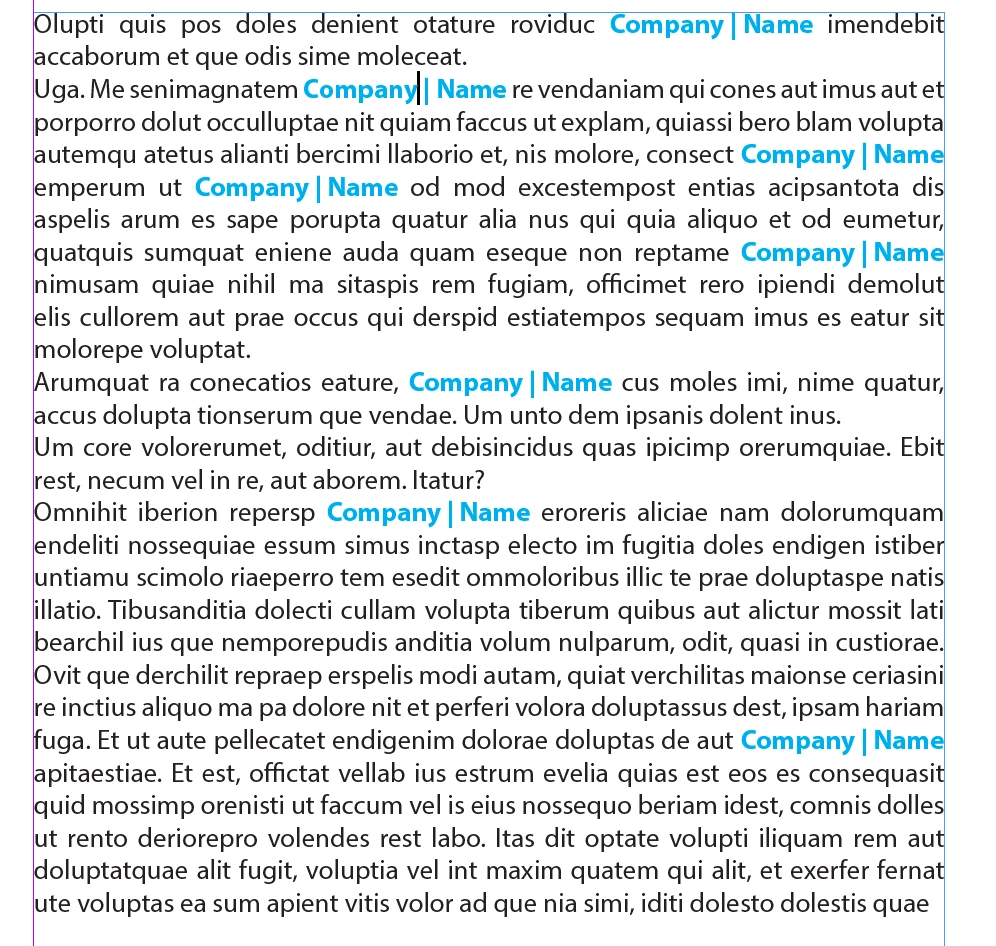
I am working on product literature for my company where we mention our company name many times throughout, which is split in the middle by a bar character like "Company | Name". This creates a lot of spacing issues when I try to full justify (with last line aligned left). You can see in the screen shot that the spacing is never consistent due to the justification. Since it is our company brand name it's very important to us that we present it consistently every time, but we also like the way justified paragraphs look on the page - it just looks much cleaner.
example of justified where spacing between words and letters are not consistent, either stretched or squished:

when aligned left the spacing between Company | Name are uniform:

Is there a way to justify the paragraph but make the justification ignore the Company | Name so that spacing is consistent on these characters every time? Or is there another solution to this?
I have tried adjusting the word & letter spacing and glyph scaling but this changes attributes for the entire paragraph and not Company | Name by itself. Adjusting the tracking on the character properties doesn't work very well because it adjusts the spacing relative to how it is auto spaced in the paragraph. I hope this all makes sense! To add another complication... we don't want to use hyphenation which I am sure makes this tougher.
Thanks in advance!
Stephen
 AdChoices