
Inspiring
January 30, 2019
Question

gen pdf fonts problem

  • January 30, 2019
  • 3 replies
  • 849 views

Hi experts,

I use this method:

cDoc.exportFile(ExportFormat.PDF_TYPE, cFile, false, cPreset);

gen pdf in javascript.

but my come out has this problem:
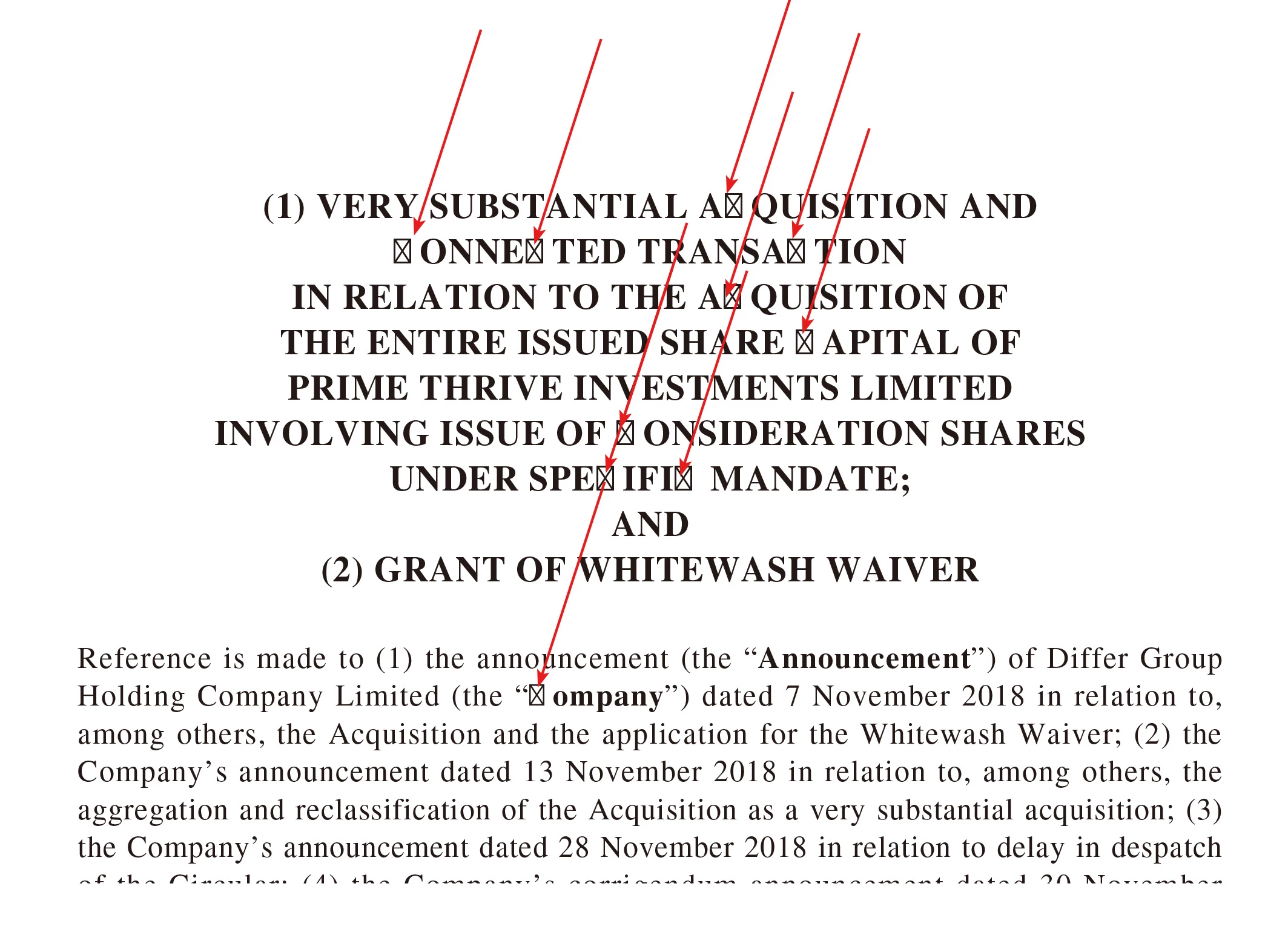
sometimes it is C, sometimes G, or other characters

Could some one tell me what's the problem?

thanks

regard

John

    This topic has been closed for replies.

    3 replies

    JohnwhiteAuthor
    Inspiring
    January 31, 2019

    Hi Uwe,

    InDesign
    CC2018

    Version
    13.0-J

    Win 10
    Professional

    Times LT Std

    Suitcase Fusion 3

    what is the meaning:

    What's the composer of the paragraphs?

    While running the script do not anything

    John

    Community Expert
    January 31, 2019

    Hi John,

    the paragraph composer. A property of every paragraph and paragraph style.

    Basically by scripting there are six different composers available.

    Here a list with the locale independent strings:

    Adobe:

    $ID/HL Single

    $ID/HL Composer

    World Ready:

    $ID/HL Single Optyca

    $ID/HL Composer Optyca

    Japanese:

    $ID/HL Single J

    $ID/HL Composer J

    Regards,
    Uwe

    JohnwhiteAuthor
    Inspiring
    January 31, 2019

    Do you mean this:

    JohnwhiteAuthor
    Inspiring
    January 31, 2019

    thank you Manan,

    thank so much.

    John

    Community Expert
    January 31, 2019

    Hi John,

    what's your exact version of InDesign?

    What's your operating system?

    What's the composer of the paragraphs?

    What fonts are used? Is any font management software into play?

    While running the script do you do other things in different apps?

    Regards,
    Uwe

    Community Expert
    January 30, 2019

    Hi John,

    This seems to be an issue with the font embedding in PDF, try exporting the pdf of the same document using the same preset used in the code and then see the results. I think you have used a font in the document that does not allow embedding.

    You can also check the pdf in Acrobat to see if the font is missing or not, look at the following discussion on the topic.

    Missing fonts in PDF or not?

    -Manan

    -Manan
    JohnwhiteAuthor
    Inspiring
    January 30, 2019

    Hi Manan,

    It is barely happen.

    for thousands times it happen 4 times.

    if it is embedding fonts problem,

    but why it is happen so barely?

    John

    Community Expert
    January 30, 2019

    Are you always testing the pdf on the same machine and does it happen with the same font. It might also be the case that font is not embedded but Acrobat is reading it from the local installed version on the machine you are opening the pdf but in cases where you see this issue the machine on which the pdf is being opened does not have the font installed as well.

    Anyhow i don't see this as a scripting query, lets move this discussion to the InDesign user forum, there we can get opinion of more experts better suited to look into this matter. I am moving this discussion to the other forum.

    -Manan

    -Manan