
ricks35183463
Participating Frequently
May 12, 2025
Question

Get footer from parent page to apply italics from title

  • May 12, 2025
  • 4 replies
  • 537 views

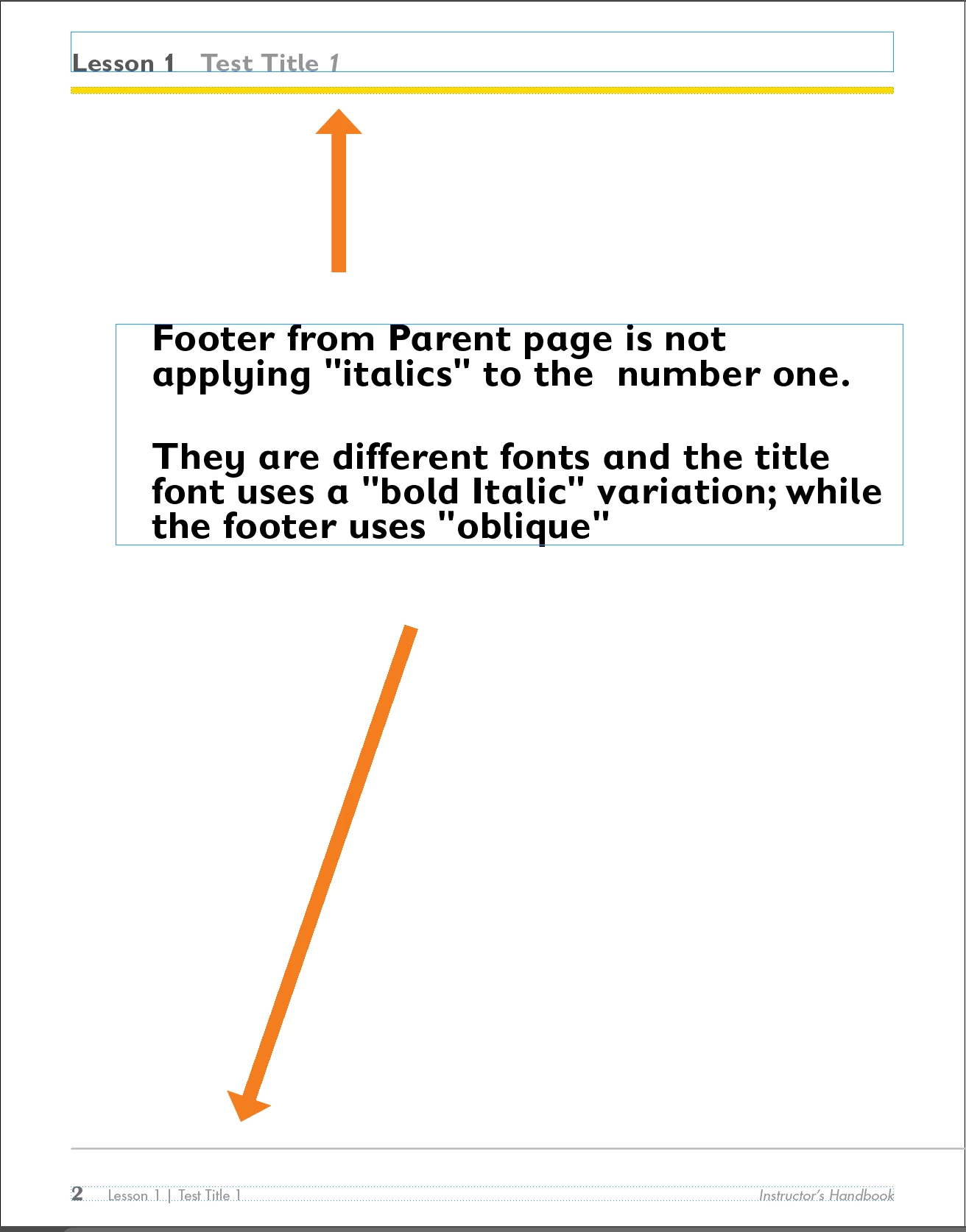
I am working on a series of textbooks for a client, and the parent page has a running footer that is pulling the title of that lesson from the top of each page.  Some of the titles have a character style applied to make that character "italic."  The problem is the footer will not apply the variation because they are different fonts and one uses a "bold, italic" and the other uses "bold, oblique."  


Does anyone have a suggestion on how to remedy this?  I'm attaching screenshots of a text page and the parent page as well.


I thank anyone who responds in advance.


Best regards,

Rick Skippon


4 replies

Barb Binder
Community Expert
Community Expert
May 13, 2025

Hi @ricks35183463:


What you didn't share is how the content looks on the body page so I made a guess and set up the title as a single paragraph, styled with the paragraph style called Title. I then assigned three individual characters styles. (Yours may be simpler.)


I used three character styles: Lesson No (no formatting), Title (removes bold) and Number (removes bold and assigns italics).  


On the parent page I set up three consecutive, individual variables: I called them Lesson No, Title and Number. All three are using the Type: Running Header (Character style) which allows me to call in (and format individually) content assigned the character styles Lesson No, Title and Number on the Body pages.


I then used a character style to assign bold to the first variable, ignored the middle one and made the last variable italic.


The result on the body pages:


~Barb


~Barb at Rocky Mountain Training
Robert at ID-Tasker
Legend
May 13, 2025

@ricks35183463 


Can you post a "better" screenshots - with more real/complete examples?


ricks35183463
Participating Frequently
May 13, 2025

Here's PDF showing how this is set up and what's happening.  I hope this helps explain this better.


Robert at ID-Tasker
Legend
May 13, 2025

@ricks35183463


As has been pointed out already - and unless I'm missing something - Text Variables are treated as a single character - in text - and they're formatted as whole - so how can you have PART of the CONTENTS of a single Text Variable - formatted differently?


Barb Binder
Community Expert
Community Expert
May 13, 2025

Hi Rick:


There are two ways to get InDesign to collect content from the page for the running heads: either by referencing a paragraph style or a character style (or styles) in running head variables. 

Like Willi suggested, the only way I have figured out how to get regular and italics into the running head automatically is to use two character styles on the title: one for the regular text and one for the italics. I set up both variables on the parent page side-by-side and then call in the text assigned the character styles. This works if there is position consistency (the italics is always at the beginning of the title or always at the end) but falls apart if the italics is in the middle of the title. Since your lesson number is always at the end,  that should work for you.

Come back if you have further questions. I'm happy to record a demo for you tomorrow morning.


~Barb

~Barb at Rocky Mountain Training
Willi Adelberger
Community Expert
Community Expert
May 12, 2025

Text variables are seen as one single character. Can you divide the title into 2 entities, based on each one with a character style you can insert 2 text variables with different character formatting.