
Answered
Get rid of multipage spreads
Hello Hive!
I must have accidently changed something because when I try to add pages to my document, instead of getting nice 2 page spreads, I'm getting mega spreads.
Help!
TIA 🙂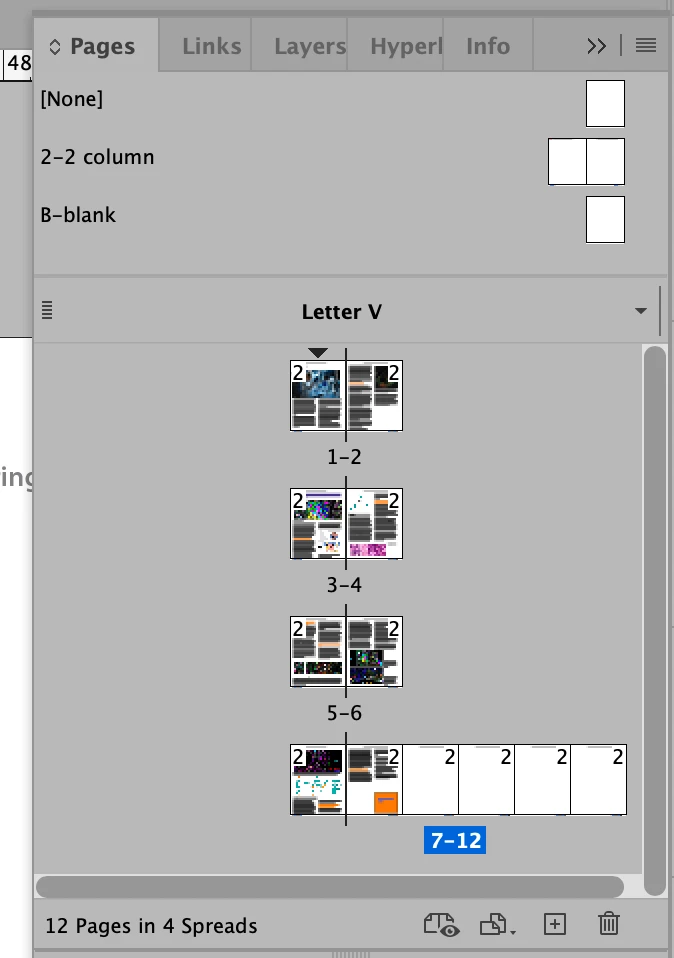

Hello Hive!
I must have accidently changed something because when I try to add pages to my document, instead of getting nice 2 page spreads, I'm getting mega spreads.
Help!
TIA 🙂
Hi @Noyster2:
You can manually drag the new pages into their own spreads, or you can select all the spreads and re-enable Allow Document Pages (and Selected Spreads) to Shuffle. That will restore normal spreads, where 1 is a right page and you have 2-page spreads moving forward.
Making page 1 a left page is an option—not necessary a good option and doesn't follow standard publishing conventions where right pages are always odd numbers and left pages are always even numbers—but that's what led you into this situation.
~Barb
Already have an account? Login
Enter your E-mail address. We'll send you an e-mail with instructions to reset your password.
 AdChoices