
Exit
  • Global community
    • Language:
      • Deutsch
      • English
      • Español
      • Français
      • Português
  • 日本語コミュニティ
  • 한국 커뮤니티
0

Getting text to start at the leftmost position of an upward-slanded text box?
New Here ,
Sep 27, 2021 Sep 27, 2021

Kraus5E7E_1-1632801096455.png


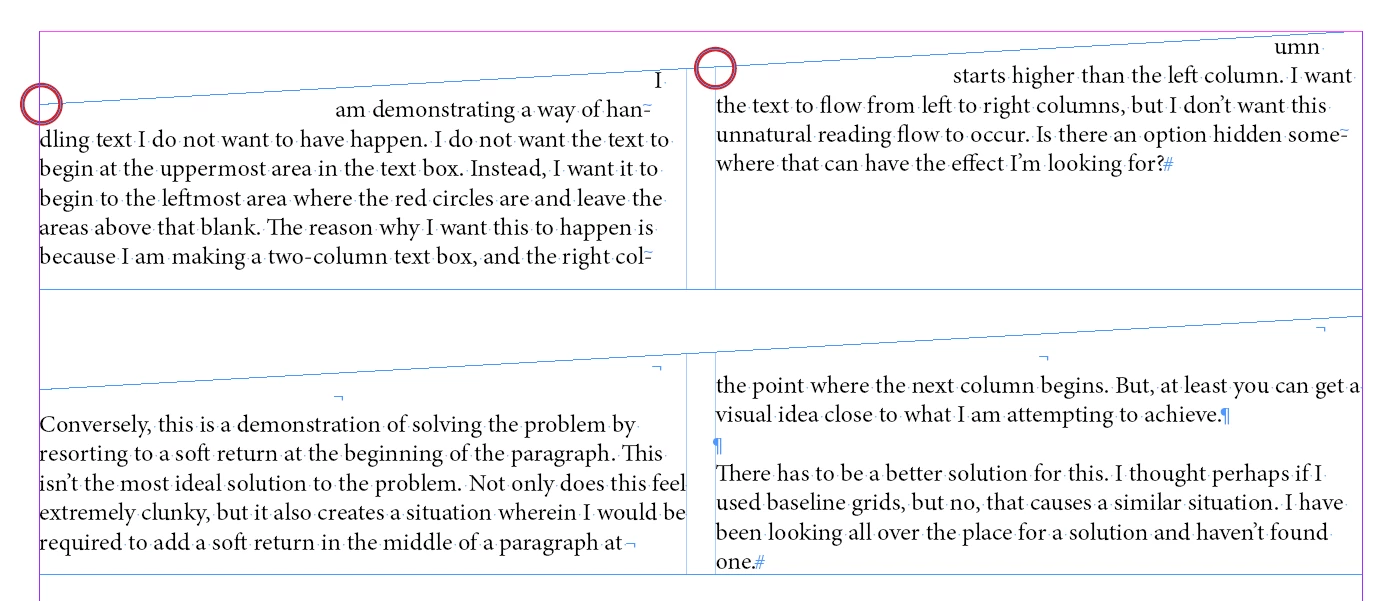
How can I get the first line of a column to begin at the leftmost area of a text box rather than what is being shown in my demonstration? I am creating a multi-column text box whose right corner is higher than the left, but want text to begin from the leftmost area where the red circles are. The areas above that would remain empty.


Underneath that, I'm showing a clunky solution I found. It's not desirable. Not only would I have special characters inserted into the middle of the paragraph where they don't belong, but if any of the text changes, I would have to reset those characters into the proper places.

TOPICS
How to , Type
312
Translate
Report
Community guidelines
Be kind and respectful, give credit to the original source of content, and search for duplicates before posting. Learn more
community guidelines
Community Expert ,
Sep 27, 2021 Sep 27, 2021

I don't love your clunky solution, but I use it too. You should also look at the Baseline choices in the Text Frame Options. That will give you some more flexibility; I think if you chose x-height it might be closer to what you're trying to do. . 


However, I think that probably just having plain ol' rectangular text frames, and then using a triangle with an image wrap, will give you better results.


Sometimes I'll just draw lines and then use the Text On Path tool:


JoelCherney_0-1632804122903.png


Translate
Report
Community guidelines
Be kind and respectful, give credit to the original source of content, and search for duplicates before posting. Learn more
community guidelines
Community Expert ,
Sep 28, 2021 Sep 28, 2021

Why not just use single column frames?

Translate
Report
Community guidelines
Be kind and respectful, give credit to the original source of content, and search for duplicates before posting. Learn more
community guidelines
New Here ,
Sep 30, 2021 Sep 30, 2021
LATEST

That's what I usually end up doing. I just figured there might be a more elegant solution. It's been a problem for well over 10 years and figured someone would have solved it by now.

Translate
Report
Community guidelines
Be kind and respectful, give credit to the original source of content, and search for duplicates before posting. Learn more
community guidelines
LEGEND ,
Sep 28, 2021 Sep 28, 2021

Another clunky solution, but without the special characters, and allowing for easier text changes.  

Invisible boxes about the text box, with text wrap applied. They can be grouped with the text box to avoid having them shift out of place.

Screen Shot 2021-09-28 at 3.22.39 PM.png


Translate
Report
Community guidelines
Be kind and respectful, give credit to the original source of content, and search for duplicates before posting. Learn more
community guidelines