Participant
Sep 6, 2017 6:17 PM UTC
Answered

Gray bars over text

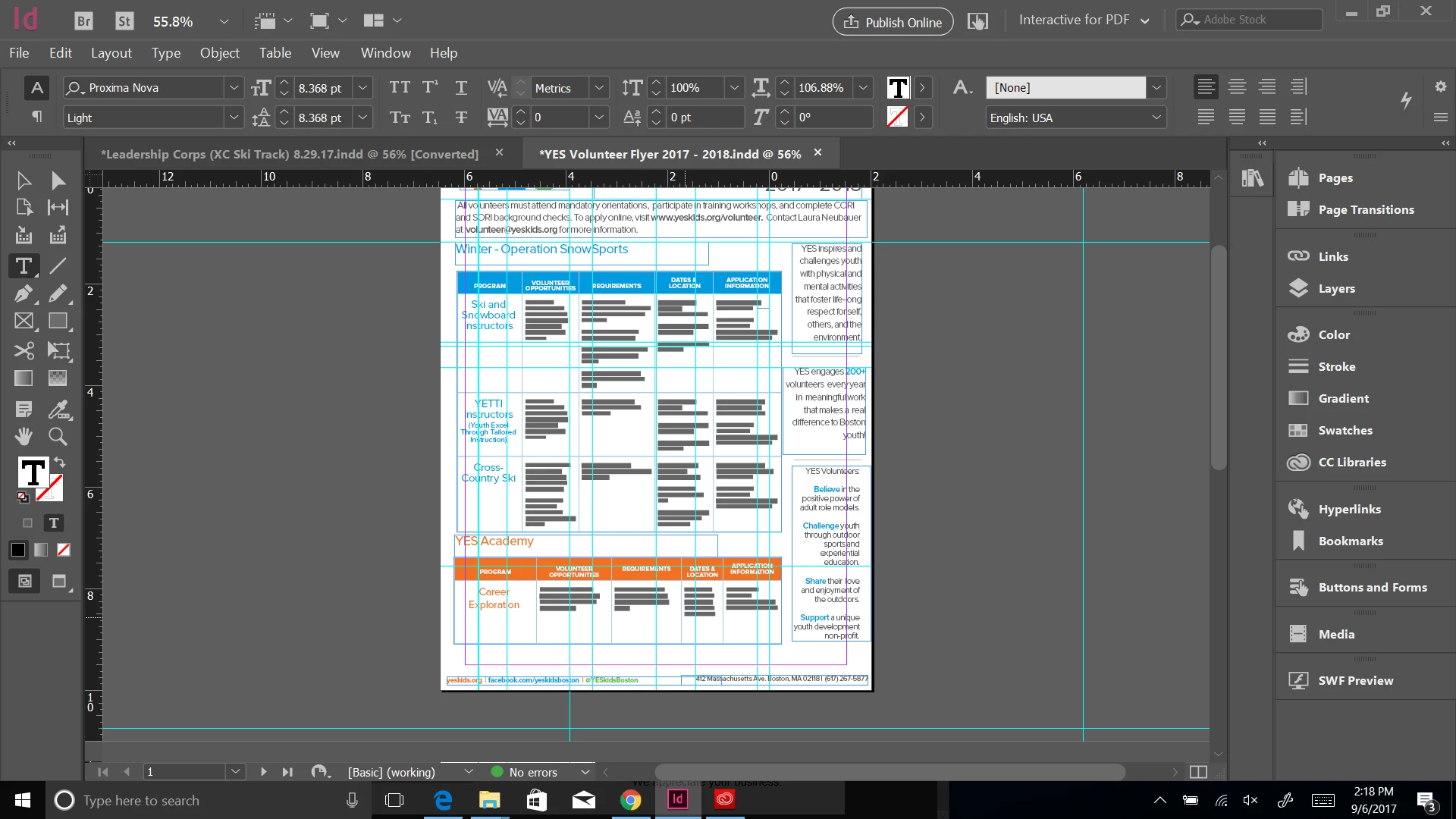
Hi: I just updated my InDesign, so not sure if that has something to do with it, but I keep on having gray bars appear over text (see below). Does anyone know how to undo this?

    This topic is closed to new replies. Start a new post to keep the conversation going.
    Barb Binder
    Barb BinderCorrect answer
    Community Expert
    Sep 6, 2017 6:23 PM UTC

    It's called Greeking. Go to Edit > Preferences > Display Performance and set Greek Type Below to 0.

    Greeking is on as a default, and it displays very small text as gray bars when the assumption is that the text is too small to read anyway. Years ago it was a speed issue to help the pages display more quickly, but I've never cared for it, and always disable it.

    ~Barb at Rocky Mountain Training

    5 replies

    Participant
    Sep 6, 2017 6:38 PM UTC

    Thank you!!

    Translate
    Barb Binder
    Community Expert
    Community Expert
    Sep 6, 2017 10:01 PM UTC

    Always happy to help, Christine!

    Translate
    ~Barb at Rocky Mountain Training
    Barb Binder
    Community Expert
    Barb BinderCommunity ExpertCorrect answer
    Community Expert
    Sep 6, 2017 6:23 PM UTC

    It's called Greeking. Go to Edit > Preferences > Display Performance and set Greek Type Below to 0.

    Greeking is on as a default, and it displays very small text as gray bars when the assumption is that the text is too small to read anyway. Years ago it was a speed issue to help the pages display more quickly, but I've never cared for it, and always disable it.

    Translate
    ~Barb at Rocky Mountain Training
    le37gill
    Participating Frequently
    Sep 10, 2021 11:47 AM UTC

    Thank you for the above. This issue was solved in 2017.
    However, now in 2021, the same issue arise but the solution doesn't match the new interface 😞
    Hate it when they upgrade stuff but get rid of things just to put back later and call it another upgrade!!! 😞

    Very dissapointed with Adobe Illustrator team!

    So what is the solution in 2021? Can anyone help?

    Translate
    BobLevine
    Community Expert
    Community Expert
    Sep 10, 2021 12:08 PM UTC

    This is the InDesign forum and if you meant InDesign you are not looking in the right place. It's under display performance and nothing has changed in this regard in more than 2 decades since InDesign was released.

    Translate