Copy link to clipboard
Copied
Trying to create a line of text that doesn't break on a name followed by a space, a bullet character, and a space. I want the entire name on the same line followed by the space and bullet character with no break, but when I try to create the grep expression for it all the text goes out of the text frame. I have managed to apply a different character style to every other name, and I can apply no break to either style successfully, but if I apply it to both styles it treats the paragraph like one big no breaking line of text. Anyone have a suggestion how to create the appropriate grep expression?.

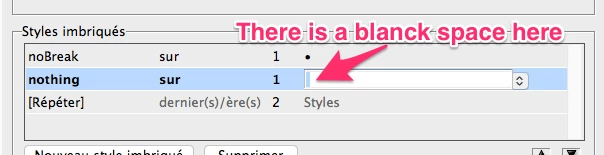
You can use Nested styles: apply the noBreak style up to the bullet, apply the nothing style (which does nothing) on/up to the blank space following the bullet (so it should break the line here), and repeat last 2 styles.
Copy link to clipboard
Copied
You can use Nested styles: apply the noBreak style up to the bullet, apply the nothing style (which does nothing) on/up to the blank space following the bullet (so it should break the line here), and repeat last 2 styles.
Copy link to clipboard
Copied
@JR Boulay That is a great solution and I'm marking it as correct. It does exactly what @mompcomike is looking for.
@mompcomike I'm including an English language screen shot in case JR's French language screen shot is confusing. Remember to add the space in the row below the bullet.
~Barb
Copy link to clipboard
Copied
Sorry for the "blanck" typo and sorry for InDesign's silly translation of "last", which is horrible in French.
Get ready! An upgraded Adobe Community experience is coming in January.
Learn more