
GREP issues in Find/Change - Repeat After Wildcards Not Working in Positive Lookbehind Match
I have a rather long document. The text is flowed from a word document sent over from the client, however, the formatting is inconsistent when dealing with commas in lists and coordinating conjunctions. In some places serial commas are used after the last item before the coordinating conjunction, and in other places they are not. I need to change them all to serial commas for consistency and to reduce ambiguity since this is a professional document.
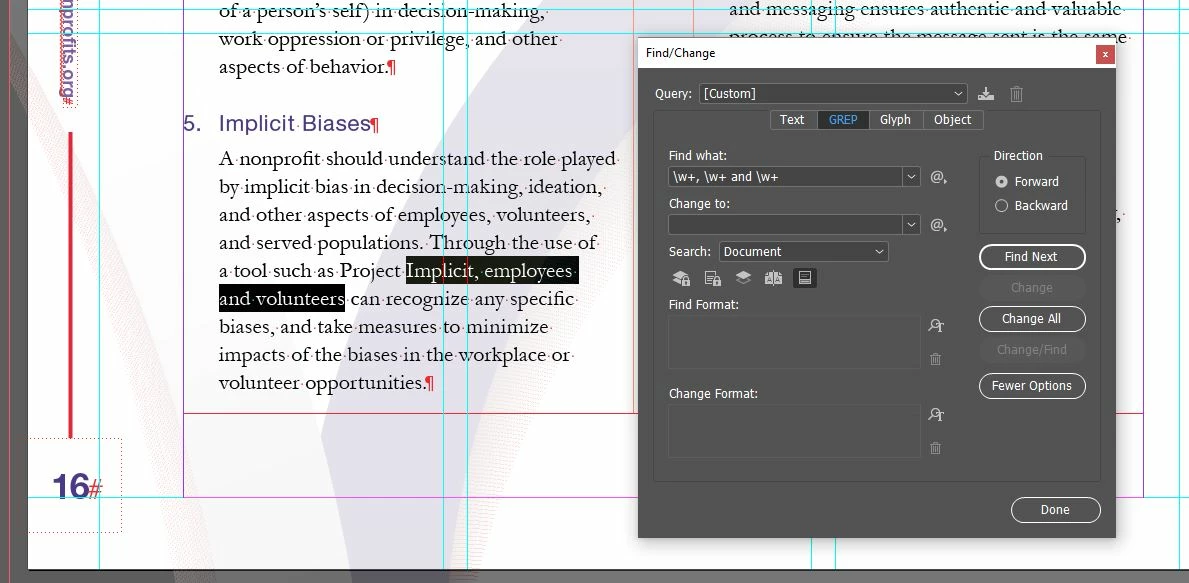
I can find instances of this by searching a very simple pattern using GREP. The expression \w+, \w+ and will match the pattern I need, however, I cannot easily change the white space to be preceded by a comma. I have to do this manually, because this expression selects not only the space, but also the other elements of the pattern, as shown by the image below.
I can change this expression to use a positive lookbehind and a positive lookahead, but it lacks the specificity I need. The expression (?<=\w) (?=and \w) will select just the space, but this is not necessarily a space that is part of a list or a coordinating conjunction. This means that I would manually have to select Find Next, check to make sure this is a coordinating conjunction, and if it in fact is, then I could press change. I couldn't just press Change All, because it would put a comma after every word followed by a space and the word "and". This is illustrated in the image below.

What I need to do is to write an expression that uses a positive lookbehind that matches for a word followed by a comma, a space, and another word which proceeds a space, and a positive lookahead that matches for the word "and" followed by a word. However, when I add a repeat to the word character, it breaks the expression and cannot find a match. For example, the expression (?<=\w) (?=and \w) is not specific enough but finds the space before the word "and" followed by a space and a word, and also after a word without a comma. However, the expression (?<=\w+, \w+) (?=and \w+) does not work. Even the expression (?<=\w+) (?=and) doesn't match anything, although both should. This can be seen in the image below.

My question is, what am I doing wrong? Why does adding the repeat inside of the positive lookbehind break the expression, and what can I do to work around it? There are hundreds of these inconsistencies in the document and I need to find a solution that is more automated for accuracy.
Thank you for taking the time to look at this. I appreciate it.
 AdChoices