
Participant
June 21, 2019
Frage

Grey pointy finger screen tip symbol/icon making a colum of table disappear upon export?!

  • June 21, 2019
  • 2 Antworten
  • 1775 Ansichten

Hi guys!

Bit desperate here...

Anyone know what this <insert swear word here> grey pointing finger thing in the bottom right corner of part of a table is?
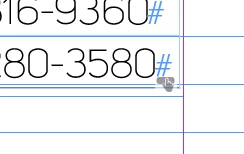
Some kind of formatting/"help" symbol/icon - wtf is it and how to get rid of it? Bc this one column in a table made up of many columns over many pages is now disappearing when I export/package the PDF!!  

Any help is very appreciated. Grrr.

Thanks!

Dieses Thema wurde für Antworten geschlossen.

2 Antworten

Diane Burns
Inspiring
June 24, 2019

Yes, this is a button. click on the frame, then open Window menu > Interative  > Buttons and Forms. At the bottom of this panel, you will see an icon for "Convert to Object."

Participant
November 4, 2019

Thank you very much Diane too for your help on this (and sorry for the mega-late response). You guys rock!! 


Jongware
Community Expert
Community Expert
June 21, 2019

This was actually featured in an InDesignSecrets contest: https://indesignsecrets.com/identify-the-adornments-contest-answer-and-winner.php

This one is an interactive button. Apparently, the default is to not export them to a PDF, but you can change its behavior. But it seems you did not want it a button at all, so check the online help on how to convert it back to a regular object: Add interactive buttons in InDesign

Participant
November 4, 2019

Thank you so much for your help on this (and sorry it's taken me several months to respond!!)