


New Participant
July 1, 2016
Question

GUI: Updating an edittext type box

  • July 1, 2016
  • 1 reply
  • 1617 views

Hi all.

I'm a database developer by profession. Doing some work, however, in ID for a client. In my down time I'm exploring scripting. I built a cool GUI for the scripts that I'll use while working on a client's document.

On the initial running of the script that generates the GUI, an edit text box gets populated with the names of the layers in this document. If the layers are NOT set how I need them for the client, then I run an "Set Layers" script which adds a 2nd layer, renames both layers and such.

What I need is that "Set Layers" script to update the textbox in my GUI:
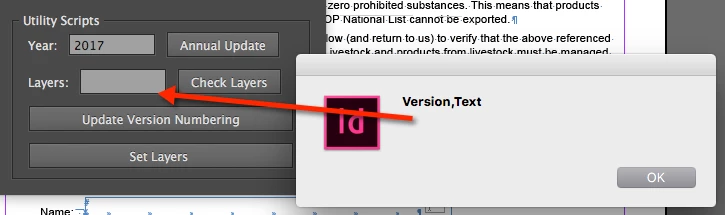
How do I get what temporarily shows up in the Alert into that edit-text field? How do I pull the object name from that? When the window generates, this code generates that edittext box.

utilityGroupThree.add ("statictext",undefined,"Layers:");

   var myTextLayers = utilityGroupThree.add("edittext", undefined,layerNames);

    myTextLayers.characters = 10;

i'm guessing the name of the textbox doesn't stay. Can I assign this text box something so that I can grab it for a function called on a button click?

Thanks.

This topic has been closed for replies.

1 reply

Vamitul
Brainiac
July 3, 2016

myTextLayers.text='Yada yada ho!"

beltan5Author
New Participant
July 6, 2016

Hmm. That doesn't seem to work. the debugger says myTextLayers is undefined. I would have thought the name of the object would be retained in the session, but that doesn't seem to work...

Thanks for your help.

Loic.Aigon
Brainiac
July 7, 2016

I would have thought so too. I tried a lot of attributes of the edit text box. But it seems that after the window is generated, the edittext field doesn't keep its name, so I can't add to it or change it.

I'm overall not really sure how ExtendScript works. In a browser and pure JS, the object would retain its name, right? Does a window, in the session, retain the name of objects?

Here's the code that creates the edittext area:

for (i = 0; i < countLayers ; i++) {

    var layerName = myLayer.item(i).name;

    layerNames.push(layerName);

    };

utilityGroupThree.add ("statictext",undefined,"Layers:");

   var myTextLayers = utilityGroupThree.add("edittext", undefined,layerNames);

    myTextLayers.characters = 10;


    //updateLayerInfo

var setLayersCheckbtn = utilityGroupThree.add('button',undefined,'Check Layers');

        setLayersCheckbtn.onClick = function() { updateLayerInfo()};   


var setLayersbtn = utilityGroupOne.add('button',undefined,'Set Layers ');

        setLayersbtn.onClick = function() { checkLayer()};

Here's the code that is supposed to recheck the layer names and report them (called from the "Check Layers" button):

function updateLayerInfo () {

    var myDocument = app.documents.item(0);

    var myLayer = myDocument.layers;

    var countLayers = myLayer.length;

var layerNames = new Array( );


   for (i = 0; i < countLayers ; i++) {

    var layerName = myLayer.item(i).name;

    layerNames.push(layerName);

    };

alert (layerNames);

myTextLayers.text = layerNames;

//windowClose

    };


Your code works just fine. The only reason I can think of about ScriptUI doing not what it is asked is that an uncaught error raised before the ui change. (Those errors are not thrown through the UI).

Try converting array to string as:

myTextLayers.text = layerNames.join("");