
Known Participant
April 23, 2022
Answered

Having issues moving or deleting what appers to be paragrah rules on a document

  • April 23, 2022
  • 4 replies
  • 1132 views

I am new to indesign and when i delete text this horizontal line which must be a paragraph rule wont move, cant select it, cant delete or move it, i am trying to move it to be in line with the text that i changed. I also have a square box which when i add text the box doesnt move down with the text and iam unable to move it. Any ideas on how to delete or move a horizontal line in a document or make it so I am able to move the box?

The only way i have been able to delete the line is to overide the paragrah but that deletes all of them not the one i am trying to move, is there a work around or override to be able to select this line.


The second screen shot is how i want it to be, with the line under the bold text, the first screen shot is what happens after i add text and the lines dont move with it keeping everything aligned. 
This topic has been closed for replies.
Correct answer Laubender

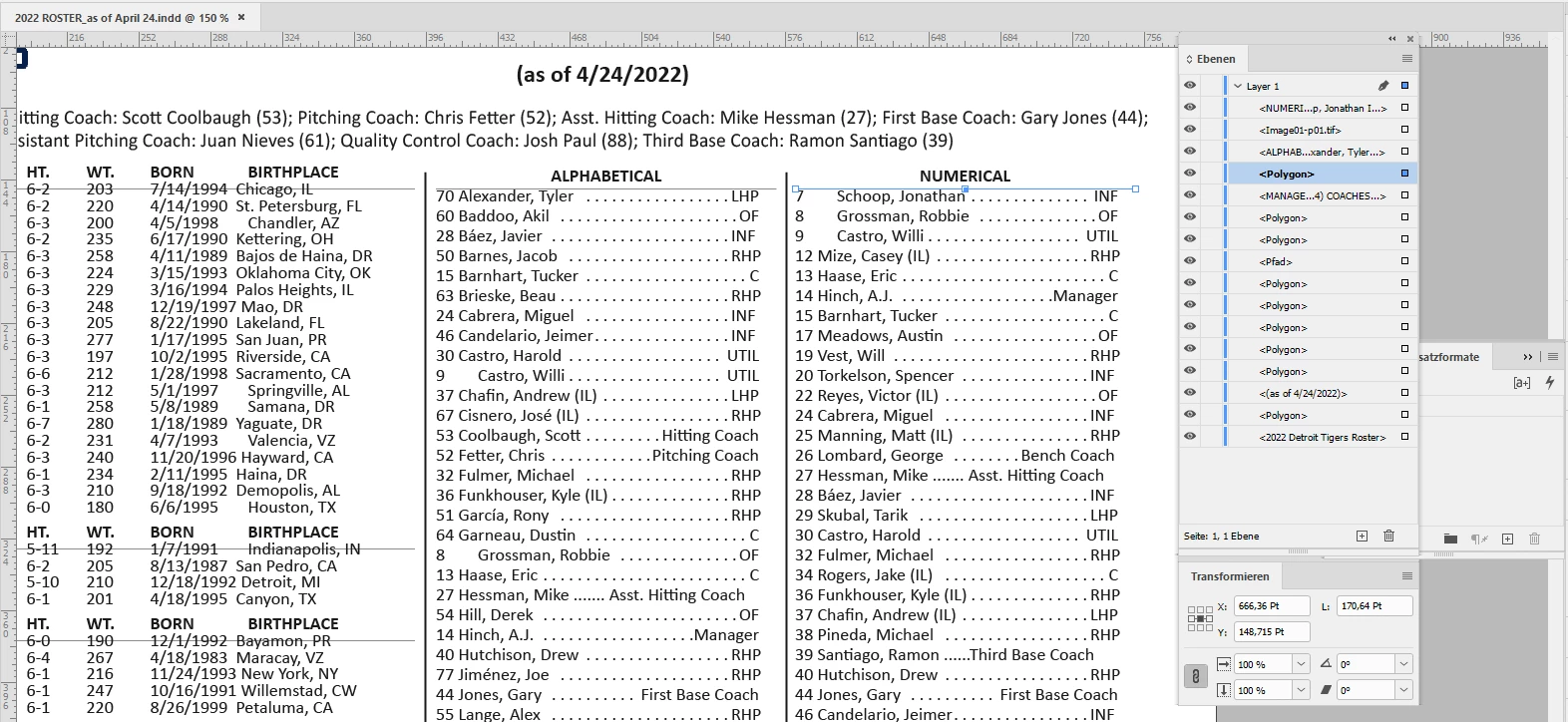
The case is simple. The horizontal lines are polygon elements stacked behind other elements like text frames on your page. Open the Layers panel and you can see them. I selected one of them by Ctrl clicking ( on MacOS Cmd clicking ) my way through the stacked elements. From my German InDesign 2021 on Windows 10:


Regards,
Uwe Laubender

( ACP )

4 replies

Community Expert
April 25, 2022

If I set all text frames that are visible in the Layers panel to invisible you can make out and select the horizontal lines that actually are named as Polygons:


Regards,
Uwe Laubender

( ACP )

LaubenderCommunity ExpertCorrect answer
Community Expert
April 25, 2022

The case is simple. The horizontal lines are polygon elements stacked behind other elements like text frames on your page. Open the Layers panel and you can see them. I selected one of them by Ctrl clicking ( on MacOS Cmd clicking ) my way through the stacked elements. From my German InDesign 2021 on Windows 10:


Regards,
Uwe Laubender

( ACP )

Known Participant
April 25, 2022

What about the other file? When i go to layers i only see the two logos on top and when i move one, they all move with it so if delete some text the line goes through the text below or above it

Community Expert
April 25, 2022

With the other document it's exactly the same; the horizontal lines are polygons on the page:


Regards,
Uwe Laubender

( ACP )

Barb Binder
Community Expert
Community Expert
April 25, 2022

Until we can see the file, we have to guess. (It would be helpful in the meantime, to see the screenshot with the hidden characters visible.)


My best guess based on what you've shown us so far is that you have a tabbed table and that there is a ruling line below the table heading row. 


~Barb


~Barb at Rocky Mountain Training
Community Expert
April 25, 2022

Hi EJ0101,

could you share the document?

I have some ideas where the rules are coming from.


For example:

Individual graphic lines drawn. On the page directly or on the applied parent page.


Save the document.

Then remove frames one by one so you can see what frame or page item is responsible for the column rules.


Thanks,
Uwe Laubender

( ACP )

Known Participant
April 25, 2022

Sure, how can I share it with you? It seems to be happening with two documents. I'm not able to move or cut the lines

Willi Adelberger
Community Expert
Community Expert
April 25, 2022

If you have a cloud service, like Dropbox, share a link to a transfer file.