
Inspiring
January 16, 2020
Answered

HELP! Automatic hyphens disappear when exporting pdf

  • January 16, 2020
  • 5 replies
  • 2337 views

Help! All my automatic hyphens disappear when exporting a pdf. First I thought it was all hyphens but in closer inspection all soft- and discretionary hyphens remain. I've tried everything from uninstalling, downgrading, updating, restarting my computer... Nothing seems to work. I packaged the file and sent it to a friend and he was able to output a pdf with the hyphens, but I can't do it on my own inDesign (using the latest version, legit Cloud version)
Correct answer samulisamuli

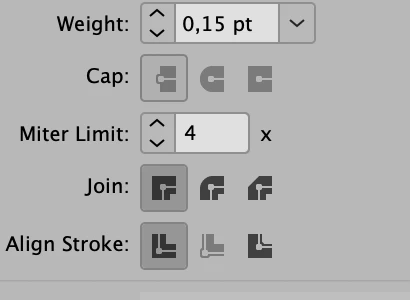
I even contacted the adobe customer service chat and they denied it's a problem with inDesign. However, it definetly was a bug (still is) and I figured it out: I realized I had a stroke in my body text aligned "center", when I changed alignement to "outside" the problem dissapeared (and the hyphens reappeared). Such a strange bug (especially when the bug just appeared in the 2020 update). How Adobe messes up something like this is beyond me—I'm also dissapointed how the customer service didn't believe me.

5 replies

Participant
April 29, 2025

I have the same issue when saving pdf from word. The optional hyphen is missing in some places but the same appear in the word. Anybody have some solutions?

BobLevine
Community Expert
Community Expert
April 29, 2025

As in a Microsoft forum, please. This is for InDesign and is an old discussion so I'm locking it.

Participant
May 27, 2022

We're having the same problem on two different computers, InDesign 2021 on one and InDesign 2022 on the other. I'll try the workaround ASAP. Thanks!!

Inspiring
May 27, 2022

For me the bug appeared after 2020 and every version after that has the same bug... It's absolutely crazy that they just never fixed it 😕😕

Participant
May 27, 2022

I've changed the center stroke settings, worked like a charm. Thank you very much!

Participant
September 16, 2021

I have experienced this problem too, on Win10, Adobe InDesign CC2021 16.4 x64

This is very disappointing.

Inspiring
September 16, 2021

Yeah it's dissapointing if they still didn't fix this 😕😕 

Did you try the workaround I wrote here earlier?

Participant
November 6, 2020

I have exactly the same problem!! Nothing is working. Can anybody help??

samulisamuliAuthorCorrect answer
Inspiring
November 6, 2020

I even contacted the adobe customer service chat and they denied it's a problem with inDesign. However, it definetly was a bug (still is) and I figured it out: I realized I had a stroke in my body text aligned "center", when I changed alignement to "outside" the problem dissapeared (and the hyphens reappeared). Such a strange bug (especially when the bug just appeared in the 2020 update). How Adobe messes up something like this is beyond me—I'm also dissapointed how the customer service didn't believe me.

Participant
November 9, 2020

wow that helped, thanks so much! I find so many bugs laltely in the newst update, super annoying – but you saved my day, thank you!

Barb Binder
Community Expert
Community Expert
January 16, 2020
~Barb at Rocky Mountain Training
Participant
April 29, 2025

I have the same issue, when converting pdf from word the optional hyphen is missing in some places. Anybody have some solutions?