


- Home
- InDesign
- Discussions
- Re: Help changing applescript to change font color...
- Re: Help changing applescript to change font color...

Copy link to clipboard
Copied
I have this script working BUT I want to change the text INSIDE the text box to the "noprint" swatch
I am a beginner and have no clue.
Can someone help me?
tell application "Adobe InDesign 2022"
tell active document
delete unused swatches
set allSwatches to every swatch
make color with properties {model:spot, space:CMYK, color value:{100, 0, 0, 0}, name:"noprint"}
make color with properties {model:spot, space:CMYK, color value:{0, 0, 0, 100}, name:"wb"}
set infoLayer to make layer with properties {name:"Job Info - Non-Print", printable:true, layer color:blue}
set infoLayer to layer "Job Info - Non-Print"
end tell
tell the active document
tell the first spread
set slugText to make new text frame with properties ¬
{geometric bounds:{(item 4 of page 1's bounds), 0.25, ((item 3 of page 1's bounds) + -1), 3}, stroke color:"noprint", stroke weight:1}
set contents of slugText to "one" & return & "two"
end tell
end tell
end tell


 1 Correct answer


Here’s the entire script—didn’t need the extra skip colors array, just edit sl as needed, these are the colors that get skipped:
set sl to {"None", "Registration", "Paper", "Black"}
tell application id "com.adobe.indesign"
	tell active document
		delete unused swatches
		set allSwatches to every swatch
		try
			set noprint to make color with properties {model:spot, space:CMYK, color value:{100, 0, 0, 0}, name:"noprint"}
		on error
			set noprint to every color whose name is "noprint"
		end t
 33
Replies
33
33
Replies
33

Copy link to clipboard
Copied
Would it be better to go back to just listing the swatches in the swatch panel list besides certain colors? I think that would work since the color from the eps would come in automatically to the indesign swatch list. I could run the part to remove all unused and then just have it read what is in the panel and add to the text box.
Copy link to clipboard
Copied
and then just have it read what is in the panel and add to the text box
The panel list would be for the entire document, not just spread 1. Are you trying to get a print list? A color can be in use but not visible.
What‘s the end use for the list—is it for some kind of preflight? Are you really looking for the names of process colors, or is it just Spot?
Copy link to clipboard
Copied
Yes, I am trying to list any colors that are used in the document. Like a preflight sort of, but after we do our file prep for print readiness.
So if I have an illustrator placed in INdesign, I will need to know what colors are used in that document as well. spot or cmyk mix
Copy link to clipboard
Copied
It is to create a sort of "slug line" for the CSR and customer to see and confirm colors used in the document.
Copy link to clipboard
Copied
But, what’s the use of listing the process color names without listing CMYK values—they’re all going to end up on the CMYK plates, and anything could happen to the Document CMYK values depending on how the PDF is exported and the printer handles color management.
I can see getting a spot color list to make sure you don’t output a color to an extra plate when it should actually be CMYK. But in any case, how do you determine if an in use color is actually printing?
If I run the last version of the script I get this where PANTONE Orange 021 is listed, but doesn’t print:
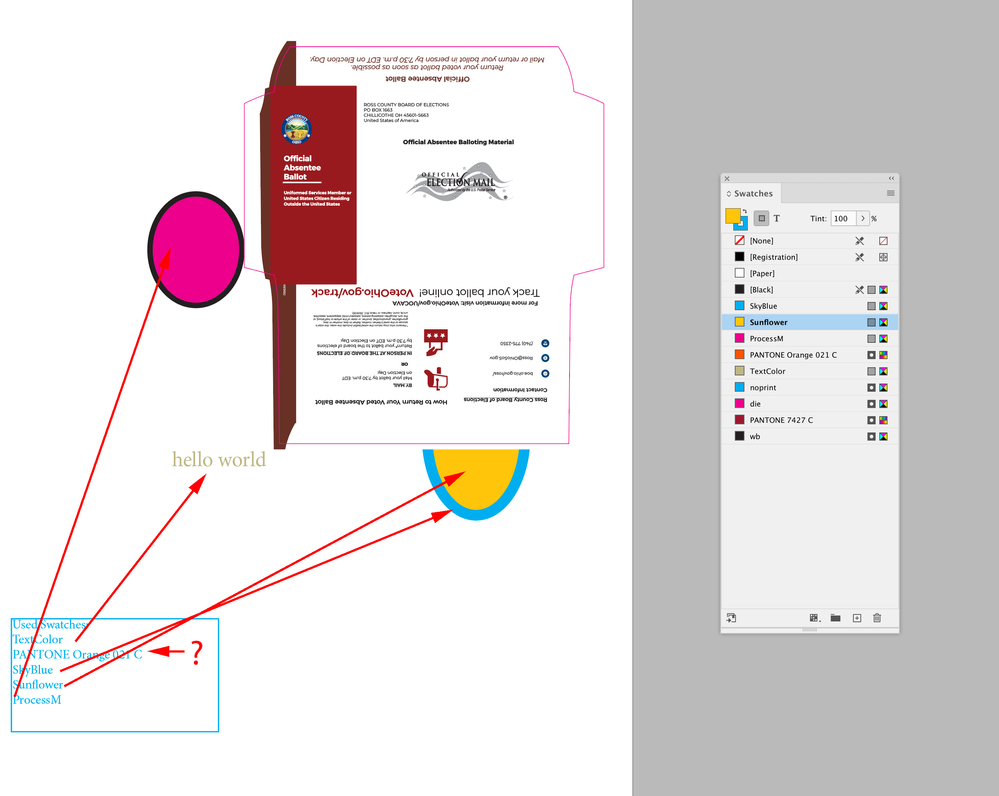
And this, where the only color in the report list actually printing is PANTONE Orange—the other colors are in use but hidden behind the orange fill:
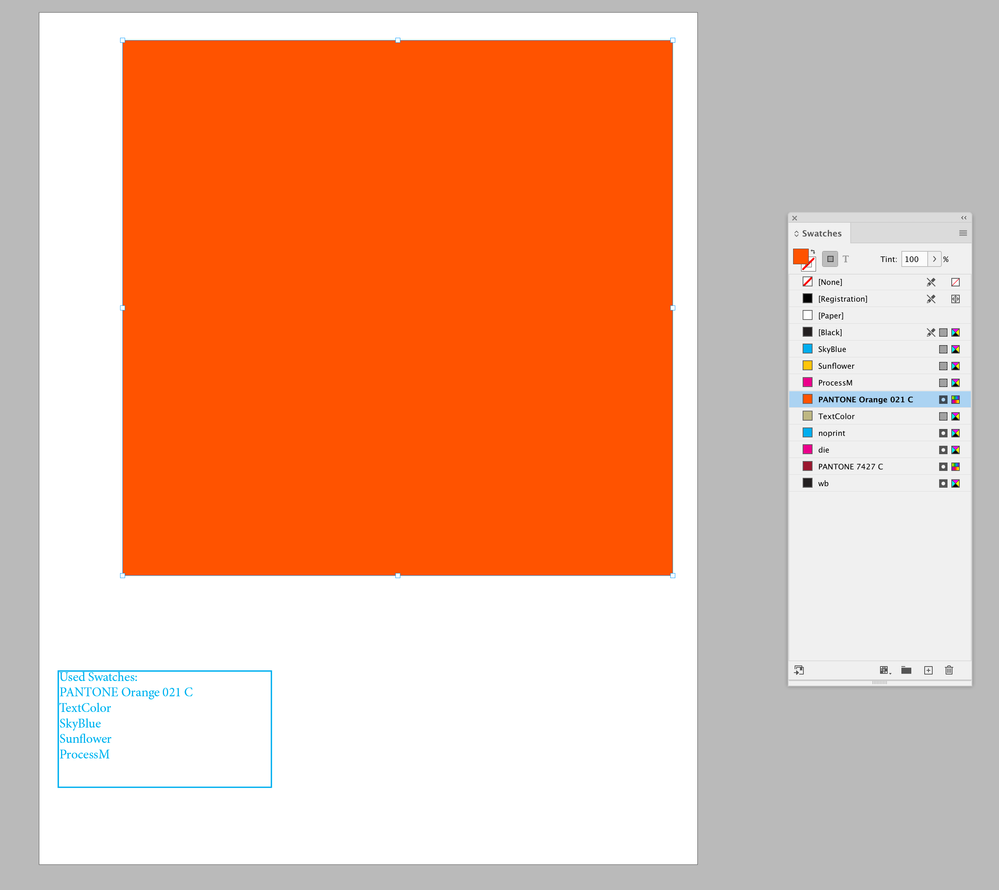
Copy link to clipboard
Copied
Copy link to clipboard
Copied
Copy link to clipboard
Copied
Oh boy. Sorry. It ONLY reports wb and noprint in the swatches used, even if other spot colors are in the list. Can you still help me? I appreciate it.
Copy link to clipboard
Copied
Also, your code is putting the info text frame on the bottom layer, not your constructed layer. You might want this for the text frame construction :
set slugText to make new text frame with properties {geometric bounds:{(item 4 of page 1's bounds), 0.25, ((item 3 of page 1's bounds) + -1), 3}, stroke color:"noprint", stroke weight:1, item layer:"Job Info - Non-Print"}

-
- 1
- 2

Get ready! An upgraded Adobe Community experience is coming in January.
Learn more
 AdChoices
