
Justin_Scalable
Participant
August 10, 2017
Question

Help Changing Text Box Fill Color Based on Text

  • August 10, 2017
  • 2 replies
  • 2061 views

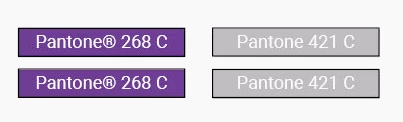
I have several text boxes I would like to change the fill color of based on whatever text is in that text box. As pictured below, if a text box contains "268" the set the box color to Pantone "268" and so on and so forth.

How do I write a script for all 4 text boxes (different Pantones # in each one) to change the color to the corresponding Pantone Color (all swatches exist in my library)? 

Any help would be much appreciated. 
Primary Pantone Box

If <<Text1>> contains "268"

then Set Box Color to: "PANTONE 268 C"

else if <<Text1>> contains "421"

then Set Box Color to: "PANTONE 421 C"

else if <<Text1>> contains "429"

then Set Box Color to: "PANTONE 429 C"

else if <<Text1>> contains "black"

then Set Box Color to: "Black"

else if <<Text1>> contains "white"

This topic has been closed for replies.

2 replies

Roy Marshall
Known Participant
August 13, 2017

or as you mentioned, so see if the contents "contains" the text, grep it...

var myText = myTextFrame.paragraphs[0].parentStory.contents.match(/\d{3,4}/);

myTextFrame.fillColor = myDoc.swatches.itemByName("PANTONE " +myText + " C" );

Justin_Scalable
Participant
August 14, 2017

Thanks for the replies! I'm new to scripting with javascript & Indesign so I may not be doing this right as evident by this error I'm receiving. Any ideas?

Roy Marshall
Known Participant
August 15, 2017

Hey.

That error implies that the swatch the script is looking for doesn't exist.

Add this line between line 2 and 3:

alert("Swatch Color name is: PANTONE " + myTextFrame.paragraphs[0].parentStory.contents + " C" );

This put an alert on your screen letting you know what swatch it is trying to use, and you can confirm then that your swatch palette contains this swatch.

Cheers

Roy

Justin_Scalable
Participant
August 10, 2017

I've found this post but it only works with cells and character styles.

Roy Marshall
Known Participant
August 11, 2017

If you are not restricting yourselves to the above colours, then this will colour each box with the number contained in the text frame:

var myDoc = app.activeDocument;

for(var i= 0; i<=myDoc.textFrames.length-1; i++){

        var myTextFrame = myDoc.textFrames;

        myTextFrame.fillColor = myDoc.swatches.itemByName("PANTONE " +myTextFrame.paragraphs[0].parentStory.contents + " C" );

}