

dublove
Legend
March 25, 2021
Answered

Help me modify the script to fit the width of the current column, thank you ~

  • March 25, 2021
  • 2 replies
  • 2252 views

The script is to fit the frame to the width of the column.

Now there is a problem that it will fit the column to the width of the leftmost column.

It should fit the width of the column in the upper left corner, and the Y coordinate should not change.


Gods, who can help me revise it?

Thank you very much.
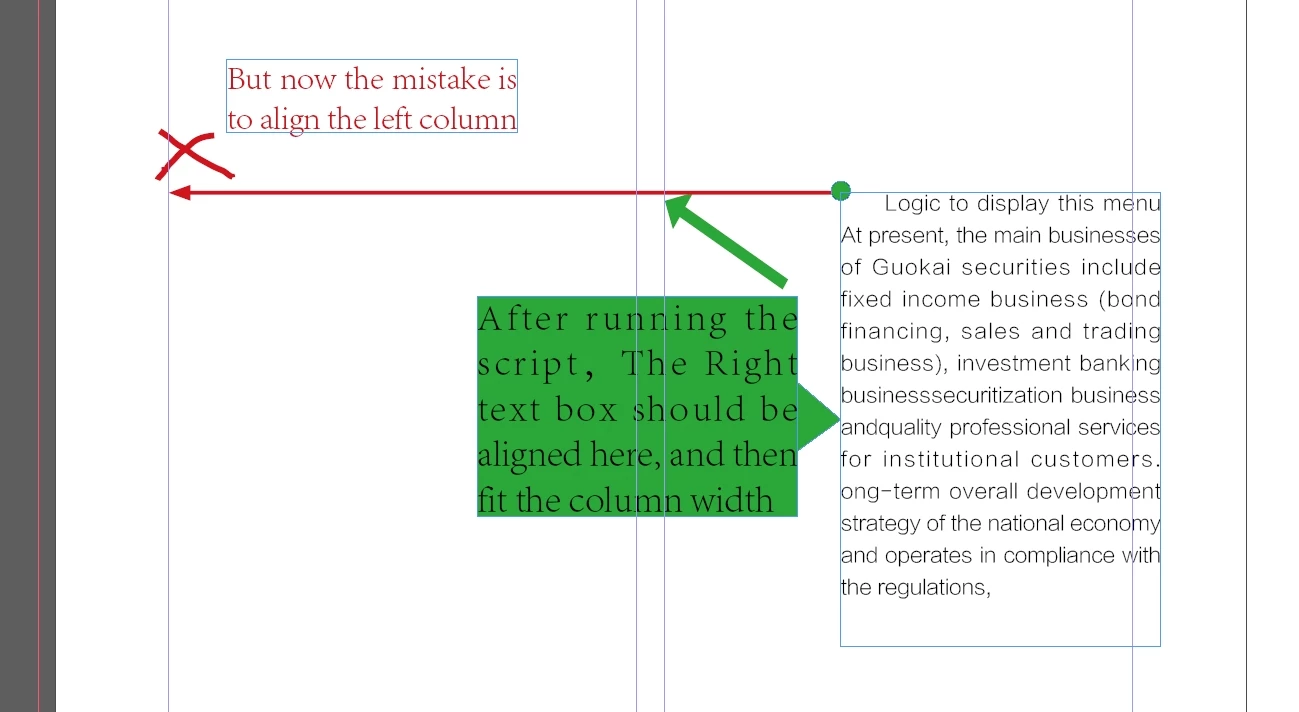
------------------------------

var curDoc = app.activeDocument;  
var curSel = app.selection[0];  
var gB = curSel.geometricBounds;  
  
// Masseinheiten, Ursprung und Nullpunkt speichern und bei Bedarf verändern  
hM = curDoc.viewPreferences.horizontalMeasurementUnits;  
vM = curDoc.viewPreferences.verticalMeasurementUnits;  
rO = curDoc.viewPreferences.rulerOrigin;  
zP = curDoc.zeroPoint;  
  
_setPref();  
  
// Variablen initialisieren  
var pWidth = curDoc.documentPreferences.pageWidth;  
pWidth = Math.floor((pWidth * 1000) + 0.5) / 1000;  
var pHeight = curDoc.documentPreferences.pageHeight;  
pHeight = Math.floor((pHeight * 1000) + 0.5) / 1000;  
  
var curPage = app.activeWindow.activePage;  
  
// weitere Variablen deklarieren  
var curPage;  
var pM;  
var curPos;  
var allPos = new Array;  
  
if(curPage.side == PageSideOptions.leftHand) {  
    // bei Doppelseiten bedeutet left > innen; right > außen  
    pM = curPage.marginPreferences.right;  
}  
else{  
    // entweder Einzelseite oder rechte Seite  
    pM = curPage.marginPreferences.left;  
}  
  
// die Anzahl der Spalten auf der Seite  
var nC = curPage.marginPreferences.columnCount;  
  
// die Positionen der Spaltenlinien  
var colPos = curPage.marginPreferences.columnsPositions;  
  
// Schleife durch alle Positionen, der Spaltenlinien, Werte runden  
for (var k=0; k<colPos.length; k++) {   
    curPos = (Math.floor((colPos[k] * 1000) + 0.5) / 1000) + pM;  
    allPos.push(curPos);  
}  
  
gB[1] = allPos[0];  
gB[3] = allPos[1];  
  
curSel.geometricBounds = gB;  
  
if (curSel.constructor.name == "TextFrame") fitFrame(curSel);  
  
_reStorePref();  
  
// --------------------- Funktionen -------------------------  
  
function fitFrame(aFrame) {   
    var gB = aFrame.geometricBounds;  
    gB[2] = gB[2]+ 50;  
    aFrame.geometricBounds =  gB;   
  
    var lastBaseLine = aFrame.lines.lastItem().baseline;   
    aFrame.geometricBounds =  [ gB[0], gB[1], lastBaseLine, gB[3] ];   
}   
  
// Voreinstellungen verändern und zurücksetzen  
  
function _setPref() {  
    curDoc.viewPreferences.horizontalMeasurementUnits = MeasurementUnits.millimeters;  
    curDoc.viewPreferences.verticalMeasurementUnits = MeasurementUnits.millimeters;  
    curDoc.viewPreferences.rulerOrigin = RulerOrigin.PAGE_ORIGIN;  
    curDoc.zeroPoint = [0,0];  
}  
  
function _reStorePref() {  
    curDoc.viewPreferences.horizontalMeasurementUnits = hM;  
    curDoc.viewPreferences.verticalMeasurementUnits = vM;  
    curDoc.viewPreferences.rulerOrigin = rO;  
    curDoc.zeroPoint = zP;  
} 


This topic has been closed for replies.
Correct answer rob day

Also, if the text box is not in the type page, the script is invalid


The right page problem might be the ruler origin, setting the rulers to page origin should fix that.


Also the script is checking the left edge of the selected text frame to determine which column to center the frame in. If the frame is in the pasteboard there will be an error because there is no parent page. If the left edge is in the margins you might assume it sould be moved to either the inside or outside column. So this version checks if the left edge is in the margins.


//set zero point, rulers and get selection
var zp = app.activeDocument.zeroPoint;
var ro = app.activeDocument.viewPreferences.rulerOrigin;
app.activeDocument.zeroPoint = [0,0]; 
app.activeDocument.viewPreferences.rulerOrigin = RulerOrigin.PAGE_ORIGIN;
var curSel = app.activeDocument.selection[0];  

//the selection’s page
var pp = curSel.parentPage;

//selection bounds
var sb = curSel.visibleBounds;

//the left margin, and an array of column postions from left to right
var tm = pp.marginPreferences.top
var lm = pp.marginPreferences.left
var cp = pp.marginPreferences.columnsPositions;

var lcb, rcb;

//get the new left and right bounds based on the selection’s left edge
for (var i = 0; i < cp.length; i++){
    if (sb[1] >= cp[i]+lm && sb[1] <= cp[i+1]+lm) {
        lcb = cp[i]+lm;
        rcb = cp[(i+1)]+lm
    }else if (sb[1] < cp[0]+lm){
        lcb = cp[0]+lm;
        rcb = cp[1]+lm
    }else if (sb[1] > cp[cp.length-1]){
        lcb = cp[cp.length-1]+lm;
        rcb = cp[cp.length-2]+lm
    }
}; 

try {
    curSel.visibleBounds = [sb[0], lcb, sb[2], rcb];
    curSel.fit(FitOptions.FRAME_TO_CONTENT)
}catch(e) {} 
 
app.activeDocument.zeroPoint = zp;
app.activeDocument.viewPreferences.rulerOrigin = ro;


2 replies

rob day
Community Expert
Community Expert
March 27, 2021

Or if you want to move the selected text frame to the top of the closest column:


//set zero point and get selection
var zp = app.activeDocument.zeroPoint;
app.activeDocument.zeroPoint = [0,0]; 
var curSel = app.activeDocument.selection[0];  

//the selection’s page
var pp = curSel.parentPage;

//selection bounds
var sb = curSel.geometricBounds;

//the left margin, and an array of column postions from left to right
var tm = pp.marginPreferences.top
var lm = pp.marginPreferences.left
var cp = pp.marginPreferences.columnsPositions;

//the last column position
var lc = cp[cp.length-1]+lm;
var tc, lcb, rcb;

// moves the selection to the closest column
for (var i = 0; i < cp.length; i++){
    if (i%2 == 0) {
        tc = Math.abs((cp[i]+lm)-sb[1]);
        if (tc < lc) {
            lc = tc;
            lcb = cp[i]+lm
            rcb = cp[i+1]+lm
        }  
    }     
}; 


curSel.geometricBounds = [tm, lcb, sb[2], rcb]
app.activeDocument.zeroPoint = zp;
dublove
dubloveAuthor
Legend
March 28, 2021

I hope:

Align the top left corner of the text box to the left of the column it is in, and move it horizontally

Width adapts to column width.

At the same time, the height of the text box adapts to the height of the text content.

As shown in the figure below:

Thank you~

rob day
Community Expert
Community Expert
April 21, 2021

Suddenly, if there is only one column, the script will not work.

When one column (not divided into columns), it should be aligned left and right,


There’s no alignment, the text frame resizes to the column. So if there’s one column.


rob day
Community Expert
Community Expert
March 25, 2021

I’m not sure the code needs to be that complex. In this case you don’t need to save and set the ruler units because the bounds and column positions return in the document’s units. Does this work?:


//set zero point and get selection
var zp = app.activeDocument.zeroPoint;
app.activeDocument.zeroPoint = [0,0]; 
var curSel = app.activeDocument.selection[0];  

//the selection’s page
var pp = curSel.parentPage;

//selection bounds
var sb = curSel.geometricBounds;

//the left margin, and an array of column postions from left to right
var lm = pp.marginPreferences.left
var cp = pp.marginPreferences.columnsPositions;

//left and right bounds of the outside column for a right side page
var rlb = cp[cp.length-2]+lm;
var rrb = cp[cp.length-1]+lm;

//for a leftside
var llb = cp[0]+lm;
var lrb = cp[1]+lm; 

//if the selection is a text frame set its bounds to the outside column.
if (curSel.constructor.name == "TextFrame") {
    if (pp.side == 1919382632) {
        curSel.geometricBounds = [sb[0], rlb, sb[2], rrb]
    }else {
        curSel.geometricBounds = [sb[0], llb, sb[2], lrb]
    }   
}

app.activeDocument.zeroPoint = zp;


Before and after run:


dublove
dubloveAuthor
Legend
March 27, 2021

Dear ~

I've tried the code you provided and it works, but it's still wrong.

What I want is to fit the bar in the upper left corner of the frame.

rob day
Community Expert
Community Expert
March 27, 2021

If you want this:


The code would be:


//set zero point and get selection
var zp = app.activeDocument.zeroPoint;
app.activeDocument.zeroPoint = [0,0]; 
var curSel = app.activeDocument.selection[0];  

//the selection’s page
var pp = curSel.parentPage;

//selection bounds
var sb = curSel.geometricBounds;

//the left & top margin, and an array of column postions from left to right
var lm = pp.marginPreferences.left;
var tm = pp.marginPreferences.top
var cp = pp.marginPreferences.columnsPositions;

var lrb = cp[1]+lm; 

//if the selection is a text frame
if (curSel.constructor.name == "TextFrame") {
    curSel.geometricBounds = [tm, lm, sb[2], lrb]  
}

app.activeDocument.zeroPoint = zp;


If you want this where the text frame fits to the top of the outside columns:


Then:


//set zero point and get selection
var zp = app.activeDocument.zeroPoint;
app.activeDocument.zeroPoint = [0,0]; 
var curSel = app.activeDocument.selection[0];  

//the selection’s page
var pp = curSel.parentPage;

//selection bounds
var sb = curSel.geometricBounds;

//the left margin, and an array of column postions from left to right
var lm = pp.marginPreferences.left;
var tm = pp.marginPreferences.top
var cp = pp.marginPreferences.columnsPositions;

//left and right bounds of the outside column for a right side page
var rlb = cp[cp.length-2]+lm;
var rrb = cp[cp.length-1]+lm;

//for a leftside
var llb = cp[0]+lm;
var lrb = cp[1]+lm; 

//if the selection is a text frame.
if (curSel.constructor.name == "TextFrame") {
    if (pp.side == 1919382632) {
        curSel.geometricBounds = [tm, rlb, sb[2], rrb]
    }else {
        curSel.geometricBounds = [tm, llb, sb[2], lrb]
    }   
}

app.activeDocument.zeroPoint = zp;