
Inspiring
January 14, 2018
Answered

Highlight color just showed up in InDesign book

  • January 14, 2018
  • 2 replies
  • 446 views

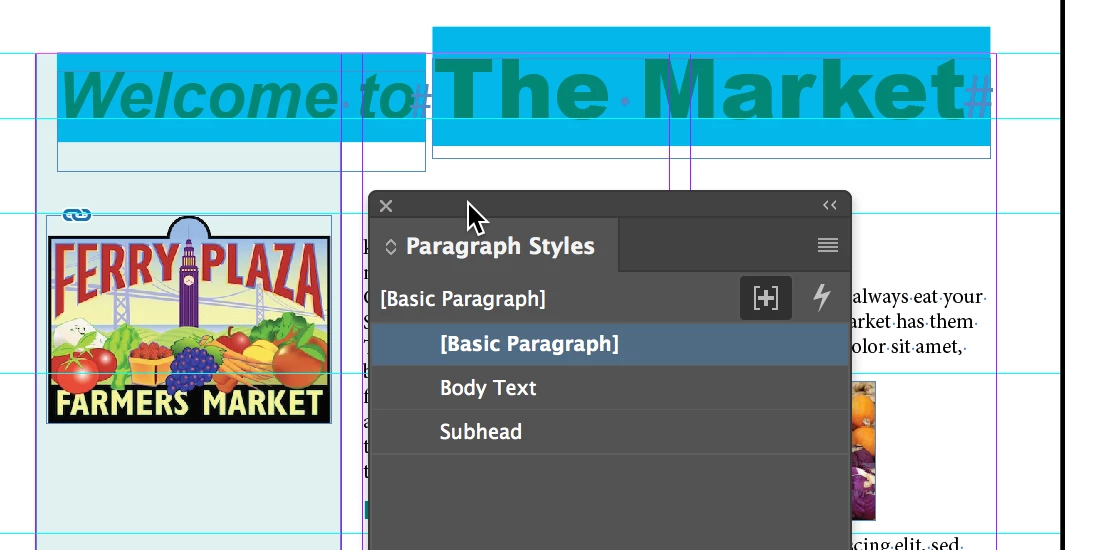
Suddenly page numbers, the text box for the page numbers, an italicized line of a caption, and endnote numbers are highlighted in cyan. The cyan does not print, nor does it export to pdfs, but it's driving me crazy because I don't know why it suddenly appeared, or how to get rid of it.

Any ideas?

I'd upload a sample if I could find some way to do it.
    This topic has been closed for replies.
    Correct answer Steve Werner

    You accidentally turned on the Style Override Highlighter on the Paragraph Styles or Character Styles panel like below (it's the + sign icon):

    2 replies

    Derek Cross
    Community Expert
    Community Expert
    January 14, 2018

    It will disapear if you view your page in Preview mode. But make this feature your friend, learn how to create Paragraph (and Character) Styles to improve your InDesign practice!

    FloraMacDAuthor
    Inspiring
    February 19, 2018

    Thank you! Good to know how to easily view the page without it. I use a lot of paragraph and character styles. Hadn't run across this before.

    Steve Werner
    Community Expert
    Steve WernerCommunity ExpertCorrect answer
    Community Expert
    January 14, 2018

    You accidentally turned on the Style Override Highlighter on the Paragraph Styles or Character Styles panel like below (it's the + sign icon):

    FloraMacDAuthor
    Inspiring
    February 19, 2018

    Thank you! I've decided I like it because it shows me what isn't set to a style, so if I have to shift things around, I can easily find what I've altered. But I am very happy to know how to turn it on and off, too!