
meganm19591182
Participant
December 5, 2016
Answered

Highlighting text causes Spinning wheel of death

  • December 5, 2016
  • 5 replies
  • 3844 views

I'm having issues with the spinning wheel of death when I try to highlight text in just one text box in particular of a 72-page document. I tried trashing my preferences to no avail. I can type and backspace in the text box, but the second I take the cursor to highlight, the wheel comes up. I've deleted the text box and the spread and tried typing the content from scratch and it just happens again. I've made an .idml file and that didn't help. Even worse, the Indesign template file that I work off of, and have used successfully for months now, is now acting the same way. Any suggestions why this is happening all of sudden?

I am working in CC 2017
This topic has been closed for replies.
Correct answer amaarora

Hi,

Can you try the following and let me know if this works.

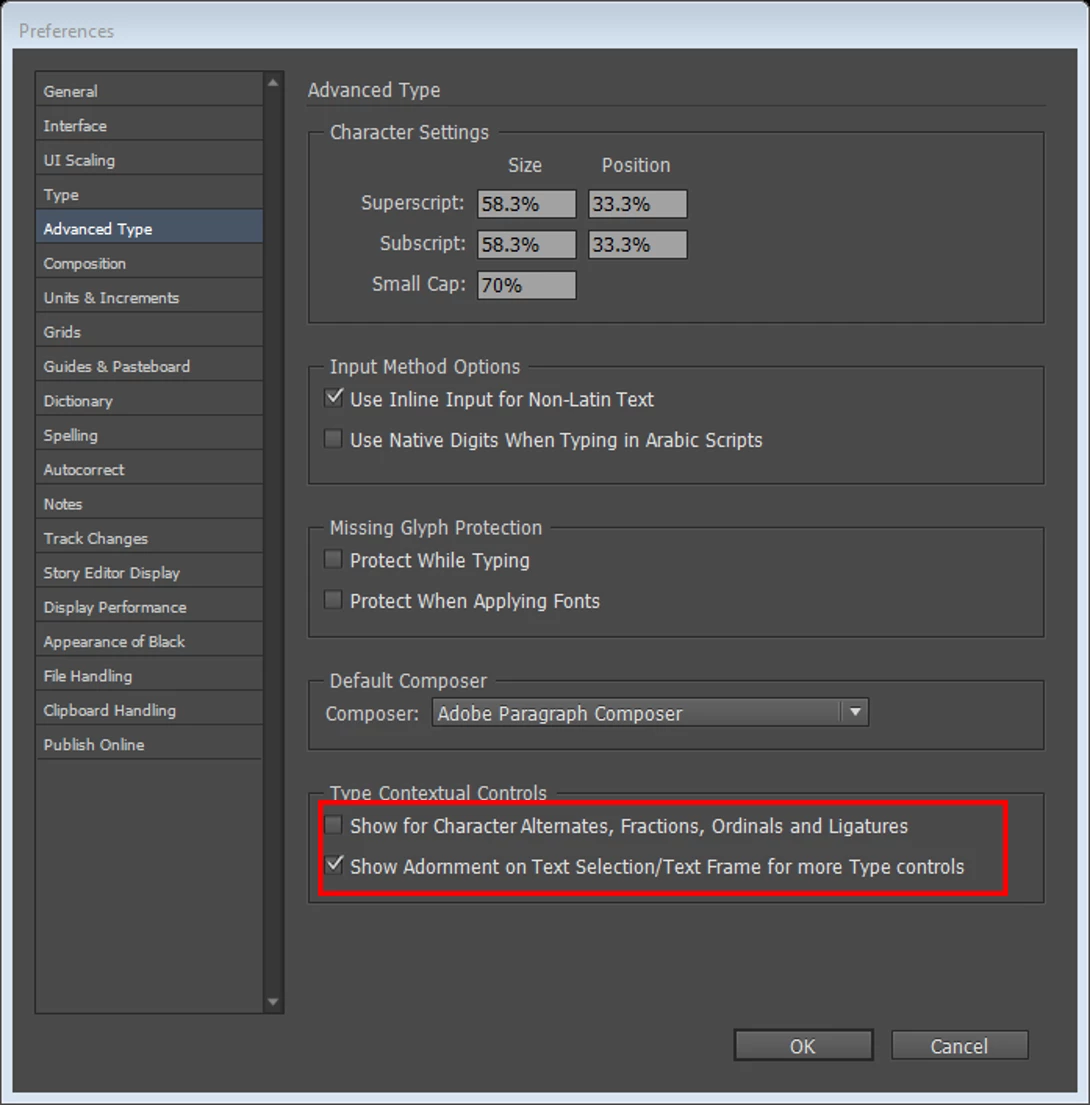
Navigate to Preference->Advance Type -> Type Contextual Controls and disable the first preference

“Show for Character Alternates, Fractions, Ordinals and Ligatures”

Also, if possible can you please mail me your document (to the mail id added at the end) so  that we can look into the "spinning" issue that you are facing?

Thanks and regards,

-Aman

amaarora@adobe.com

5 replies

Participating Frequently
December 27, 2017

Have had this problem of spinning beach ball on selecting text or backspacing for a YEAR in various documents.. a huge bug that makes working impossible at times.

Unchecking the contextual controls did not change it.

Disabling ALL fonts on my mac except the three used in the document did not help.

Reinstalling InDesign did not help.

Has persisted through numerous updates for over a year.

I am afraid to try the CopyTexPlugin due to the bad experience of other users.

It sure has something to do with text flow, as it will not happen in a single page document.

Is there a known CAUSE for this huge bug and what is the solution??? And why is it not fixed after a year or more?

Thanks.

Participant
November 8, 2017

I tried to uncheck the boxes and it is still extremely slow to type anything!

robertt90733727
Participant
August 23, 2017

DO NOT FOLLOW THE OPTION given by STAFF Monica Singh. I just did that, followed the directions to a "T", and when I relaunched InDesign, the app would not launch, said it was now corrupt. I had to uninstall, get rid of my prefs, and then re-download.

Going to the cloud with these programs was the worst decision Adobe has made, ever, for users. The apps plainly suck. They are buggy, they are slow, and it is BS that I have to pay $600 a year FOREVER to use crap apps.

Monica Singh
Adobe Employee
Adobe Employee
March 11, 2017

Hi All,

A solution for this issue is provided at Troubleshoot text selection issues. Please try the steps mentioned in the link.

Note: You need not to turn off the preferences now with this solution, and should be able to work fine.

Please share your feedback.

Thanks,

Monica Singh

InDesign Team

Inspiring
July 30, 2017

I tried to download the app recommended and install it. It says "CopyTextPlugin.app" can't be opened because it is from an unidentified developer. I really need some help here. It is taking forever to edit files and I have a ton of work. I sent sample files requested to Aman and never heard anything back. Please help.

amaarora
amaaroraCorrect answer
Inspiring
December 6, 2016

Hi,

Can you try the following and let me know if this works.

Navigate to Preference->Advance Type -> Type Contextual Controls and disable the first preference

“Show for Character Alternates, Fractions, Ordinals and Ligatures”

Also, if possible can you please mail me your document (to the mail id added at the end) so  that we can look into the "spinning" issue that you are facing?

Thanks and regards,

-Aman

amaarora@adobe.com

meganm19591182
Participant
December 6, 2016

That solved it! Thank you! I can't even believe it was that simple. Will I need to turn this back on when I work on other documents? Can you explain to me what that did or why my document was acting up with it checked? Just curious so I know in the future. Again THANK YOU! Would you still like to see the working files?