

Susan Culligan
Inspiring
September 8, 2022
Answered

Hinky hyphenation

  • September 8, 2022
  • 2 replies
  • 513 views

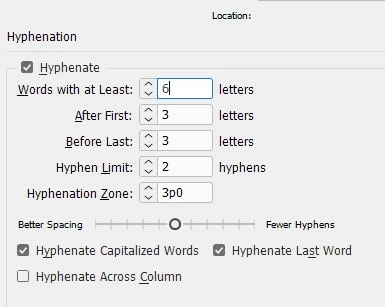
Has anyone noticed the terrible hyphenation errors in the latest version of InD? I'm finding so many mis-hyphenations, it seems I have to check every third one! I've checked my hyphenation settings, and they seem fine (see attached). 

Any ideas?
This topic has been closed for replies.
Correct answer Willi Adelberger
  1. What language has your paragraph style?
  2. Did you apply any character style? What language does this style have?
  3. Do you have any manually formatted text without any style? If so, did you alter the text language?
  4. Are the dictionaries set up in preferences correct?

2 replies

Willi Adelberger
Community Expert
Willi AdelbergerCommunity ExpertCorrect answer
Community Expert
September 8, 2022
  1. What language has your paragraph style?
  2. Did you apply any character style? What language does this style have?
  3. Do you have any manually formatted text without any style? If so, did you alter the text language?
  4. Are the dictionaries set up in preferences correct?
Susan Culligan
Inspiring
September 8, 2022

Thanks, I'll check all those things. Much appreciated!

Scott Falkner
Community Expert
Community Expert
September 8, 2022

InDesign’s hyphenation is dictionary based. You need to apply a language (in the Character panel) to text to tell InDesign which language’s dictionary to use. If the text has no language InDesign will use an algorithm which is not as accurate. If the text has the wrong language applied then InDesign might not find the words in its dictionary and still use an algorithm. Check to see if the right language it applied.


Other causes of poor hyphenation can be narrow columns that require aggresive hyphenation that might not be ideal.

Susan Culligan
Inspiring
September 8, 2022

No narrow columns, but I will check the dictionary. Thanks!!