Participant
March 24, 2019
Answered

Hot to fix strange behaviour of PageNumberOnly cross references

  • March 24, 2019
  • 2 replies
  • 725 views

I put few cross references in one paragraph.

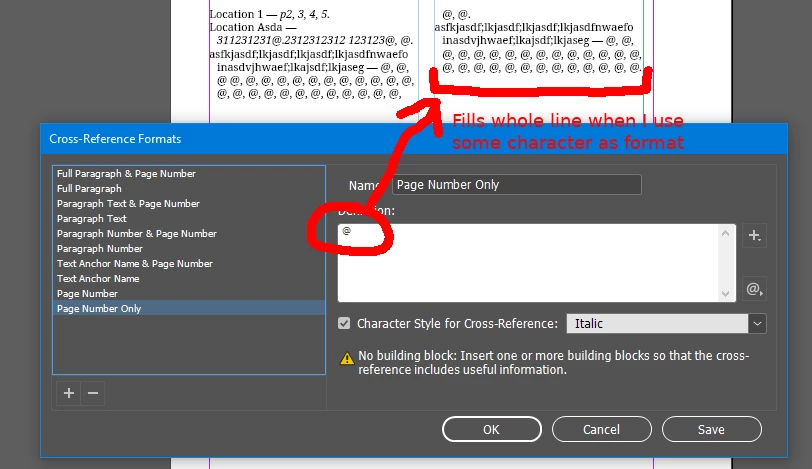
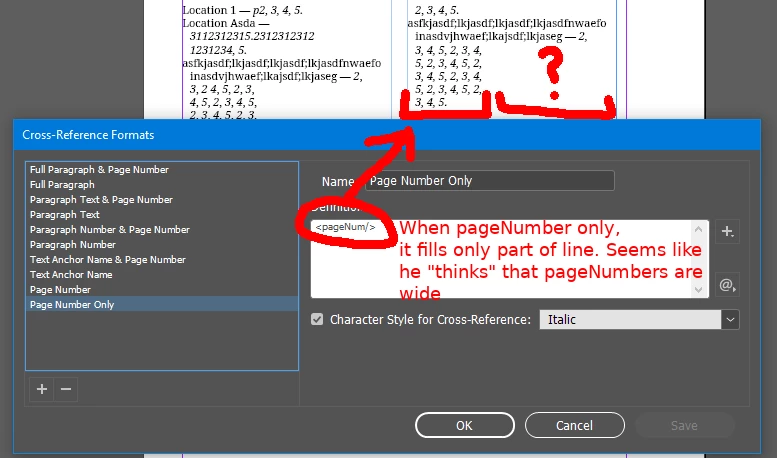
InDesign does not fill whole line when I use "page number only" format for references.

If I use some static characters in format, everything is ok. If i place <pageNum/>, it became wrong.

It seems that <pageNum/> has some kind of "virtual" width about 3-5 characters.

Is there a way to make it work correct?

Images, video and sample file
This topic has been closed for replies.
Correct answer fotomirk

I've noticed that changing paragraph's justification composer to "Adobe World-Ready Paragraph Composer" solves the problem!

2 replies

fotomirkAuthorCorrect answer
Participant
March 24, 2019

I've noticed that changing paragraph's justification composer to "Adobe World-Ready Paragraph Composer" solves the problem!

Barb Binder
Community Expert
Community Expert
March 24, 2019

Hi Fotomirk:

This appears to be an issue with InDesign x-refs, and the second one reported today.

Lines wrapping when they should not

After this thread from Feb 1 (Re: Cross Reference Not Flowing Correctly ) a bug report was logged here:  Cross reference takes more space than its text – Adobe InDesign Feedback.

Adding your vote and a link to this thread will help draw the InDesign team's attention to the matter.

~Barb

~Barb at Rocky Mountain Training
fotomirkAuthor
Participant
March 24, 2019

Thank you for your note. I've placed a vote for the bug report.