


- Home
- InDesign
- Discussions
- Betreff: How can i add 3 specific color C100, M100...
- Betreff: How can i add 3 specific color C100, M100...
How can i add 3 specific color C100, M100 and Y100 to top of swatch array using Script?

Copy link to clipboard
Copied
How can i add 3 specific color C100, M100 and Y100 to TOP OF SWATCH ORDER using Extend Script && avoid the first 4 default colors.


 12
Replies
12
12
Replies
12


Copy link to clipboard
Copied
You can not move color using javaScript upside down. But you can add colors using specific names & use them accordingly.
Or you in your template if you need using cursor, you can move colors upside down.
Or simply add colors with specific names & use them.
Try this code snippet:
addColors("C100", [100,0,0,0]);
addColors("M100", [0,100,0,0]);
addColors("Y100", [0,0,100,0]);
function addColors(colorName, colorValue){
    var myDoc = app.documents[0];
    if(!myDoc.colors.item(colorName).isValid){
        var myColor = myDoc.colors.add();
        myColor.name = colorName;
        myColor.colorValue = colorValue;
        }
    }
Best
Sunil
Copy link to clipboard
Copied
actually, i was thinking about swap swatch, like
4 default colors (swatch[0] -> swatch[3]) stay same position.
then add 3 colors (let say swatch[n],swatch[n+1],swatch[n+2] ), and then we are gonna swap those 3 with another 3 colors at position swatch[4],swatch[5],swatch[6].
Copy link to clipboard
Copied
Why you want to do like this?
If you need to use any specific color, you can get then with name & use it.
Sunil
Copy link to clipboard
Copied
hello Sunil, yes. im coding a script for my small company so this is just one of them.
They are specific color i defines for "unsure info" in my document. So i want to move them in position swatch array [4~6] and first four default colors stay same position.


Copy link to clipboard
Copied
Hi OfficialNeaven,
the first four swatches in your Swatches Panel might be the "default" colors in your specific document.
Note, that a user can move them around in any other order in the Swatches Panel.
Regards,
Uwe Laubender
( ACP )
Copy link to clipboard
Copied
Hello Laubender, i love your script. Been learning script from your, really a fan.
Actually, the first four is default and i am not gonna move them anywhere. My meant is TOP OF SWATCH ORDER && AVOID the first 4 default colors. swatches[0~3] =>
that means top of swatch is swatches[4~6]. because they are specific color i defines for "unsure info" in my document. and there are like a lot. and this is for swapping swatch function later

Copy link to clipboard
Copied
There isn’t a way to rearrange the swatches in the Swatches panel the way you can in the UI, but if you wanted to get a collection of swatches that does not include the readonly default swatches, you could build a function that returns a collection of just the read/write swatches. Something like this:
//a collection of all read/write swatches
var mySwatches = getSwatches();

$.writeln("Number of swatches: " + mySwatches.length)
$.writeln("Swatch named " + mySwatches[0].name +" Properties: " + mySwatches[0].properties.toSource())


/**
* Gets a collection of the active document’s read/write swatches
*  an array of swatches
*
*/
function getSwatches(){
    var p=app.activeDocument.swatches;
    var def = ["Black", "Cyan", "Magenta", "Yellow", "Paper", "Registration", "None"];
    var s = [];
    var d = false;

    for (var i = 0; i < p.length; i++){
        for (var j = 0; j < def.length; j++) {
            if (def[j] === p[i].name) {
                d = true;
            }
        }
        if (!d) {s.push(p[i])}
        d = false;
    }
    return s
}

Copy link to clipboard
Copied
A litle workaround would be to store the defautlt swatches, remove them, add your custom 3 swatches, and then readd the default swatches.
Copy link to clipboard
Copied
If you try to remove a default swatch (the swatches in brackets) with JS the script will throw an error.
Copy link to clipboard
Copied
By default I meant the default color swatches like Cyan, Magenta, Yellow, Red, Green and what not... (the first thing I delete after resetting ID :D).
Of course if OfficialNeaven meant the colors in brackets my comment is mute.
Copy link to clipboard
Copied
I think the OP wants the scripted colors to be listed at the top of the Swatches panel, above [None].
How can i add 3 specific color C100, M100 and Y100 to TOP OF SWATCH ORDER
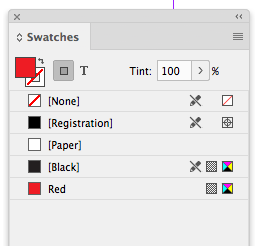
You can do that with the UI by dragging the colors, but not via scripting. If all of the user defined colors are removed, and you add a color, it gets listed after the default [Black] swatch in the UI and not at the top.
So:
var doc = app.activeDocument;

var ns = doc.colors.add({name:"Red", colorValue:[0, 100, 100, 0]})
Gives me this when there are no user defined swatches:
Copy link to clipboard
Copied
Hi Rob,
ah, yes, that makes a lot of sense…
Even if you drag the swatches around in the Swatches panel:
If you export to IDML and open the IDML file as document the order of swatches has changed so that [None], [Registration], [Paper] and [Black] is on top of the list.
Regards,
Uwe Laubender
( ACP )


Get ready! An upgraded Adobe Community experience is coming in January.
Learn more
 AdChoices