Known Participant
February 18, 2025
Question

How can I create side-by-side bullet lists?

  • February 18, 2025
  • 2 replies
  • 2795 views

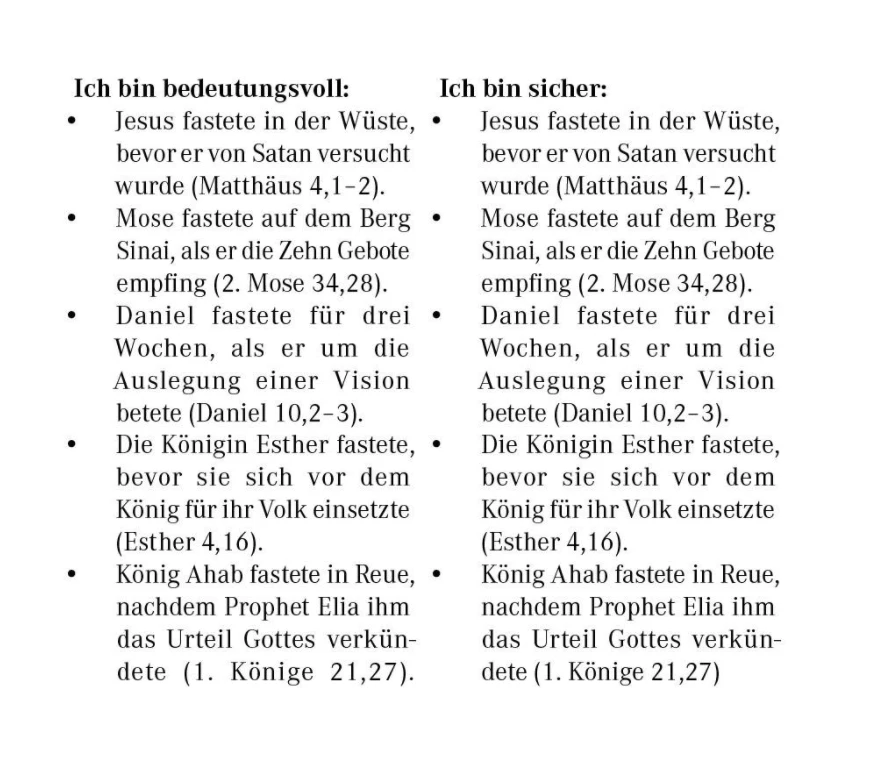
How can I create something like this in InDesign? Thank you for any help!
2 replies

Robert at ID-Tasker
Legend
February 18, 2025

@Mateomono


Is it a contents of the same thread / Story - or two separate threads / Stories?


MateomonoAuthor
Known Participant
February 18, 2025

@Robert at ID-Tasker What Is a thread / Story?

MateomonoAuthor
Known Participant
February 19, 2025

@Robert at ID-Tasker

Ah, no, sorry. They are separate text frames. So the left side shouldn’t flow over into the right one. Basically, my setup will be: on one side, we list out positive things, and on the other side, negative things. So they shouldn’t mix. Hope this makes sense!


@Robert at ID-TaskerI can’t seem to figure out how to set up the two columns to go across multiple pages since there is a lot of content that won’t fit on one page. How can I do that?

BobLevine
Community Expert
Community Expert
February 18, 2025

Two columns or two text frames side by side.

Paragraph style for the heading and one for the bullets.


That's really all there is to it. If you need details, let us know.

MateomonoAuthor
Known Participant
February 18, 2025

@BobLevineThank you! I think I will try the two-column option. This is achieved with the table feature, right?

BobLevine
Community Expert
Community Expert
February 18, 2025

You can go that route if you'd like but I would create two text frames side by side.
