
Participating Frequently
May 31, 2020
Answered

How Can I Mass Apply Hyperlink to a Text Anchor for a Certain Word?

  • May 31, 2020
  • 1 reply
  • 855 views

Ok so let's say I want every instance of the word "red" to be hyperlinked to the text anchor "Big Red" and Character Style 1 to be applied to the hyperlink format. How would I do that?

I know how to set text anchors and hyperlink text to it with a specific character style but I can't figure out how to do is on a large scale.


Can something like that be done with GREP? Is there some function in find/replace I'm unfamilar with? Can it even be done?
This topic has been closed for replies.
Correct answer Barb Binder

Sure. 


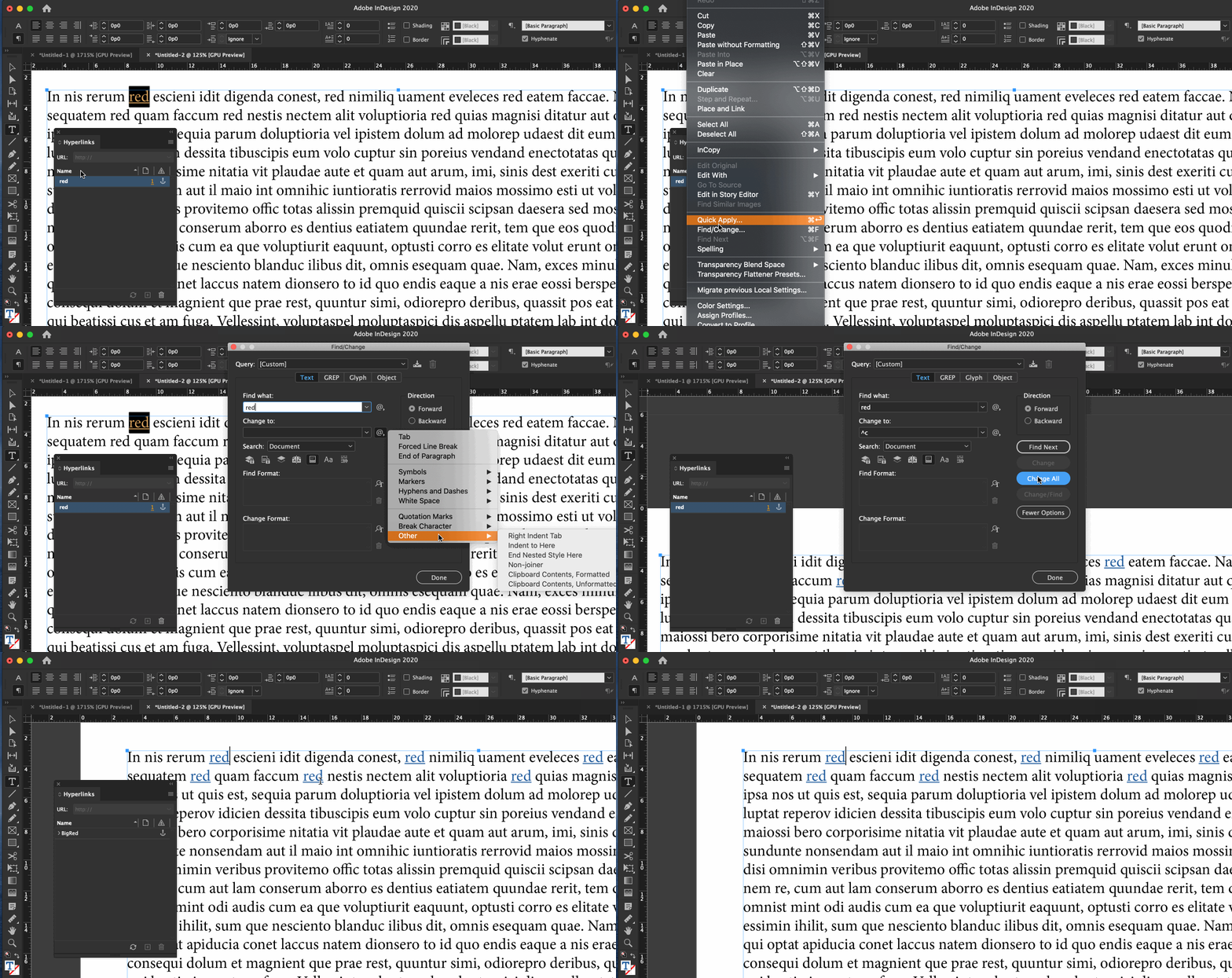
  1. Add the anchor to Big Red.
  2. Add the hyperlink to the anchor for the first occurrence of Red.
  3. Copy Red.
  4. Edit > Find/Change:
    1. Find: Red
    2. Change: ^c


^c means to paste the contents of the clipboard and maintain formatting.


~Barb


1 reply

Barb Binder
Community Expert
Barb BinderCommunity ExpertCorrect answer
Community Expert
June 1, 2020

Sure. 


  1. Add the anchor to Big Red.
  2. Add the hyperlink to the anchor for the first occurrence of Red.
  3. Copy Red.
  4. Edit > Find/Change:
    1. Find: Red
    2. Change: ^c


^c means to paste the contents of the clipboard and maintain formatting.


~Barb


~Barb at Rocky Mountain Training
Inspiring
October 24, 2022

Hi @Barb Binder 
This is a good option but problem is that when we select "All Documents" from the search menu it gives an error.


If we want to apply the above method in multiple InDesign files what will be the process for that?
I'm thinking to create a cross-reference through this process.


  1. Create Text Anchor
  2. Insert cross-reference -- Destination choose Text Anchor
  3. Copy Text Anchor
  4. Edit > Find/Change: -- Search : All Documents
  5. Find: Text Anchor
  6. Change: ^c
  7. Change All


I'm looking for the shortest solution. If anyone has any other way let me know.

Thanks!