
Participant
December 14, 2017
Beantwortet

How can I put audio files into Indesign document folder?

  • December 14, 2017
  • 2 Antworten
  • 1982 Ansichten

How can I put audio files into Indesign document folder?

So I know how to put audio files through Ctrl + D,

but when I make a button first and then try to put a sound file, (Action)

it simply says there is no sound file,

in this case where can I put sound files so when I try to put it

it's already there?

Thank you so much!
    Dieses Thema wurde für Antworten geschlossen.
    Beste Antwort von manal shanableh

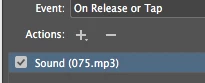
    if you inserted the file sound into your document, you will find it here


    From Actions: Click on the Plus sign and add sound.

    2 Antworten

    jane-e
    Community Expert
    Community Expert
    December 14, 2017

    Place the sound file the same way you do the audio file:

    File > Place (Ctrl/Cmd + D)

    Add movie and sound files to InDesign documents

    manal shanableh
    Legend
    December 14, 2017

    When you want to create a button to play and stop the sound

    from buttons and forms panel

    type: Button

    Action> +> Sound

    you will find your sound file on sound.

    Participant
    December 14, 2017

    Thank you Manal!

    The thing is, in your case there is 075 mp3 file already there,

    but in my case, there is no file at all! I don't know how to insert audio files so I can see it or select it.

    manal shanableh
    Legend
    December 14, 2017

    if you inserted the file sound into your document, you will find it here


    From Actions: Click on the Plus sign and add sound.