


gdwd
Known Participant
August 2, 2022
Answered

How can I remove/reset Japanese formatting?

  • August 2, 2022
  • 4 replies
  • 2569 views

I have two text frames, both in the SAME paragraph and character style, with no style overrides (according to InDesign). However, one of them has some weird Japanese formatting options applied to it, making it right-aligned, rotated, and slightly smaller:
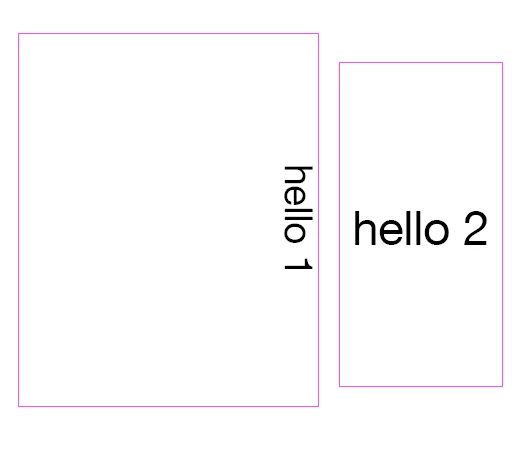
 

I'm aware there's a Japanese version of InDesign, but I have no idea how Japanese formatting works, so it doesn't seem useful to me. Using it shouldn't be necessary, anyway: the desired style is in the same document. How can I make the "Japanese" text frame look like the "normal" text frame? 

This topic has been closed for replies.
Correct answer Peter Kahrel

That script doesn't for me, in either version on InDesign. No error message, just nothing happens.


I got that wrong, sorry. It should be this:

app.activeDocument.stories.everyItem().properties = {
  storyPreferences: {
    storyOrientation: StoryHorizontalOrVertical.HORIZONTAL
  }
};

It works only in the real CJK InDesign. 

4 replies

Community Expert
August 5, 2022

Hi @gdwd ,

perhaps its easier to export, edit and place IDMS files from the text frames when in a non-CJK version of InDesign ? [*]


Found a rather "dirty" solution for my German InDesign version where I add a new text frame and duplicate the text over to the new frame. Before running the script, select the text frame:

/**
* @@@BUILDINFO@@@ AddNewTextFrame-DupTextToNewFrame-SELECTION.jsx !Version! Fri Aug 05 2022 17:47:08 GMT+0200
*/


( function()
{

app.scriptPreferences.userInteractionLevel = UserInteractionLevels.INTERACT_WITH_ALL;

app.doScript
(

	addNewTextFrameRemoveSelectedOne, 
	ScriptLanguage.JAVASCRIPT, 
	[],
	UndoModes.ENTIRE_SCRIPT, 
	"Add new text frame, move text over and remove selected text frame | SCRIPT"

);

function addNewTextFrameRemoveSelectedOne()
{
	// SELECTED TEXT FRAME:
	var textFrame = app.selection[0];
	textFrame.redefineScaling();

	// To find the right spread I am using this helper code.
	// Not needed if the original text frame is not positioned
	// in a nested structure like a group of objects or is anchored or is pasted inside a graphic frame:
	var dup = textFrame.duplicate();
	var spread = dup.parent;
	dup.remove();
	
	/*
		For not nested contents we can get the spread like that:
		var spread = textFrame.parent;
	*/

	var newFrame = spread.textFrames.add();
	newFrame.paths[0].entirePath = textFrame.paths[0].entirePath;

	textFrame.parentStory.duplicate
	( 
		LocationOptions.AT_BEGINNING , 
		newFrame.parentStory 
	);

	// OPTIONAL:
	textFrame.remove();

};

}() )


Note: You can undo all the script's action in one go.

It will also redefine scaling so that the frame is not showing a scaling percentage anymore.


[*] That should also be scriptable, but requires more effort.


Regards,
Uwe Laubender
( Adobe Community Professional )

New Participant
November 20, 2024

Your script just saved my life.
Thank you a lot !

Brainiac
August 5, 2022

@Peter Kahrel wrote:


But now that I write this I'm wondering how StoryOrientation can end up in the IDML if it's not in the scripting DOM. . .


ScriptInfo resources are used as source of the "Scripting DOM".

Each resource has snippets such as declaring an enum kHorizontalVerticalEnumScriptElement with its name (string), comment (string for OMV) and enum values, a property or a method argument etc. referring to it, and a piece of code that implements the property on some objects. The same property may get supported on other objects by other code, so a plug-in may create a new kind of page item, and implement original InDesign properties for that.

Properties can also get obsoleted.

These ScriptInfo resources are prefaced with a set of conditions - the script manager (ExtendScript, AppleScript, INX, IDML or Core shared by all), the product (ID, IC, ID Server) and the language feature set (Roman, Japanese, RightToLeft). 

For example the CS2 "story orientation" is obsoleted in story prefs, but CS3 added a "column direction" property to margin prefs, CS5 added "writing direction" to table cells.

Maybe you can still access story orientation in a versioned script?

Story direction is also a property considered by TOC style, so by creating a TOC into a frame you may be able to set the direction.


Community Expert
August 5, 2022

Thanks for that info, Dirk. Going back through the OMV versions I can see that storyDirection was introduced in CS4. But I can't see storyOrientation in any version, going back to CS.

Brainiac
August 3, 2022

Could it be that the frame is just rotated by the rotate tool or the control strip's rotate by 90 degrees button? Some additional transform may explain the distortion.

Community Expert
August 3, 2022

Maybe the 'Japanese' frame has an object style applied, or the applied object style has some overrides. Did you check that?

Joel Cherney
Community Expert
August 3, 2022

If gdwd's document is suddenly exhibiting CJK behaviors, then something is going wrong, but the best solution that I can think of would be to write a script that returns text frame to horizontal orientation, but I've not yet been able to pull it off. The 


I spent maybe three hours last night trying to solve gdwd's question. In the InDesign object model, I found storyHorizontalOrVertical. I also found previous conversation about turning vertical text frames to horizontal text frames, but for the life of me I couldn't get a script to turn a vertical text frame to a horizontal one. I couldn't even get the JS console or the Object Model to admit that storyOrientation was even a storyPreference. So, I thought to myself, maybe some ACP who knows way more about JS scripting in ID than myself can explain this mystery?


I do know that you can affect text rotation with scripting fairly easily, if you turn on the Japanese Composer. So gdwd, if you select the vertical text and go to the Justification menu (CtrlAltShift J, on Windows), is the "Composer" dropdown saying "Adobe Japanese Composer"? 

gdwd
gdwdAuthor
Known Participant
August 4, 2022

I hacked together a very stupid script that changes text orientation of every selectable thing in a document to horitontal.

for (var j=0; j<app.activeDocument.pages.length; j++) {

	app.activeWindow.activePage=app.activeDocument.pages[j];
	app.select(app.activeWindow.activePage.allPageItems);

	for (var i=0; i<app.selection.length; i++) {
		app.activeDocument.selection[i].parentStory.storyPreferences.storyOrientation = StoryHorizontalOrVertical.HORIZONTAL;
	}
}

It probably fails if there are any selectable objects that aren't text frames. I know everyItem() exists and would probably be simpler, but I couldn't get it to work with parentStory.


And yes, this script seems to ONLY work in the CJK version of InDesign, for some mysterious and unknowable reason.