Exit
  • Global community
    • Language:
      • Deutsch
      • English
      • Español
      • Français
      • Português
  • 日本語コミュニティ
  • 한국 커뮤니티
0

How Can I Type Text Without the Wrong Glyphs in InDesign?

Community Beginner ,
Mar 30, 2023 Mar 30, 2023
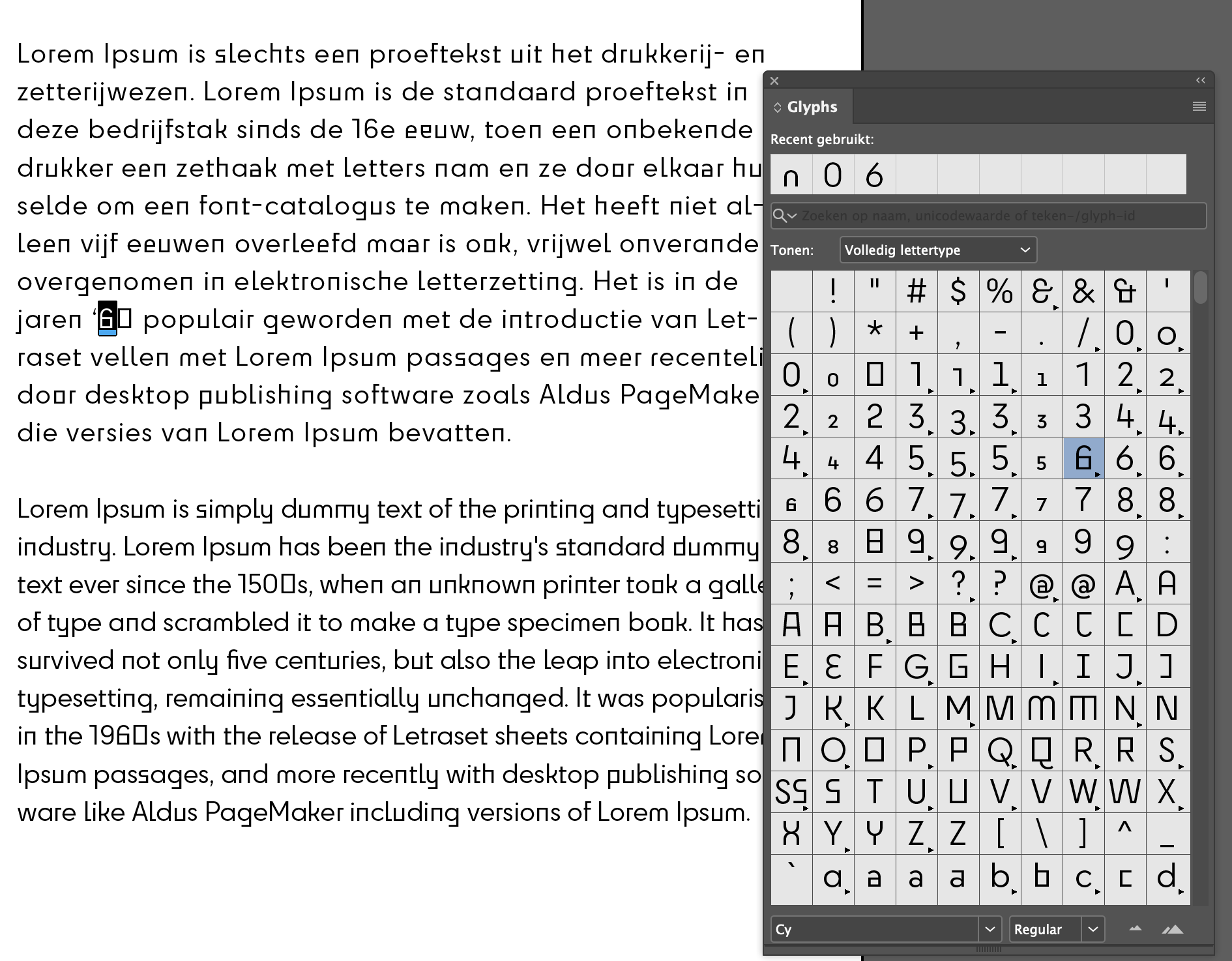
How Can I Type Text Without the Wrong Glyphs in InDesign? I'm using Adobe's Cy font, but when typing, this font automatically uses 'random' glyphs. That's not what I want. It is a lot of work to have to adjust every character every time. Is this what can be fixed?
 
I've also read a bit about Glyphs settings from Adobe, but I'm not really getting any wiser from this.
 
Thanks in advance for the help!
Johan - vdS creatie
TOPICS
How to , Type
650
Translate
Report
Community guidelines
Be kind and respectful, give credit to the original source of content, and search for duplicates before posting. Learn more
community guidelines
Community Expert ,
Mar 31, 2023 Mar 31, 2023

Check the OpenType options in your paragraph or character styles.

Translate
Report
Community guidelines
Be kind and respectful, give credit to the original source of content, and search for duplicates before posting. Learn more
community guidelines
Community Beginner ,
Mar 31, 2023 Mar 31, 2023
LATEST
 
Hi Bob, I've tried something in the OpenType Options > Stylistic Sets and see that several styles already appear. We'll also take a closer look at how it works. Thanks for your help!
Translate
Report
Community guidelines
Be kind and respectful, give credit to the original source of content, and search for duplicates before posting. Learn more
community guidelines
Community Expert ,
Mar 31, 2023 Mar 31, 2023

Looks like there are Contextual Alternates. These can be turned off in the OpenType Options as Bob suggests, but didn't detail.

Translate
Report
Community guidelines
Be kind and respectful, give credit to the original source of content, and search for duplicates before posting. Learn more
community guidelines