

devops at app-project
Participating Frequently
May 21, 2022
Question

How do I correct font rendering PPI in Indesign for iPhone high resolution Epub?

  • May 21, 2022
  • 4 replies
  • 1534 views

From Adobe Stock, I purchased the template  Classic Book for Reflowable EPub Books

I used this to create an indesign document set up for intent "Mobile" with resolution of 1125px 2436px, iPhone X.


At 14 points, the font is rendering to the display  as below.  This is much to small for anyone to read on a 5" iPhone X. It appears that the font is rendering points as pixels, and on todays' devices pixels are smaller than 72 per inch. So how do I cause the fonts to ender at the correct PPI for display in InDesign?
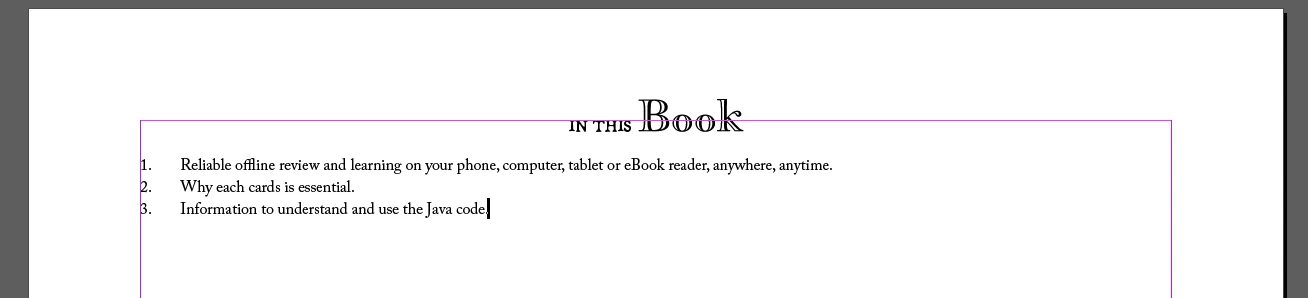
 

 I realize as a reflowable ePub, this will change on the device, but I still need to be able to work with a reasonable facsmile of the design within the desktop application.


If the answer is to change the font size, is there a way to do this globally across all styles? 


This topic has been closed for replies.

4 replies

BobLevine
Community Expert
Community Expert
May 21, 2022

It's a reflowable epub. Document size is quite literally meaningless! Every epub reader is a bit different but they all allow the reader to choose not just the actual font but the font size as well.

Legend
May 21, 2022

Yes, I think this is a key point. " I still need to be able to work with a reasonable facsmile of the design " There isn't a design, really. You have to give up the idea, and focus on the content, since it will look different on all devices. (That's not to say the template is a good one).


InDesign is all about fixed design, so using it to design reflowable work is forcing it to do what it isn't made for. I suggest you make some quick sample documents and try them on a WIDE range of devices and reading apps. Don't use InDesign to get any clue what it looks like.

James Gifford—NitroPress
Legend
May 21, 2022

ID is excellent for reflowable doc work as long as you understand the end nature of the material, just as it's fine for print books, posters, interactive PDF and the other wide spectrum of end docs. Books and long docs are already "flowable" if not dynamically reflowable; it's just a matter of keeping your view of page layout flexible.


There isn't any tool I know of that really works in the 'liquid' model and provides advanced editing and layout control, other than Dreamweaver (with limitations) and ID (with limitations) or Word (with many limitations). E-books are just not a well-supported medium yet, much like web design was still a complicated PITA ten years ago (and well over ten years into the medium).


rob day
Community Expert
Community Expert
May 21, 2022

Hi @devops at app-project , I think one thing to consider is Pixels in InDesign are a Ruler Unit measurement and don’t represent resolution. If you change the ruler units for your document you will see that its output dimensions are 15.625" x 33.833". Points are a print output dimension, so 14pt relative to your 15.625" x 33.833" page is very small when the page is forced into the iPhoneX 2.75" x 5.65" physical dimensions:


Fixed ePub Export, Apple’s Books on the right:


If I setup a document closer to the target device’s physical dimensions 14pt text looks more like its 100% print output dimensions on that device:


James Gifford—NitroPress
Legend
May 21, 2022

Unless it's for a very specific, narrow purpose, reflowable EPUB should not be designed scaled to a particular device, screen size or resolution. A proper reader for each device will scale the content appropriately — based on that "body text = 1X" rule.


EPUB etc. =/= print or fixed screen resolution, and should not be developed or constrained in that model.


If you want a fixed layout, use PDF instead.


JonathanArias
Legend
May 21, 2022

Is the file using web fonts?

have you looked in to using adobe fonts instead?:

https://community.adobe.com/t5/indesign-discussions/how-to-embed-a-font-in-epub-format/m-p/11009577#M180483


devops at app-project
Participating Frequently
May 23, 2022

For now i'm specifying adobe OTF fonts and seeing built-in kindle fonts in the output.  Based on limited research the consensus seems to be that font embedding is not possible in the kindle environment outside of hiring a service bureau to help.

James Gifford—NitroPress
Legend
May 23, 2022

It's possible to get fonts into Kindle. It is, however, difficult and unstable and strongly disrecommended. The reader is not 'passive' but does many active things to the document, the way old-school browsers used to apply their own ideas even to straightforward web code.


You can fight this uphill battle (see: Sisyphus), or just relax to a completely different medium that offers plenty of design options using a default font set.


If you want electronic pages that look just like printed ones... use PDF.


James Gifford—NitroPress
Legend
May 21, 2022

I have never been much of a fan of using templates of any kind, even those from high-quality/premium sources. But maybe that's just me.


If the template is indeed defining font sizes in pixels, it's obsolete. You might be able to fix it, but honestly, for a simple flowing-text book (novel, narrative, basic nonfic) you can do your own layout from scratch and have more control and fewer problems. I'm not sure that makes sense, since if ID can define font sizes in px, it's a feature I've never encountered.


First, look into the generated EPUB — it's just a ZIP file, use any utility — drill down to the CSS folder and examine the default CSS file. If the fonts are defined in pixels, you could adjust these values using a custom CSS file, but (again, honestly) I'd chuck it and start over with a simple document format that is not in any way "told" it's for web, EPUB or screen. The one thing the export and template should NOT be doing is building the document for that specific screen and resolution (if that's part of the workflow) — it means the doc will not display correctly on any other display or reader. Use a standard page size and font sizes; EPUB will take care of the display and 'liquidity.'


ETA: I just opened a new doc for Mobile, 1100x2400 or so, and the base font, defined as 12pt, is so tiny on my screen it's greeked. This is not the path to successful doc development.


If the CSS uses points, as it should, you can try adjusting the document sizes in ID. There is a peculiar aspect to EPUB (and Kindle) in that the defined body font size is used as the 1X value for all text scaling; it should be defined as 1rem (or 1em) and nothing else. That's how the readers start parsing and defining the text sizes.


Also, Apple's EPUB readers are... idiosyncratic. You might check the EPUB in other, more standard readers (Thorium Reader is pretty much the baseline) to see if the problems persist


More questions welcome.


BobLevine
Community Expert
Community Expert
May 21, 2022
quote

I have never been much of a fan of using templates of any kind, even those from high-quality/premium sources. But maybe that's just me.

Most definitely not just you. Most of them are trash and they've been dumbed down even if they were created properly by an expert.