
Known Participant
February 2, 2021
Answered

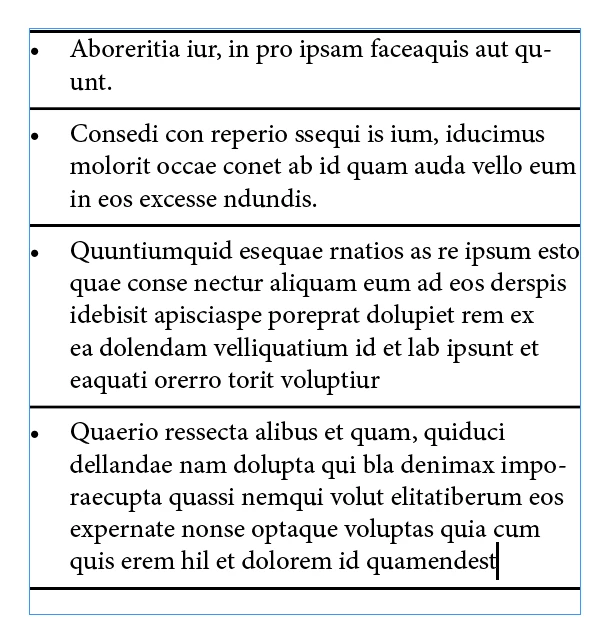
How do I create a styled bullet point list with lines above and below each bullet point as per image

  • February 2, 2021
  • 3 replies
  • 782 views

How would you be best to create a bullet point list with lines above and below each point?


Thank you.

This topic has been closed for replies.
Correct answer Barb Binder

You can use that dialog box to define either a rule above a paragraph or below or both. You might want to define a rule above the first bullet point, and then below all of the bullet points, if the goal is to have a line above the first one, between all of them and then under the last one.
~Barb

3 replies

DESTINK
Inspiring
February 2, 2021

In Stoke there is options start/end you can choose arrow or bullet or open cube on ur your line

Barb Binder
Community Expert
Barb BinderCommunity ExpertCorrect answer
Community Expert
February 2, 2021

You can use that dialog box to define either a rule above a paragraph or below or both. You might want to define a rule above the first bullet point, and then below all of the bullet points, if the goal is to have a line above the first one, between all of them and then under the last one.

~Barb

~Barb at Rocky Mountain Training
Barb Binder
Community Expert
Community Expert
February 2, 2021

You can do this by defining a paragraph rule below (and/or above). 


~Barb 

~Barb at Rocky Mountain Training
yveshaAuthor
Known Participant
February 2, 2021

Thanks Barb, How do I get a line at the bottom of all the bullet points too tho?