Known Participant
July 23, 2024
Question

How do I make text look less ragged and more aligned without turning on hyphenation?
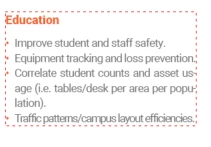

  • July 23, 2024
  • 2 replies
  • 487 views

How do I make text look less ragged and more aligned without turning on hyphenation?

This topic has been closed for replies.

2 replies

Community Expert
July 23, 2024

"… without turning on hyphenation?"

Hi @James3669094303ct ,

but your sample screenshot is showing hyphenated words. Or am I wrong with that?
And it seems that the paragraph is set to Justified.

A sample InDesign document would help…


Thanks,
Uwe Laubender
( Adobe Community Expert )

Known Participant
July 23, 2024

Hi, please see attached file

Community Expert
July 23, 2024

Hi @James3669094303ct ,

thanks for your sample InDesign document.

Well, just change the justification from "Justified" to "Left Justified":


You should do that in the applied paragraph style "bullets".


Regards,
Uwe Laubender
( Adobe Community Expert )

Robert at ID-Tasker
Legend
July 23, 2024

You can turn Hyphenation ON:


but then set some "crazy" values for number of letters - so no word will be hyphenated, then move slider to Better Spacing. And turn off last 3x checkboxes.


And / or Spacing in Justification: