

Chris  P.  Bacon
Inspiring
August 26, 2022
Question

How do I put my spine in the middle?

  • August 26, 2022
  • 5 replies
  • 1487 views

A printing company requires me to have my cover spine in the middle when I provide the document:
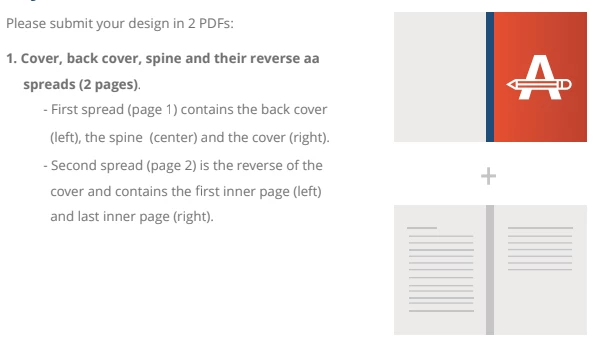
And this is my setup now:
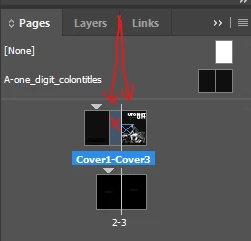
My spine right now it's on the left side of the white line that represents the center.

I can move it to the right side too, but I cannot put it in the middle, so that the white line would cross it in the middle.

How do I follow the requirements to have it in the middle?

My spine marked with X.

This topic has been closed for replies.

5 replies

rob day
Community Expert
Community Expert
August 27, 2022

My spine right now it's on the left side of the white line that represents the center.


The white line doesn't represent the center, it's the fold mark between the spine and front cover of the 3 panel spread. Your export to PDF will be as a single spread


When you design a facing page book the spreads are folded on the center line and gathered into signatures.

rob day
Community Expert
Community Expert
August 27, 2022

Their instructions are odd. They are asking for a regular 3 page facing document with page 1 as the back cover, and the page 2-3 spread as the spine and front cover. It seems like they don't realize it is possible to have a single, 3 page spread, which is what you have setup.

Community Expert
August 27, 2022

@Willi Adelberger said: "It does not matter here, on which side of the line the spine is."


I agree very much on this.


Hi @Chris P. Bacon  ,

when done with a facing-pages document like yours simply add a page in the first spread dedicated for the spine of the book jacket.


It does not matter at all, if technically spoken, there is a "spine" at all ( non-facing pages document ) or if the technical spine ( facing pages document ) is at the left, at the right, between page 1 or page 2 or, if you add one, to page 3. In every case one could export all two or three pages by exporting the whole spread.


Perhaps one thing to add:

It would make very much sense, as Rob Day has showed, to add a page to the first spread that is meant for the "spine" of the book jacket. It would be easier to change its width with automatically moving elements on it when you do this in a facing-pages document.


Regards,
Uwe Laubender
( Adobe Community Professional )

Chris  P.  Bacon
Inspiring
August 27, 2022

Hi @Laubender ,

my spine is a page, because when I right click it, I get the page menu:

It's between the 2 cover pages, so it's already added as a page, if that's what you meant.


Willi Adelberger
Community Expert
Community Expert
August 26, 2022

Don't allow to shuffle pages.

Chris  P.  Bacon
Inspiring
August 26, 2022

Why not?

Willi Adelberger
Community Expert
Community Expert
August 26, 2022

So you can put 3 pages into a single spread.

chrisg11235813
Participating Frequently
August 26, 2022

You'll probably have to create separate file for the covers with the spine

Typically the pages inside your book don't need a spine.


chrisg11235813
Participating Frequently
August 26, 2022

*you could create 2 spine pages (half the width of the spine, 1 on each side of the centre-line

Chris  P.  Bacon
Inspiring
August 26, 2022

Do I really have to do that and compose my spine content across 2 spreads?

Or it would work as it is?

My 4 cover pages (2 inner, 2 outer)  + the spine are already in a separate file, what you see on the screenshot.

Chris  P.  Bacon
Inspiring
August 26, 2022

And, is it possible to give the page number 3 a dynamic number, which would mean: the page number before the last page?

My content has to be provided in a separate PDF file, therefore I cannot sync the numberings between the 2.

But, there will never be a page number on the page that is marked with number 3, because both 2 and 3 will be advertisement pages, right on the back side of the cover pages.

Will that cause any confusion for the printer?