
Inspiring
January 28, 2021
Answered

How do I turn this off - "transparency mode"

  • January 28, 2021
  • 1 reply
  • 546 views

Hi,

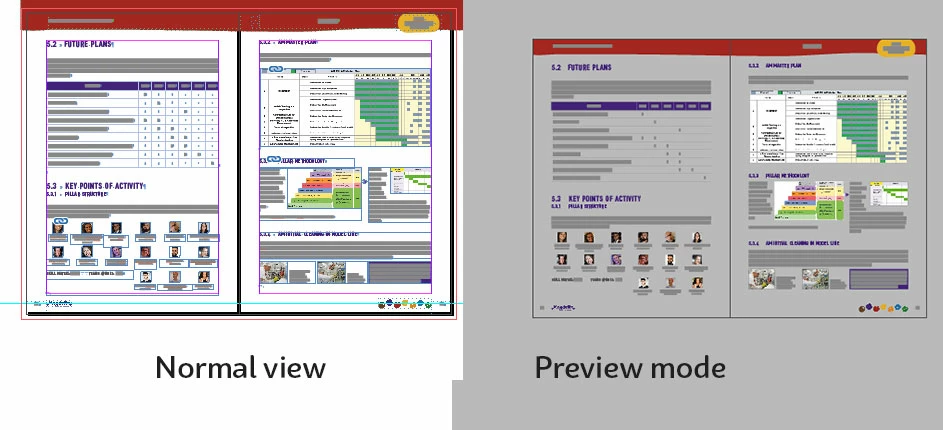
I turn something on. And I don't have any idea, w. In "preview mode" the background becomes gray.  It's good to see, what has transparency, in somehow. It only happens in one specific spread of the document. When exporting the in pdf or png, these pages, comes in white. The document is not corrupted, I have inserted new pages, after the "feature" and paste something old and new, and no dada was missing.
This topic has been closed for replies.
Correct answer Dandalo

I had no issues exporting the document to IDML. But when I try to open the idml. Indesign crash. It's a Huge document  -- I also did  the reset the preference and clean the caches. 

Right now, I'm folowing a tip, to disable "preflight" and open the document, and.....  - IT WORKS!!!!! Disabling the preflight alow me to open the idml.


I also recorded a video of my screen showing the behavior of the corrupted file.

https://www.youtube.com/watch?v=3vKQ_zaj158


Cheers


Dandalo Gabrielli


1 reply

Community Expert
January 29, 2021

Hi Dandalo,

hm. The document is corrupt.

Save the document as IDML file.

Open the IDML file as document and save with a new name.


Regards,
Uwe Laubender

( ACP )

DandaloAuthorCorrect answer
Inspiring
January 30, 2021

I had no issues exporting the document to IDML. But when I try to open the idml. Indesign crash. It's a Huge document  -- I also did  the reset the preference and clean the caches. 

Right now, I'm folowing a tip, to disable "preflight" and open the document, and.....  - IT WORKS!!!!! Disabling the preflight alow me to open the idml.


I also recorded a video of my screen showing the behavior of the corrupted file.

https://www.youtube.com/watch?v=3vKQ_zaj158


Cheers


Dandalo Gabrielli