
Participating Frequently
December 8, 2021
Answered

How do you link text fields to QR codes in InDesign?

  • December 8, 2021
  • 2 replies
  • 2927 views

Hello, I am laying out labels using InDesign, the labels have a lot# that often changes (in it's own text field).  I would like this lot # to be the text that comes up when the QR code is scanned.  I can manually input the text into the QR code text box.  I would rather have the QR code change when the text is changed though.  If anyone knows of a way to write it so that the QR code always shows what is in the specified text box, it would be amazing.  Thank you for your time.  
This topic has been closed for replies.
Correct answer m1b

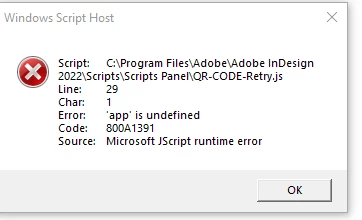
Thanks so much for taking the time to do that.  I tried out the script by pasting it into Notepad++ and outputting as a javascript file.  When I go to lauch the script from the script panel, I get the following error.  To be honest, I'm not sure how to define the app here.  it is just a command to run the script right?


Hi @Sean22153274qbmh, I'm wondering if there's been a slight change to the script between encoding on this web page, displaying in your web browser and copy/pasting into Notepad, etc. I've sent you a private message with a direct link to the script. Please try that first, just to rule out that possibility.

- Mark

2 replies

m1b
Community Expert
Community Expert
December 8, 2021

Your problem seems quite solvable via scripting. Do you have any experience with scripting? Let me know if you'd like some help. Or maybe post an example of a page of labels and we could see what could be done.

- Mark

Participating Frequently
December 9, 2021

m1b, 


Thank you so much, I was also thinking there may be an easy scripting or coding answer, I am just not familiar with scripting and have not been have not been able to solve the issue with my research so far. I am including an image, at this point I am just trying to figure out a good procedure before handing off the project to my companies pre-press department. 


At the very base level, I am just looking for one 5 digit number ( lot number field, highlighted in image) to translate to the QR code.  I was also thinking of setting up the labels with a master page that has lot# and QR code.  The child pages would have each individual size for the product.  Either scenario though, it's really just one place in the document (QR code), that I am hoping to translate one number to (lot #).   Please let me know if I can provide more information or images.  

m1b
Community Expert
Community Expert
December 10, 2021

Hi @Sean22153274qbmh, I've written a script that I think may solve this problem quite well. See instructions in script listing, and let me know what you think.

- Mark


/*
    Update QR-Codes with Styled Text
    for Adobe Indesign

    by m1b
    here: https://community.adobe.com/t5/indesign-discussions/how-do-you-link-text-fields-to-qr-codes-in-indesign/m-p/12582394

    Instructions to set up one updatable QR Code:
    (Do these steps again for each updatable QR-Code.)
        1. Make a text frame:
            • containing your text contents that will be used to update a QR-Code
            • set in a Character Style that the script will use to find updatable QR-Codes
        2. Choose Object > Generate QR Code... and place and scale the QR-Code to suit you
        3. Group the text frame from (1) and the QR Code Graphic from (2).

    Instructions to configure script
        1. character style name below must match the Character Style name in (1)
        2. swatch name supplied below will be applied to the updated QR-Code in (2)
            (comment out that line to use default swatch color)

*/

function main() {

    updateQRCodesWithStyledText(
        /* document to update */
        app.activeDocument,

        /* character style name */
        'Update QRCode Style',

        /* qr code swatch name (optional - comment out next line to use black) */
        'My Swatch Color'
    );

    function updateQRCodesWithStyledText(doc, characterStyleName, qrCodeSwatchName) {
        app.findGrepPreferences = NothingEnum.NOTHING;
        app.changeGrepPreferences = NothingEnum.NOTHING;
        app.findGrepPreferences.appliedCharacterStyle = characterStyleName;
        var texts = doc.findGrep();
        for (var i = 0; i < texts.length; i++) {
            if (!texts[i].hasOwnProperty('contents')) continue;
            var qrCodeGraphic = texts[i].parentTextFrames[0].parent.allGraphics[0];
            if (!qrCodeGraphic.isValid) continue;
            qrCodeGraphic.createPlainTextQRCode(texts[i].contents, qrCodeSwatchName);
        }
    }

} // end main

app.doScript(main, ScriptLanguage.JAVASCRIPT, undefined, UndoModes.ENTIRE_SCRIPT, 'Update QR-Codes');


Legend
December 8, 2021

Off hand, you could do this with Data Merge. Have a field for the text, and a duplicate field that creates the QR code. 


This would not be a dynamic document, but it would be easier than hand-entering the text.

Participating Frequently
December 8, 2021

Thank you SJRiegel,


That would save some time.  An ideal situation would be that the text field could be updated in the PDF using acrobat (for ease of use and time) or InDesign.  I am also open to using illustrator or other abode products, if that helps.  I have not fully explored the illustrator plug-ins for QR codes.

Community Expert
December 8, 2021

Does the lot# need to be a QR code? If not, barcodes like 39 and 128 could be generated with a font, and then you could have a dynamic situation where entering data once and populate in many.