
Participant
September 24, 2022
Answered

How do you load multiple of the same image from the CC libraries panel onto your cursor?

  • September 24, 2022
  • 1 reply
  • 159 views

How would you load 30 instances of the same graphic from CC libraries onto your cursor so that you can replace images that are already in the document? I can do this manually for each one by dragging from the library and then hitting option + click on the graphic I want to replace. However, I'd like to load multiple instances of the same image so that I can quickly go through and replace images without having to drag and drop for each one. Thanks!
This topic has been closed for replies.
Correct answer Steve Werner

I've worked with placing images from CC libararies in InDesign for a long time.

I don't think there's a way of loading multiple instances of the same graphic so you can replace multiple images in a document. 


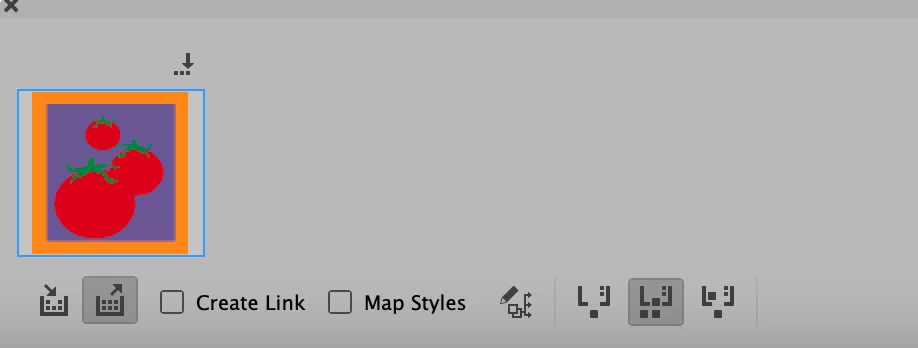
However, I think you could (1) place one instance in your document from the CC Library, and then (2) use the Content Collector tool to select it and put it on the Conveyer, and choose the Content Placer tool. One option for the Content Placer tool is "Place Multiple and Keep in Conveyor" (selected at the right). You could then use the graphic to multiple replace other graphics by Option-clicking them.


If you're unfamiliar with the Content Collector tools, read this Help file:


https://helpx.adobe.com/indesign/using/linked-content.html


1 reply

Steve Werner
Community Expert
Steve WernerCommunity ExpertCorrect answer
Community Expert
September 24, 2022

I've worked with placing images from CC libararies in InDesign for a long time.

I don't think there's a way of loading multiple instances of the same graphic so you can replace multiple images in a document. 


However, I think you could (1) place one instance in your document from the CC Library, and then (2) use the Content Collector tool to select it and put it on the Conveyer, and choose the Content Placer tool. One option for the Content Placer tool is "Place Multiple and Keep in Conveyor" (selected at the right). You could then use the graphic to multiple replace other graphics by Option-clicking them.


If you're unfamiliar with the Content Collector tools, read this Help file:


https://helpx.adobe.com/indesign/using/linked-content.html


Participant
October 19, 2022

Thank you, Steve. This was very helpful!