Participant
December 5, 2022
Answered

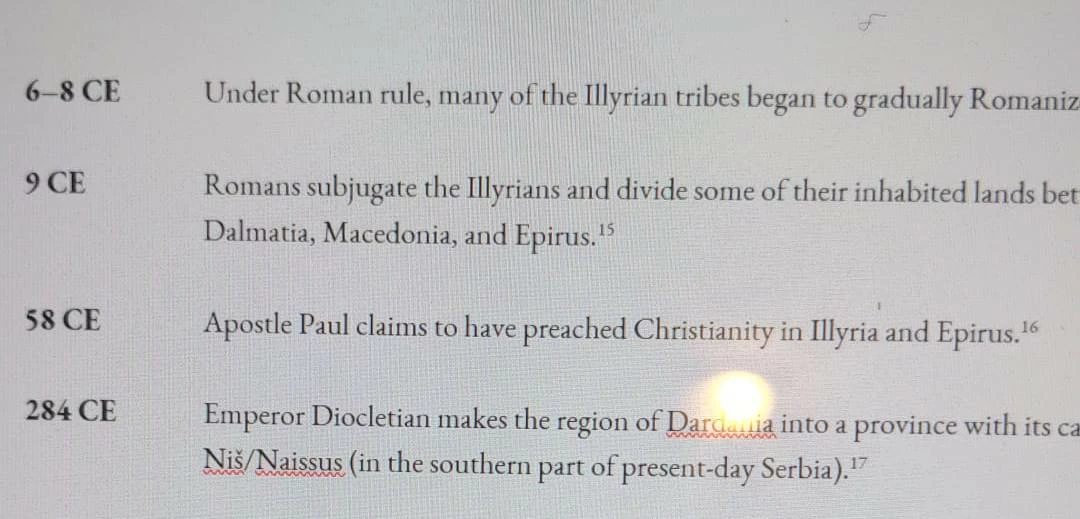
How I can acchieve this text ident look - Please help
  • December 5, 2022
  • 2 replies
  • 500 views


I want to make this text indent type but stuck on how to achiev it.

Any help will be welcome and very appreciated.

Cheers

This topic has been closed for replies.
Correct answer Willi Adelberger
  1. Create a character style for the first intendet glyphs.
  2. Create a paragraph style with left intent and negative left intent für the first line. Use the text font as font and use space after and/or before to get the distance between paragraphs.
  3. In the paragraph style go to nested styles and set up to 1 tabulator to use the character style above.
  4. Write the text and set a tabulator between the first part and the text.

2 replies

Willi Adelberger
Community Expert
Willi AdelbergerCommunity ExpertCorrect answer
Community Expert
December 5, 2022
  1. Create a character style for the first intendet glyphs.
  2. Create a paragraph style with left intent and negative left intent für the first line. Use the text font as font and use space after and/or before to get the distance between paragraphs.
  3. In the paragraph style go to nested styles and set up to 1 tabulator to use the character style above.
  4. Write the text and set a tabulator between the first part and the text.
Peter Kahrel
Community Expert
Community Expert
December 5, 2022

Set the paragraph's left indent to the required value, and its first line left indent to the same value, but negative. And set a tab stop, of course.


Alternative: insert indent-to-here characters after the tab characters.

Willi Adelberger
Community Expert
Community Expert
December 5, 2022

A tab must be written, but do not se a tab stop as it uses the left intend automatically.