
Participating Frequently
February 12, 2024
Answered

how rezise all documents in book indesign

  • February 12, 2024
  • 2 replies
  • 517 views

I have an indesign book with 32 documents, where each document is a chapter. The documents were all in a size of 16 x 23 cm but now a new publisher has asked to change the size to 15.24 x 22.86 cm. How can I change all documents within the indesign book at once? Do you have a script for this?
This topic has been closed for replies.
Correct answer Kasyan Servetsky

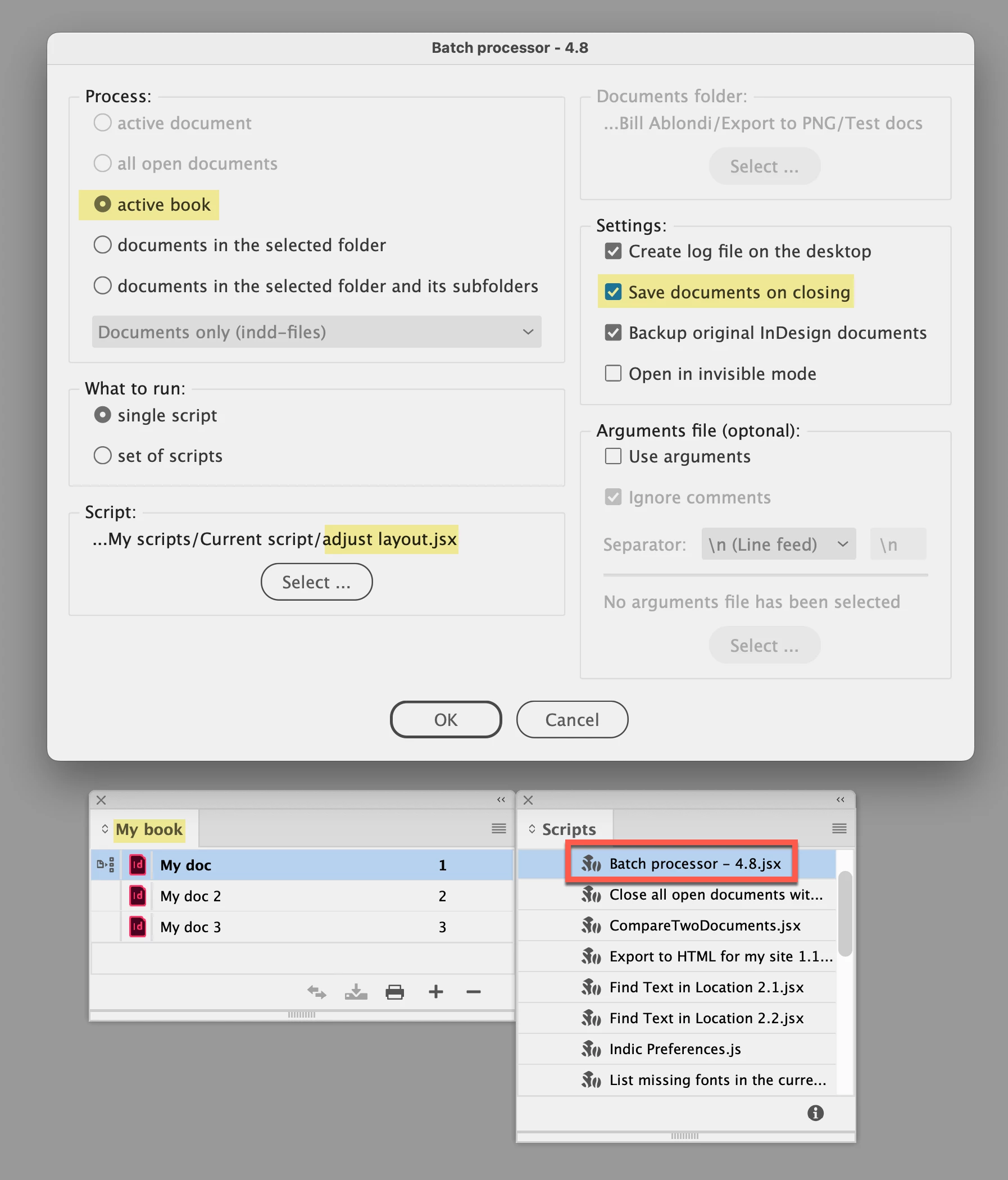
Let's try to run this simple script from the batch processor:


main();

function main() {
	var doc = app.activeDocument;
    doc.adjustLayout( {width:'15.24cm', height: '22.86cm'} );
}


Like so:

Besides width and height, you can use other parameters:  bleedInside, bleedTop, bleedOutside, bleedBottom, leftMargin, topMargin, rightMargin, bottomMargin. Check out the adjustLayout method for details.


— Kas


2 replies

Luke Jennings3
Community Expert
Community Expert
February 12, 2024

You also have the option to export to pdf and change the page size in Acrobat using a preflight profile. Tools> Print Production> Preflight> Fixups.

Note, you can duplicate an existing preflight profile using the "Options" menu, then edit it to include the desired settings.

Kasyan Servetsky
Kasyan ServetskyCorrect answer
Legend
February 12, 2024

Let's try to run this simple script from the batch processor:


main();

function main() {
	var doc = app.activeDocument;
    doc.adjustLayout( {width:'15.24cm', height: '22.86cm'} );
}


Like so:

Besides width and height, you can use other parameters:  bleedInside, bleedTop, bleedOutside, bleedBottom, leftMargin, topMargin, rightMargin, bottomMargin. Check out the adjustLayout method for details.


— Kas


Participating Frequently
February 12, 2024

you saved days of work. Very, very grateful indeed.