
Participant
January 8, 2023
Answered

How to apply Paragraph Style to text lines of all caps?

  • January 8, 2023
  • 4 replies
  • 1800 views

I have a book of catalog entries, where the entrys' title is in all caps (not styled, manually done this way). I want to assign a paragraph style to these all-cap lines -- but there are 300+ of these (long catalog-style book) Should I use find-replace or is this a GREP kind of voodoo?
This topic has been closed for replies.
Correct answer m1b

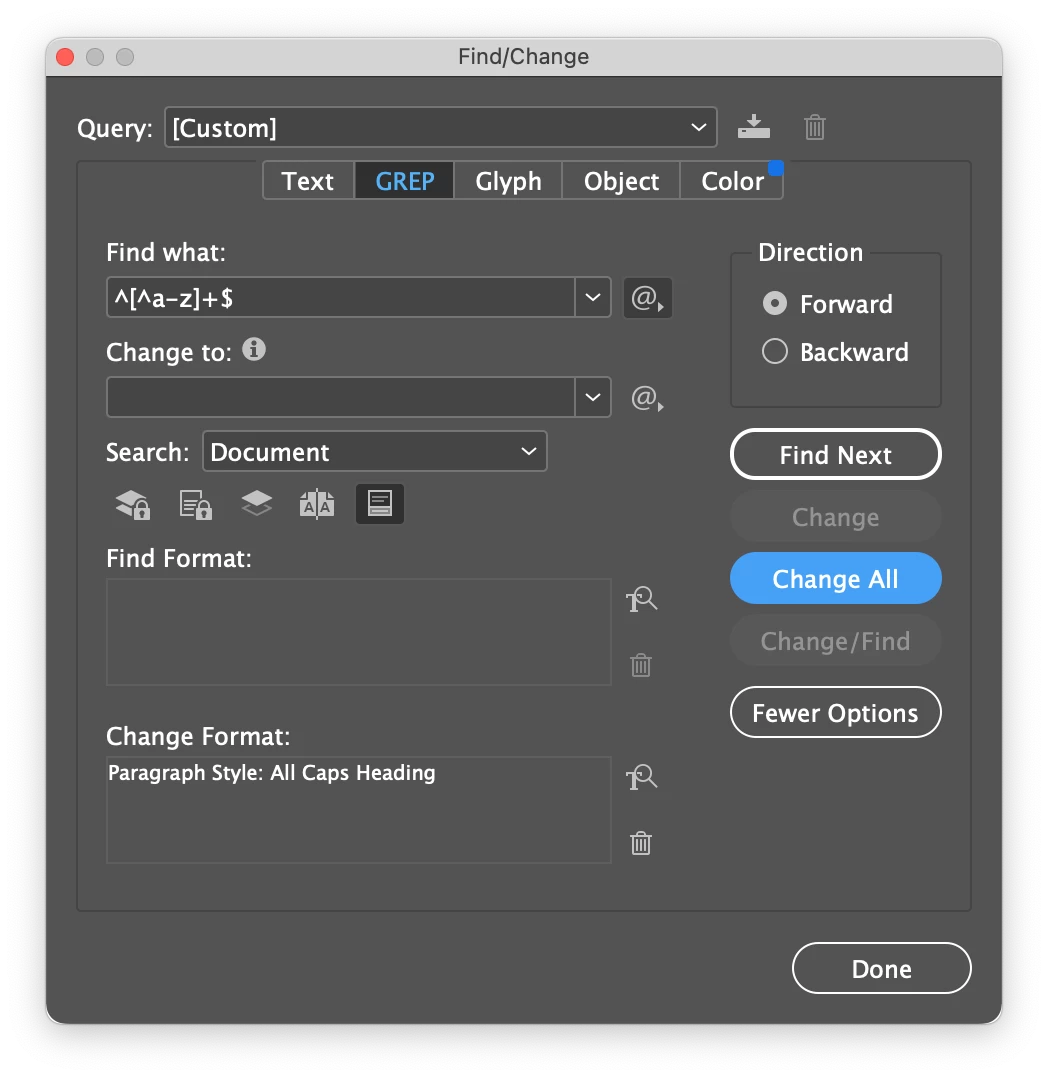
Hi @Ted27844426fne8, I think you can use:

^[^a-z]+$

It finds any whole paragraph that has more than one character, and no a-z (lowercase) characters.

- Mark


4 replies

Dave Creamer of IDEAS
Community Expert
Community Expert
January 8, 2023

As an aside, All Caps is formatting based (via manually, a character style, or a paragraph style), Uppercase is typed in that way (by holding down the shift or pressing caps lock key).


The opposite of uppercase is lowercase, which refers to the typesetting cases that held the letters back in the day when pages were created one letter at a time (and in reverse!). The capital letters were in the uppercase, the minuscule letters were in the lowercase. (The opposite of capital letters is minuscule letters.)


David Creamer: Community Expert (ACI and ACE 1995-2023)
m1b
Community Expert
Community Expert
January 8, 2023

Thanks David. By the way, I think your autocorrect doesn't want you to type "capital". Or apologies if it was deliberate and my spelling is too parochial—it wouldn't be the first time I've made that mistake. 🙂

Barb Binder
Community Expert
Community Expert
January 8, 2023

I grew up in DC, which is the only reason I can differentiate between them. 


~Barb

~Barb at Rocky Mountain Training
Barb Binder
Community Expert
Community Expert
January 8, 2023

Hi @Ted27844426fne8:


Are there other all-uppercase strings in this document beside the heads? If not, this would find 2 or more uppercase letters at the beginning of a paragraph and assign the paragraph style. If there are other uppercase strings, don't change all!


^\u\u+


~Barb


~Barb at Rocky Mountain Training
m1b
Community Expert
m1bCommunity ExpertCorrect answer
Community Expert
January 8, 2023

Hi @Ted27844426fne8, I think you can use:

^[^a-z]+$

It finds any whole paragraph that has more than one character, and no a-z (lowercase) characters.

- Mark


Barb Binder
Community Expert
Community Expert
January 8, 2023

Much better than my feeble attempt. Use this one, @Ted27844426fne8!


~Barb

~Barb at Rocky Mountain Training
m1b
Community Expert
Community Expert
January 8, 2023

Haha, thank you Barb. When it comes to grep, it is only a matter of time before someone posts a solution that makes mine look feeble too! I am used to it! 🙂 Still nice to have so much help on hand, so quickly!

James Gifford—NitroPress
Legend
January 8, 2023

Did you not apply a distinct style to these titles? Or are they only some entries among others that are not all-caps?


There are probably Find-Replace methods, but it would probably be almost as fast to simply go through and properly apply a style to these paragraphs.