

Youdoovoodoo
Participant
February 23, 2023
Question

How to arrange two anchored objects on z-axis

  • February 23, 2023
  • 1 reply
  • 262 views

Hi there.

I'm working on a catalogue and have the following challenge:
I want to arrange two anchored objects so that the product image is always above the yellow bar for the product description (on the z-axis if you want so).
However, the text for the product should remain editable!


Currently I have managed to anchor objects and make the anchors "invisible".

What does not work is that the produkt description on the yellow bar is changeable.
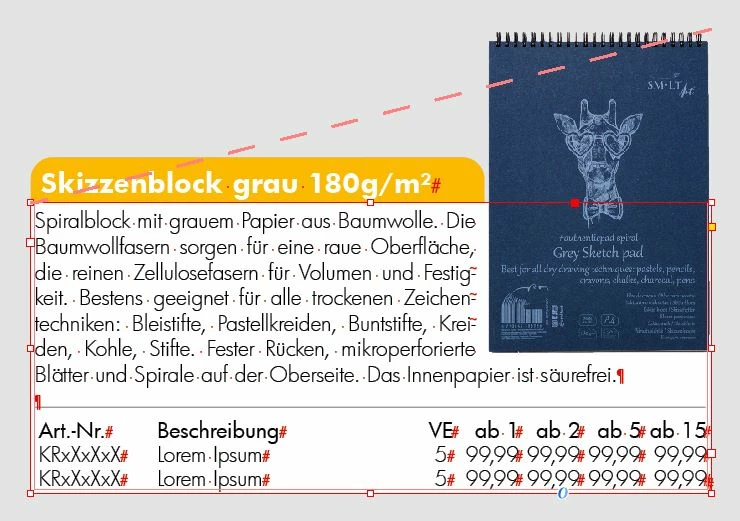


Does anyone have any ideas?
Thanks in advance. 

This topic has been closed for replies.

1 reply

Youdoovoodoo
Participant
February 23, 2023

OK. I have done it myself.

For all those who might also be interested:

1) You can arrange anchored objects on top of each other (in the z-axis, so to speak) by observing the order.
The object that is anchored first in a frame is at the bottom. The second anchored object is above the first, the third above the first and second and so on.

2) The text in the yellow text frame remains editable, but the option "Prevent manual positioning" must not be activated. This seems to prevent not only manual positioning but also all other editing options.

Translated with www.DeepL.com/Translator (free version)