Dear Team,
Sure, I will continue working manually.
Kindly let me know if you have any scripts that meet my needs or if you have any other alternatives.
Thank you for taking the time to respond to my inquiry. I'm going to close our conversation as of now.
@Peter Kahrel @rob day @m1b @Joel Cherney @brian_p_dts
Thank you for your support and guidance.
Thanks
kk
Hi @kanagakumar and others, really you guys have worked out the hard parts already. So I've written a script that uses your insights, and hopefully this will do what you want.
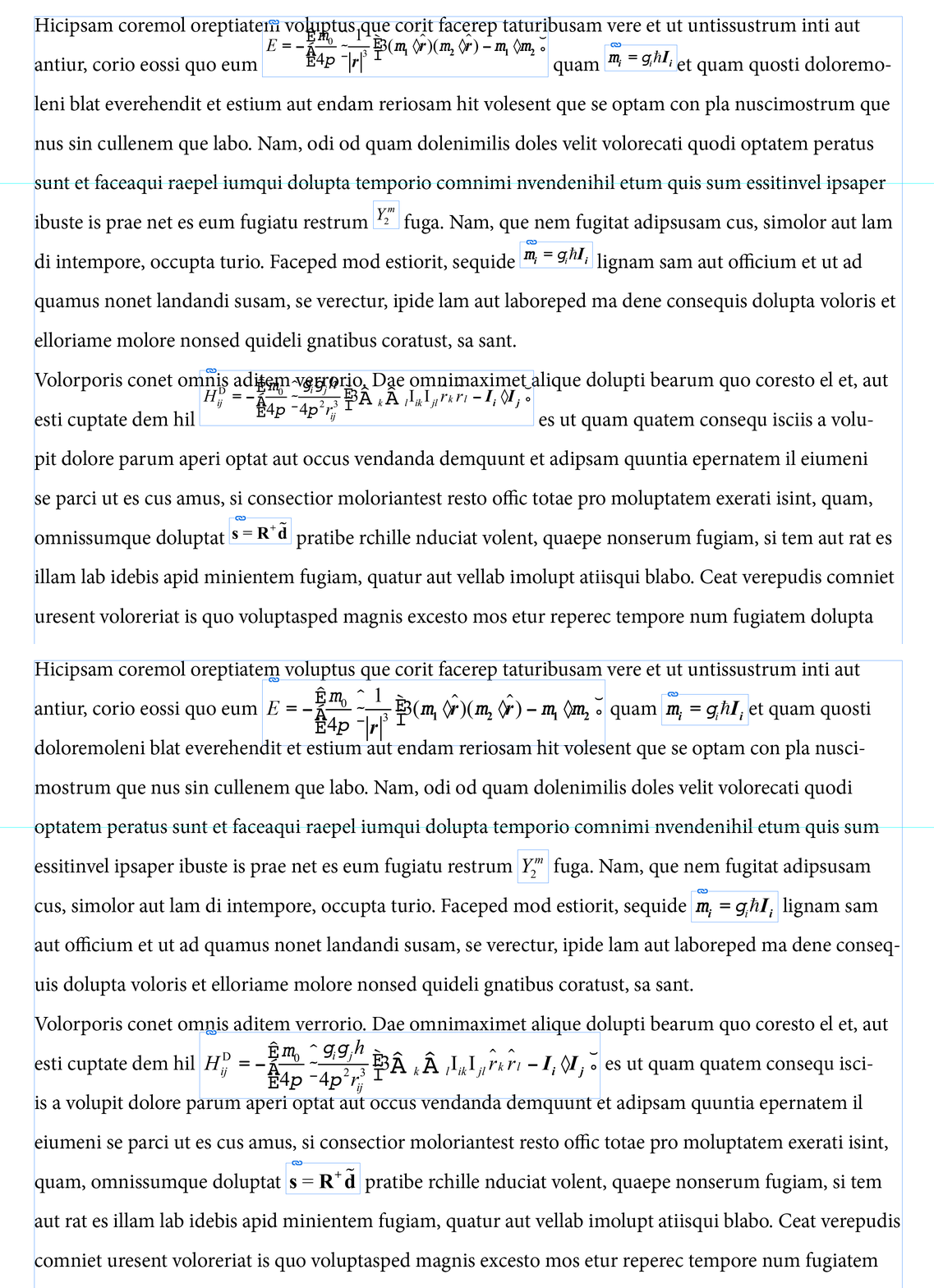
I have assumed that the equations are all eps graphics that are anchored in text. I've included options to set a uniform scale for the equations, and also to fit the frame to the content—this is critical, otherwise the baseline might not be correct.
Give it a try and let me know how you go.
- Mark
Example, using scalePercent: 120:
/**
 * Aligns all anchored EPS math equation graphics to their baseline
 * by using the `Baseline` value in the eps markup.
 *
 * Options:
 *   - apply an object style to each equation's frame
 *   - apply a separate object style for "display" equation's frames
 *   - scale the equation graphic
 *   - fit content to frame (NOTE: turning this off may result in baseline misalignments.)
 *   - adjusts equations cropping on left and right sides.
 *
 * Notes:
 *   - "Display" equations start a line, are displayed on the line by themselves
 *      and do not have baseline adjustments.
 * @author m1b
 * @discussion https://community.adobe.com/t5/indesign-discussions/how-to-avoid-empty-space-in-the-inside-of-the-equations/m-p/14460828
 */
function main() {

    var settings = {
        equationInlineStyleName: 'Equation Inline',
        equationDisplayStyleName: 'EQ-text Wrap',
        scalePercent: 100,
        leftSideBearing: -1,
        rightSidebearing: -1,
        fitFrameToContent: true,
    };

    app.scriptPreferences.measurementUnit = MeasurementUnits.POINTS;

    var counter = 0,
        doc = app.activeDocument,
        inlineEquationStyle = getThing(doc.allObjectStyles, 'name', settings.equationInlineStyleName),
        displayEquationStyle = getThing(doc.allObjectStyles, 'name', settings.equationDisplayStyleName),
        graphics = doc.allGraphics;

    for (var i = 0, eps, baseline, newYOffset, isDisplay; i < graphics.length; i++) {

        if (
            'EPS' !== graphics[i].constructor.name
            || undefined == graphics[i].parent.anchoredObjectSettings
        )
            // ignore non-eps and non-anchored graphics
            continue;

        eps = graphics[i];

        // get the baseline from the eps file
        baseline = getBaselineOfEPS(eps);

        if (undefined == baseline)
            // didn't get baseline
            continue;

        // "display" equations are handled differently
        isDisplay = true === isDisplayEquation(eps);

        // apply object style
        if (isDisplay && displayEquationStyle)
            eps.parent.appliedObjectStyle = displayEquationStyle;

        else if (inlineEquationStyle)
            eps.parent.appliedObjectStyle = inlineEquationStyle;

        // scale
        if (settings.scalePercent)
            eps.properties = {
                verticalScale: settings.scalePercent,
                horizontalScale: settings.scalePercent,
            };

        // adjust the frame
        crop(eps, [0, settings.leftSideBearing, 0, settings.rightSidebearing], settings.fitFrameToContent);

        // the anchored object Y offset value
        newYOffset = -baseline * (eps.verticalScale / 100);

        if (!isDisplay)
            // adjust the anchored position
            eps.parent.anchoredObjectSettings.anchorYoffset = newYOffset;

        counter++;

    }

    alert('Adjusted ' + counter + ' anchored eps graphics.');

};
app.doScript(main, ScriptLanguage.JAVASCRIPT, undefined, UndoModes.ENTIRE_SCRIPT, 'Align Anchored Equations');

/**
 * Returns the `baseline` value
 * from the EPS file.
 * @author Peter Kahrel
 * @author Rob Day
 * @author m1b
 * @version 2024-03-09
 * @param {EPS} graphic - an EPS graphic.
 * @returns {Number} - the baseline extracted from the file.
 */
function getBaselineOfEPS(graphic) {

    var f = File(graphic.itemLink.filePath);

    if (!f.exists)
        return;

    f.encoding = 'BINARY';
    f.open('r');
    var str = f.read();
    f.close();

    return Number(str.match(/%%Baseline:\s(\d+)/)[1] || 0);

};

/**
 * Returns a thing with matching property.
 * @param {Array|collection} things - the things to look through, eg. PageItems.
 * @param {String} key - the property name, eg. 'name'.
 * @param {*} value - the value to match.
 * @returns {*} - the thing.
 */
function getThing(things, key, value) {

    for (var i = 0; i < things.length; i++)
        if (things[i][key] == value)
            return things[i];

};

/**
 * Adjust a graphic's container's bounds,
 * either relative to the graphic, or
 * relative to the graphic's container.
 *
 * Example:
 *   crop(myGraphic,[0,0,0,0]); // equivalent to fit frame to content
 *
 * Example:
 *   copy(mygraphic, [-1,-1,-1,-1], false); // reduce frame by 1 point all around
 *
 * @author m1b
 * @version 2024-03-12
 * @param {contained object} graphic - the target graphic, eg. PDF.
 * @param {Array<Number>} offset - the adjustment to make, in points, in current units to [top, left, bottom, right].
 * @param {Boolean} adjustRelativeToGraphic - whether the adjustment is relative to graphic object; otherwise will be relative to graphic's parentframe (default: true).
 */
function crop(graphic, offset, adjustRelativeToGraphic) {

    var frame = graphic.parent,
        bounds = false !== adjustRelativeToGraphic
            ? graphic.geometricBounds
            : frame.geometricBounds;

    if (undefined == bounds)
        return;

    frame.geometricBounds = [
        bounds[0] - offset[0],
        bounds[1] - offset[1],
        bounds[2] + offset[2],
        bounds[3] + offset[3],
    ];

};

/**
 * Returns true when the supplied EPS
 * is a "Display" equation.
 * @param {EPS} eps - an Indesign EPS graphic.
 * @returns {Boolean}
 */
function isDisplayEquation(eps) {

    return {
        'EQ': true,
        'EQ-I': true,
    }[eps.parent.parent.appliedParagraphStyle.name];

};
Edit 2024-03-12: Added the crop function and added "sidebearings" to the settings object so that the equation graphic's frames can be adjusted on the left and right.
Edit 2024-03-12: Added handling of "display" equations as per OP's comments.
Edit 2024-03-12: Changed isDisplayEquation function as per OP's comments.

 AdChoices