
Participant
December 14, 2010
Question

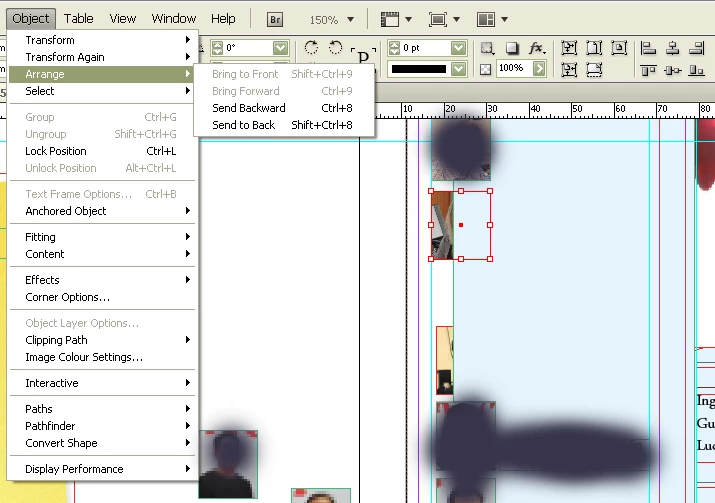
How to bring these pictures to front?

  • December 14, 2010
  • 2 replies
  • 45669 views

How to get these pictures to front?

As the attachement showing, I have used the "bring to front" option. I also used "send to back" on the blue box. There is no text wrapping on.

For some reason my images and text now have green and red frames on them, they used to be blue I think, no clue why they changed, or what it means.
    This topic has been closed for replies.

    2 replies

    Participant
    December 14, 2010

    Hi Kamos,

    InDesign displays a different color for selection for different layers. Since you mention that you see some objects with green and some with red selection I am sure this is because your object lie on different layers. In this case an object on lower layer cannot be brought over an object lying on the layer above it. You can move the lower layer over the top layer or you can cut the object from lower layer and then select the layer on which your other object lies and 'paste in place' the object.

    You can change the layers by opening the layers palette (Window>Layers)

    KaMOS-SAEAuthor
    Participant
    December 14, 2010

    That fixed it. Thanks, both of you!!

    tomaxxi
    Inspiring
    December 14, 2010

    Check layers palette (F7). Probably pictures are on different layer.

    Hope that helps.

    --

    tomaxxi

    http://indisnip.wordpress.com/

    KaMOS-SAEAuthor
    Participant
    December 14, 2010

    They apprears to be on different layers yes. But how do I change the layer on items? I use Indesign CS4.

    tomaxxi
    Inspiring
    December 14, 2010

    http://help.adobe.com/en_US/InDesign/6.0/WSa285fff53dea4f8617383751001ea8cb3f-70e8a.html#WSa285fff53dea4f8617383751001ea8cb3f-70e1a