Inspiring
August 16, 2021
Beantwortet

How to change RGB to CMYK

  • August 16, 2021
  • 2 Antworten
  • 9151 Ansichten

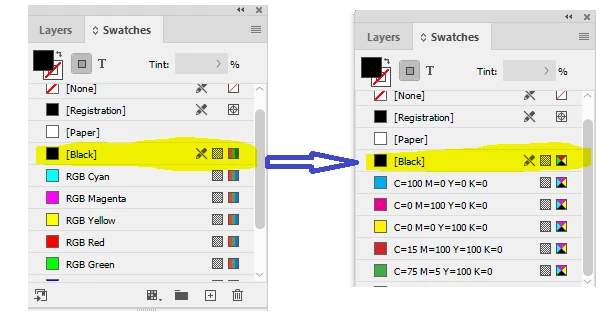
my document have been setup to RGB black, but I want to change the color to CMYK black. I see it is not editable. can the color be changed ?  thank you


Dieses Thema wurde für Antworten geschlossen.
Beste Antwort von rob day

To change the Color Mode of the default swatches choose Edit>Document Setup and set the Intent to Print—the blend space affects how transparency will get flattened on export or output, but doesn’t affect the actual Color Mode of a swatch.

2 Antworten

rob day
Community Expert
rob dayCommunity ExpertAntwort
Community Expert
August 16, 2021

To change the Color Mode of the default swatches choose Edit>Document Setup and set the Intent to Print—the blend space affects how transparency will get flattened on export or output, but doesn’t affect the actual Color Mode of a swatch.

Inspiring
August 17, 2021

but ,  I print to PDF,  K of color is not 100%, thanks 

rob day
Community Expert
Community Expert
August 17, 2021

Don’t check the PDF values in Illustrator. Export the PDF using the default PDF/X-4 or 1a preset, and check the values in AcrobatPro’s Output Preview. 


hammer0909
Community Expert
Community Expert
August 16, 2021

Choose Edit > Transparency Blend Space > Document CMYK.

Inspiring
August 17, 2021

open PDF with AI,  K is not 100%


Inspiring
August 17, 2021

 it is ok now , also need to change %100 k in color panel , thanks
