Inspiring
November 30, 2020
Beantwortet

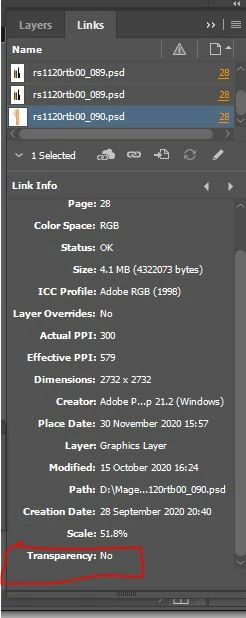
How to check the "Transparency" status

  • November 30, 2020
  • 4 Antworten
  • 714 Ansichten

Hi All,


Please help me to find the psd image transparency status, using the indesign javascript. I have attached the image for more information.


Thanks Advance,
Magesh

Dieses Thema wurde für Antworten geschlossen.
Beste Antwort von rob day

Maybe get a list of links, and then check each item in the preflight transparency list to see if it is in the link list:


var doc = app.documents.item(0);

//make a profile if doesn’t exist
try {
    var transProfile = app.preflightProfiles.add({name:"CheckTransparency"});
}catch(e) {
    var transProfile = app.preflightProfiles.itemByName("CheckTransparency")
}  

//set transparency rule
const RULE_NAME = "ADBE_TransparencyUsage";
try {
    var myRule = transProfile.preflightProfileRules.add(RULE_NAME);
}catch(e) {
    var myRule = transProfile.preflightProfileRules.itemByName(RULE_NAME)
}  

myRule.flag = PreflightRuleFlag.returnAsError; 

//run the preflight
var myProcess = app.preflightProcesses.add(doc, transProfile);
myProcess.waitForProcess();
var myResults = myProcess.processResults;

//get a list of objects from the results
if (myResults != "None"){
    var transList = [];
    var errors = myProcess.aggregatedResults;
    var errorResults = errors[2];
    for (var i = 2; i < errorResults.length; i++){
        transList.push(errorResults[i][1])
    };   
}
myProcess.remove();

//a list of placed links
var docLinks = doc.links
var transLinks = [];
//check if the items in the transparency list are links
for (var i = 0; i < docLinks.length; i++){
    if (checkItem(transList, docLinks[i].name)) {
        transLinks.push(docLinks[i].name)
    } 
};   

//get the links with transparency list
$.writeln("Links with transparency: " + transLinks)


/**
* Checks if an item is in an array
*  the array to check 
*  the item to look for 
*  true if the item is in the array 
* 
*/
function checkItem(a, obj) {
    for (var i = 0; i < a.length; i++) {
        if (a[i] === obj) {
            return true;
        }
    }
    return false;
}


4 Antworten

Community Expert
November 30, 2020

The result of Rob's Preflight script is a array of strings.

It will contain the names of any placed image files with transparency.


Hm. That can get complicated if there are other objects with transparency in the document. Would be hard to filter the images perhaps. The results will only show the names of the flagged objects.

Example: In case of a rectangle where transparency effects are applied the string can contain the rectangle's generic name in the localized version. E.g. "Rechteck" for "Rectangle" in my German InDesign.


Regards,
Uwe Laubender

( ACP )

rob day
Community Expert
rob dayCommunity ExpertAntwort
Community Expert
November 30, 2020

Maybe get a list of links, and then check each item in the preflight transparency list to see if it is in the link list:


var doc = app.documents.item(0);

//make a profile if doesn’t exist
try {
    var transProfile = app.preflightProfiles.add({name:"CheckTransparency"});
}catch(e) {
    var transProfile = app.preflightProfiles.itemByName("CheckTransparency")
}  

//set transparency rule
const RULE_NAME = "ADBE_TransparencyUsage";
try {
    var myRule = transProfile.preflightProfileRules.add(RULE_NAME);
}catch(e) {
    var myRule = transProfile.preflightProfileRules.itemByName(RULE_NAME)
}  

myRule.flag = PreflightRuleFlag.returnAsError; 

//run the preflight
var myProcess = app.preflightProcesses.add(doc, transProfile);
myProcess.waitForProcess();
var myResults = myProcess.processResults;

//get a list of objects from the results
if (myResults != "None"){
    var transList = [];
    var errors = myProcess.aggregatedResults;
    var errorResults = errors[2];
    for (var i = 2; i < errorResults.length; i++){
        transList.push(errorResults[i][1])
    };   
}
myProcess.remove();

//a list of placed links
var docLinks = doc.links
var transLinks = [];
//check if the items in the transparency list are links
for (var i = 0; i < docLinks.length; i++){
    if (checkItem(transList, docLinks[i].name)) {
        transLinks.push(docLinks[i].name)
    } 
};   

//get the links with transparency list
$.writeln("Links with transparency: " + transLinks)


/**
* Checks if an item is in an array
*  the array to check 
*  the item to look for 
*  true if the item is in the array 
* 
*/
function checkItem(a, obj) {
    for (var i = 0; i < a.length; i++) {
        if (a[i] === obj) {
            return true;
        }
    }
    return false;
}


Inspiring
December 1, 2020

Thank you very much Rob!!!

Community Expert
November 30, 2020

Hi Rob,

the idea using InDesign's Preflight functionality is very good!

What's missing in your code:

Set property flag of your rule to PreflightRuleFlag.RETURN_AS_ERROR.


Regards,
Uwe Laubender

( ACP )

rob day
Community Expert
Community Expert
November 30, 2020

Thanks!


rob day
Community Expert
Community Expert
November 30, 2020

You might be able to use preflight to check for transparency. This returns an array of document images with transparency:


var doc = app.documents.item(0);

try {
    var transProfile = app.preflightProfiles.add({name:"CheckTransparency"});
}catch(e) {
    var transProfile = app.preflightProfiles.itemByName("CheckTransparency")
}  

const RULE_NAME = "ADBE_TransparencyUsage";
try {
    var myRule = transProfile.preflightProfileRules.add(RULE_NAME);
}catch(e) {
    var myRule = transProfile.preflightProfileRules.itemByName(RULE_NAME)
}  

var myProcess = app.preflightProcesses.add(doc, transProfile);
myProcess.waitForProcess();
var myResults = myProcess.processResults;


if (myResults != "None"){
    var imgList = [];
    var errors = myProcess.aggregatedResults;
    var errorResults = errors[2];
    for (var i = 2; i < errorResults.length; i++){
        imgList.push(errorResults[i][1])
    };   
}
myProcess.remove();

$.writeln("List of Images with Transparency: "+ imgList)


//get the selected image’s transparency
var sel = doc.selection[0].itemLink.name;
alert("The selected link has transparency: " + checkItem(imgList, sel))


/**
* Checks if an item is in an array
*  the array to check 
*  the item to look for 
*  true if the item is in the array 
* 
*/
function checkItem(a, obj) {
    for (var i = 0; i < a.length; i++) {
        if (a[i] === obj) {
            return true;
        }
    }
    return false;
}


Community Expert
November 30, 2020

Hi Magesh,

don't think that the scripting DOM of InDesign can provide the answer.

You could open the file in PhotoShop and check if the value of isBackgroundLayer of the bottom most layer is true.


/*
	PhotoShop script code
	Image is already open.
	
	NOTE: If the bottom most layer shows 
	value true for property isBackgroundLayer,
	InDesign will show "Transparency: No" in the Links panel.
	Regardless if there are other layers as well.
	
*/
var openDoc = app.activeDocument;
var layersLength = openDoc.layers.length;
var hasBackgroundLayer = openDoc.layers[ layersLength-1 ].isBackgroundLayer;

if( hasBackgroundLayer )
{
	alert( openDoc.name +"\r"+ "will show Transparency: No" +"\r"+ "when placed in InDesign." )
}
else
{
	alert( openDoc.name +"\r"+ "will show Transparency: Yes" +"\r"+ "when placed in InDesign." )
};


Regards,
Uwe Laubender

( ACP )