
Participating Frequently
September 26, 2022
Question

How to convert an InDesign file to PDF without losing transparency effect?

  • September 26, 2022
  • 3 replies
  • 1261 views

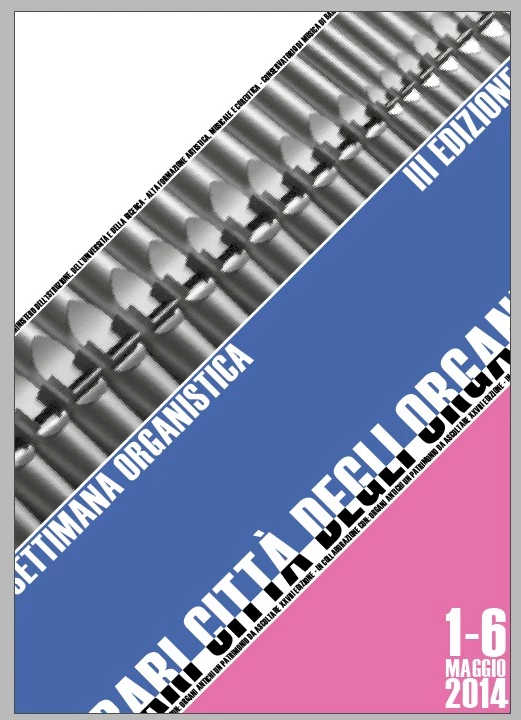
I'm trying to export a file to pdf for printing and it has some transparency effect that i cannot find a way to export to the pdf. This is how it appear on InDesign:
And this is how it appear on PDF:
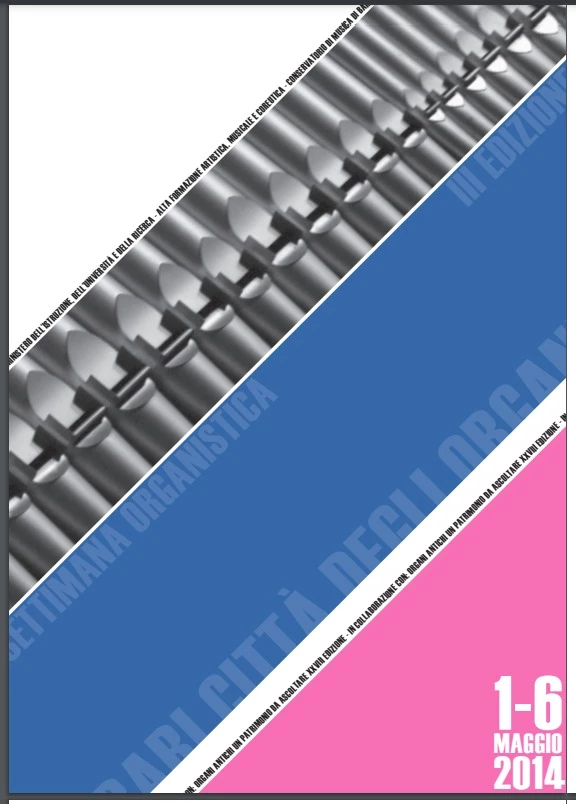

I tryed with different effect like discolour and screen and with different settings for export.

This topic has been closed for replies.

3 replies

Jumpenjax
Community Expert
Community Expert
September 26, 2022

Have you tried to File /package. Make sure your specs on pdf are what you want and it should work.

Lee- Graphic Designer, Print Specialist, Photographer
chrisg11235813
Participating Frequently
September 26, 2022

Is the background graphic a link?  if the colourspace of the link isn't the same as your documents "Transparency Blend Space" transparency issues tend to arise.

Another thought I have is: Is the blue band a spot colour?
Sometimes transparency and spot colours don't play nice, if possible convert to process colour.

Participating Frequently
September 26, 2022

I'm sorry i'm not really good with indesign, i don't know what you mean with the background being a link. It's just a vector shape.
Anyway, the blue is a spot colour, but changing to a process one doesn't change the outcome...

chrisg11235813
Participating Frequently
September 26, 2022

By "Link" I was wondering if the underlying graphics were created in Indesign, or if they were linked from an external source. Since you aren't using links, that's not the issue.


I meant to also ask if the text was using a spot colour?

Also, are you using Overprint on any of the emelents?


Willi Adelberger
Community Expert
Community Expert
September 26, 2022

Export as PDF/X-4. Take care that the document color mode CMYK or RGB is correct.

Participating Frequently
September 26, 2022

How can i make sure that the color mode is correct?