
Exit
  • Global community
    • Language:
      • Deutsch
      • English
      • Español
      • Français
      • Português
  • 日本語コミュニティ
  • 한국 커뮤니티
0

How to create a rounded rectangle for Drop Caps?

New Here ,
Apr 05, 2023 Apr 05, 2023

Hi everybody,

I want to create a paragraph style to get a "Drop Caps" look like this but, I couldn't find any option to add an indent to the rectangle and make its corners rounded. Is there any way to make it possible?
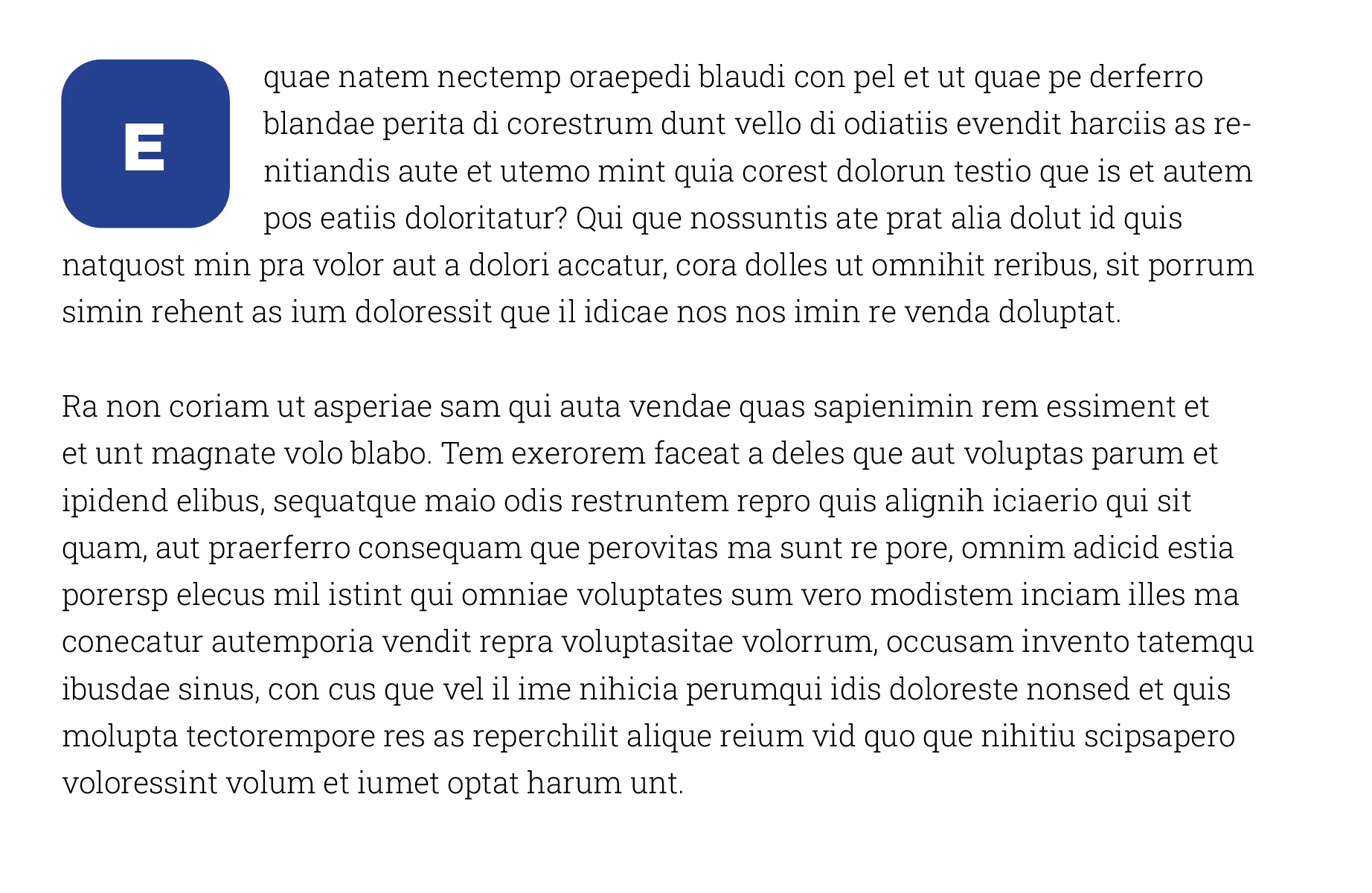
Screen Shot 2023-04-05 at 21.19.22.png


{Renamed By MOD}


TOPICS
How to
647
Translate
Report
Community guidelines
Be kind and respectful, give credit to the original source of content, and search for duplicates before posting. Learn more
community guidelines

correct answers 2 Correct answers

Guide , Apr 06, 2023 Apr 06, 2023

1 click!


Before The ScriptBefore The ScriptAfter The ScriptAfter The Script


// by FRIdNGE, Michel Allio [06/04/2023]

// TO BE PREVIOUSLY CREATED BEFORE LAUNCHING THE SCRIPT:

// "DropCap" Para Style, including the following Grep Style: appliedCharacterStyle = "DropCap", grepExpression = "^~a."
// "DropCap" Char Style (see Grep Style)

// "DropCap" Object Style
// "DropCapLetter" Para Style

app.doScript("main()", ScriptLanguage.javascript, undefined, UndoModes.FAST_ENTIRE_SCRIPT, 'DropCap! …"');
  
function main() {
    var my
...
Translate
Guide , Apr 06, 2023 Apr 06, 2023

InDesign version used: ID CC 2023


(^/)

Translate
New Here ,
Apr 05, 2023 Apr 05, 2023

Unfortunately, I couldn't find "edit" option for my first message. I think I have to add more details about my process.

I used the "Drop Caps" feature for the first letter "E"
Then I added a stroke from Underline Options to create a rectangle background and 
But I couldn't find a way to get the result I posted in the image above.


Screen Shot 2023-04-05 at 23.51.34.png

Translate
Report
Community guidelines
Be kind and respectful, give credit to the original source of content, and search for duplicates before posting. Learn more
community guidelines
Community Expert ,
Apr 05, 2023 Apr 05, 2023

You might want to consider making your own custom font for this using IndyFont: https://www.indiscripts.com/category/projects/IndyFont

Translate
Report
Community guidelines
Be kind and respectful, give credit to the original source of content, and search for duplicates before posting. Learn more
community guidelines
Community Expert ,
Apr 05, 2023 Apr 05, 2023

I don't think that can be done with any combination of 'live' styles that would adapt to the text the way a drop cap does.


Either a graphic image (of each needed letter in a rectangle), sized and floated to the left, or possibly a text box with rounded corners and the letter inside, also floated left, will be needed, unless I'm missing something.


Translate
Report
Community guidelines
Be kind and respectful, give credit to the original source of content, and search for duplicates before posting. Learn more
community guidelines
Guide ,
Apr 06, 2023 Apr 06, 2023

1 click!


Before The ScriptBefore The ScriptAfter The ScriptAfter The Script


// by FRIdNGE, Michel Allio [06/04/2023]

// TO BE PREVIOUSLY CREATED BEFORE LAUNCHING THE SCRIPT:

// "DropCap" Para Style, including the following Grep Style: appliedCharacterStyle = "DropCap", grepExpression = "^~a."
// "DropCap" Char Style (see Grep Style)

// "DropCap" Object Style
// "DropCapLetter" Para Style

app.doScript("main()", ScriptLanguage.javascript, undefined, UndoModes.FAST_ENTIRE_SCRIPT, 'DropCap! …"');
  
function main() {
    var myDoc = app.activeDocument;
    var myParagraphStyles = myDoc.allParagraphStyles;
        for ( var s = 0; s < myParagraphStyles.length; s++ ) if ( myParagraphStyles[s].name == "DropCap" ) var myParaStyle = myParagraphStyles[s];
    var myObjectStyles = myDoc.allObjectStyles;
        for ( var s = 0; s < myObjectStyles.length; s++ ) if ( myObjectStyles[s].name == "DropCap" ) var myObjectStyle = myObjectStyles[s];
    app.findGrepPreferences = app.changeGrepPreferences = null;
    app.findGrepPreferences.findWhat = "^~a?(.)";
    app.findGrepPreferences.appliedParagraphStyle = myParaStyle;
    app.changeGrepPreferences.changeTo = "$1";
    myDropCaps = myDoc.changeGrep();
    app.findGrepPreferences = app.changeGrepPreferences = null;
    for ( var i = myDropCaps.length-1; i >= 0; i--) {    
        var myDropCapFrame = myDropCaps[i].insertionPoints[0].textFrames.add();  
        myDropCapFrame.contents = myDropCaps[i].contents;  
        myDropCapFrame.applyObjectStyle (myObjectStyle);
        myDropCapFrame.clearObjectStyleOverrides();
    }
    alert("Done By FRIdNGE! …")
}


(^/)  The Jedi

Translate
Report
Community guidelines
Be kind and respectful, give credit to the original source of content, and search for duplicates before posting. Learn more
community guidelines
Guide ,
Apr 06, 2023 Apr 06, 2023
LATEST

InDesign version used: ID CC 2023


(^/)

Translate
Report
Community guidelines
Be kind and respectful, give credit to the original source of content, and search for duplicates before posting. Learn more
community guidelines