
Inspiring
June 30, 2023
Answered

How to create an URL hyperlink

  • June 30, 2023
  • 2 replies
  • 815 views

I don't know how to create an URL hyperlink like this, with SDK:
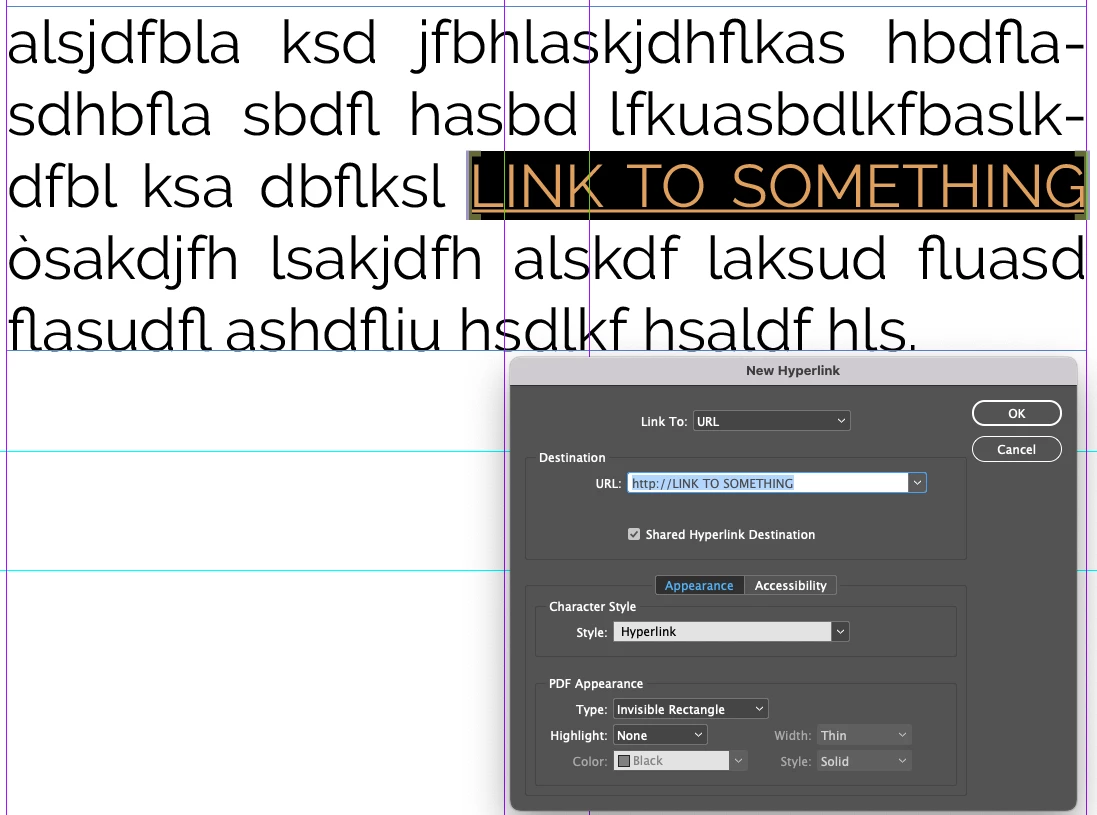
The documentation isn't clear about it, i see these methods:

My doubts are about the textRange, usually the functions always require the TextRange but this would seem not, or I'm not understanding where to insert it.

Another doubt, i don't found a command to apply an hyperlink, i found kNewHyperlinkCmdBoss but i don't know if this boss apply the hyperlink or not.


P.S. the text that I need isn't selected by end, but i select it programmatically, so i don't use ISelectionUtils

This topic has been closed for replies.
Correct answer Rahul_Rastogi

Hi @Stefano5C37 ,


You first need to create HyperLinkSource and HyperLinkDestination and then create the Hyperlink.


Refer the below code snippet -


1. Create HyperLinkSource -

Utils<Facade::IHyperlinkFacade>()->CreateHyperlinkTextSource(textModelUIDRef, startIndex, length, &outHyperLinkSource);


2. Create HyperLinkDestination -

Utils<Facade::IHyperlinkFacade>()->CreateHyperlinkURLDestination(db, strHyperLinkURL, &outHyperLinkDest, strHyperLinkDestinationName);


3. Create HyperLink -

Utils<Facade::IHyperlinkFacade>()->CreateHyperlink(outHyperLinkSource, outHyperLinkDest, &outHyperlink, strHyperLinkURL);


Regards,

Rahul Rastogi

Independent Adobe InDesign C++ Plugin Developer

iZine Solutions

rahulrastogi2@yahoo.com

skype - rahulrastogi2

2 replies

Rahul_RastogiCorrect answer
Inspiring
July 13, 2023

Hi @Stefano5C37 ,


You first need to create HyperLinkSource and HyperLinkDestination and then create the Hyperlink.


Refer the below code snippet -


1. Create HyperLinkSource -

Utils<Facade::IHyperlinkFacade>()->CreateHyperlinkTextSource(textModelUIDRef, startIndex, length, &outHyperLinkSource);


2. Create HyperLinkDestination -

Utils<Facade::IHyperlinkFacade>()->CreateHyperlinkURLDestination(db, strHyperLinkURL, &outHyperLinkDest, strHyperLinkDestinationName);


3. Create HyperLink -

Utils<Facade::IHyperlinkFacade>()->CreateHyperlink(outHyperLinkSource, outHyperLinkDest, &outHyperlink, strHyperLinkURL);


Regards,

Rahul Rastogi

Independent Adobe InDesign C++ Plugin Developer

iZine Solutions

rahulrastogi2@yahoo.com

skype - rahulrastogi2

Inspiring
July 17, 2023

Thanks a lot rahulrastogi2,

it worked perfectly

Stefano

Harshika Verma
Community Manager
Community Manager
July 4, 2023

Hi @Stefano5C37,


Thank you for reaching out. We recommend referring to this article, "https://helpx.adobe.com/indesign/using/hyperlinks.html," as it provides valuable information on the subject that may assist you.


I am also keeping the discussion open for our experts, who might have more suggestions for you.


Thanks,

Harshika