

Roger Breton
Legend
October 3, 2024
Answered

How to Create Clickable Index Page Numbers in InDesign for Interactive PDFs

  • October 3, 2024
  • 1 reply
  • 1118 views

This is a "lazy" question, I know, but how would I go about having the user automatically sent to the corresponding document page when clicking a given index page number? This is an exerpt of what my index currently looks like :
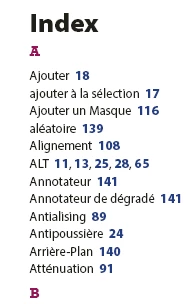
I don't think this is possible using the Index feature but I'm not sure how to go about implementing such a navigation aid in InDesign, given that the final destination of the document is an exported interactive PDF?
Any help is appreciated.


<Title renamed by MOD>


This topic has been closed for replies.
Correct answer Jeffrey_Smith

If the index was generated with Indesign's Index function, and PDF is exported with the Interactive PDF setting, then the page numbers will be hyperlinked to the actual page in the PDF.

1 reply

Jeffrey_SmithCommunity ExpertCorrect answer
Community Expert
October 3, 2024

If the index was generated with Indesign's Index function, and PDF is exported with the Interactive PDF setting, then the page numbers will be hyperlinked to the actual page in the PDF.

Roger Breton
Legend
October 4, 2024

Thank you vvery much!!! The cherry on the icing would have been if the word would have been "highlightted" in the page, but that's asking for a lot. I'm so glad I asked the question and so glad you knew the answer. I owe you a beer 🙂

Community Expert
October 4, 2024

I think having only the number surrounded by the link frame is by design, otherwise I don't know how the entries with multiple page numbers would be handled.

You could go into Acrobat and stretch the link frame over the word for single page entries.