Exit
  • Global community
    • Language:
      • Deutsch
      • English
      • Español
      • Français
      • Português
  • 日本語コミュニティ
  • 한국 커뮤니티
0

How to create this automatically?

Community Beginner ,
Nov 19, 2016 Nov 19, 2016

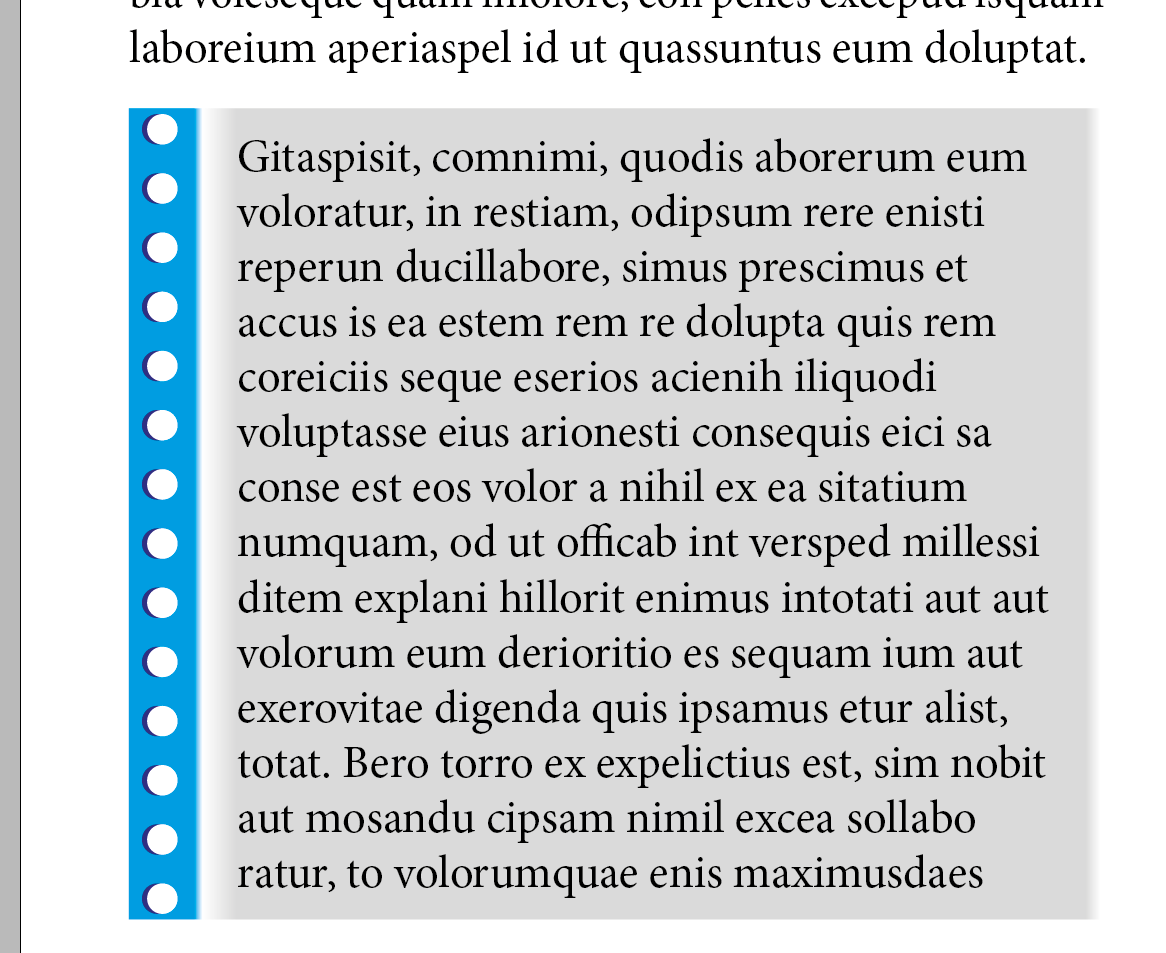
I am working on a school project. I want some paragraph look like this (has a green line on the left). I wonder there is a smart way to do it automatically or i have to do it manually?

Thanks!

Capture.JPG

1.0K
Translate
Report
Community guidelines
Be kind and respectful, give credit to the original source of content, and search for duplicates before posting. Learn more
community guidelines

correct answers 1 Correct answer

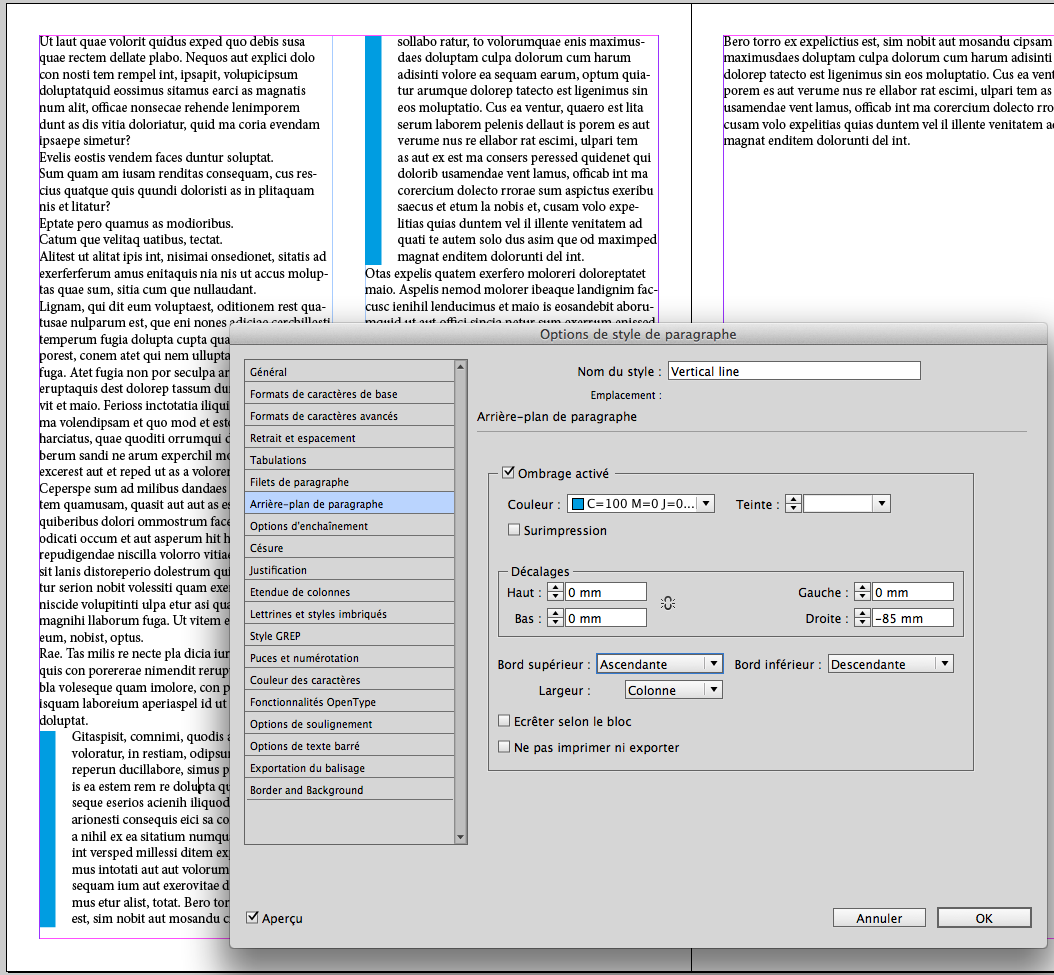
LEGEND , Nov 19, 2016 Nov 19, 2016

Capture d’écran 2016-11-19 à 13.57.37.png

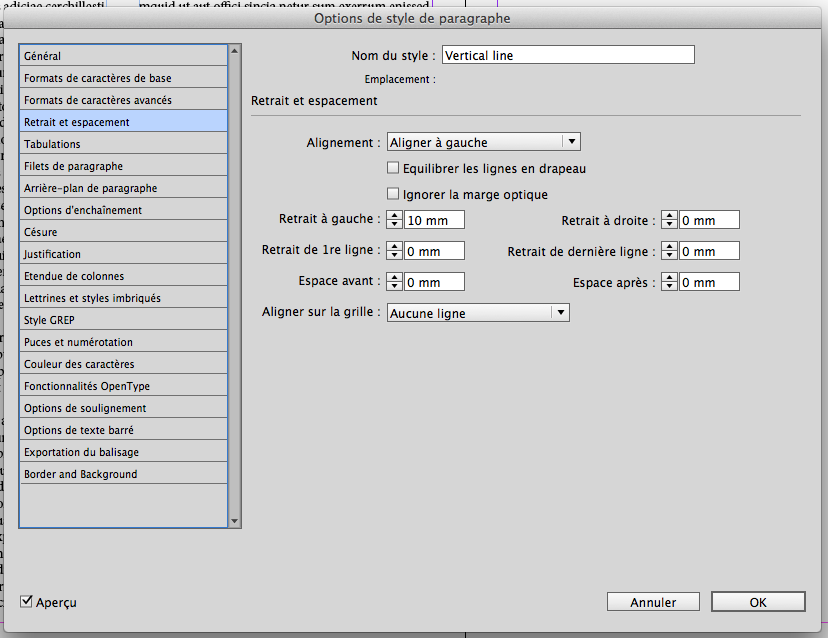
Capture d’écran 2016-11-19 à 13.57.49.png

(^/)

Translate
LEGEND ,
Nov 19, 2016 Nov 19, 2016

Capture d’écran 2016-11-19 à 13.57.37.png

Capture d’écran 2016-11-19 à 13.57.49.png

(^/)

Translate
Report
Community guidelines
Be kind and respectful, give credit to the original source of content, and search for duplicates before posting. Learn more
community guidelines
Community Expert ,
Nov 19, 2016 Nov 19, 2016

In the English version, this is called Paragraph Shading, and by setting offsets and indents as shown by Obi-Wan, you can create a vertical line.

Translate
Report
Community guidelines
Be kind and respectful, give credit to the original source of content, and search for duplicates before posting. Learn more
community guidelines
Community Beginner ,
Nov 19, 2016 Nov 19, 2016

aw, thanks!!
this help me very much!

Translate
Report
Community guidelines
Be kind and respectful, give credit to the original source of content, and search for duplicates before posting. Learn more
community guidelines
LEGEND ,
Nov 19, 2016 Nov 19, 2016

Capture d’écran 2016-11-19 à 22.13.28.png

Totally automatic of course! LOL!

(^/)

Translate
Report
Community guidelines
Be kind and respectful, give credit to the original source of content, and search for duplicates before posting. Learn more
community guidelines
Community Beginner ,
Nov 19, 2016 Nov 19, 2016

Sr but i have a problem.
i am using InDesign CC 2014 and there is i cant find something similar to your Arrière-plan de praraghraphe in english version :<Capture.JPG

Translate
Report
Community guidelines
Be kind and respectful, give credit to the original source of content, and search for duplicates before posting. Learn more
community guidelines
Enthusiast ,
Nov 19, 2016 Nov 19, 2016

See post 2 --paragraph shading

Translate
Report
Community guidelines
Be kind and respectful, give credit to the original source of content, and search for duplicates before posting. Learn more
community guidelines
Community Expert ,
Nov 19, 2016 Nov 19, 2016

@ThanhTung2903,

You need to update to InDesign CC 2015 or 2017 to use the Paragraph Shading feature. It was added in CC 2015.

Translate
Report
Community guidelines
Be kind and respectful, give credit to the original source of content, and search for duplicates before posting. Learn more
community guidelines
Community Beginner ,
Nov 19, 2016 Nov 19, 2016

my preference layout is in a book  published in 2014, i wonder how they do it back then

Translate
Report
Community guidelines
Be kind and respectful, give credit to the original source of content, and search for duplicates before posting. Learn more
community guidelines
Community Expert ,
Nov 20, 2016 Nov 20, 2016

It is much easier to Upgrade to CC 2017 than any workaround.

In that time, I did it  with an anchored frame with that color or with an 2 column table, the first row would be empty and colored.

Translate
Report
Community guidelines
Be kind and respectful, give credit to the original source of content, and search for duplicates before posting. Learn more
community guidelines
Community Beginner ,
Nov 20, 2016 Nov 20, 2016

Aw, thank you! :-bd

Translate
Report
Community guidelines
Be kind and respectful, give credit to the original source of content, and search for duplicates before posting. Learn more
community guidelines
LEGEND ,
Nov 20, 2016 Nov 20, 2016

A totally automatic way was doable since CS3! 

(^/)

Translate
Report
Community guidelines
Be kind and respectful, give credit to the original source of content, and search for duplicates before posting. Learn more
community guidelines
Community Beginner ,
Jan 10, 2017 Jan 10, 2017
LATEST

can you show me the way @@

Translate
Report
Community guidelines
Be kind and respectful, give credit to the original source of content, and search for duplicates before posting. Learn more
community guidelines