
susanfordnola
Participant
June 9, 2020
Answered

How to do Page setup for printing for InDesign Publish Online documents?

  • June 9, 2020
  • 3 replies
  • 1129 views

I've published my first digital magazine and uploaded it; my readers are having trouble printing pages, and the problems seem to vary from browser to browser, operating system, etc. People want to print a single page, but only a portion of the content on any given page will print. Does anyone have a solution for this? Is printing not supported?  An easy workaround is to do a screen shot of the page a reader wants to print, but not all of my readers are technical enough to do that. Here's the URL to the full issue; the page in the screenshot below is page 9. https://indd.adobe.com/view/4cff56bd-eb43-42dd-9146-2a8b5976d822
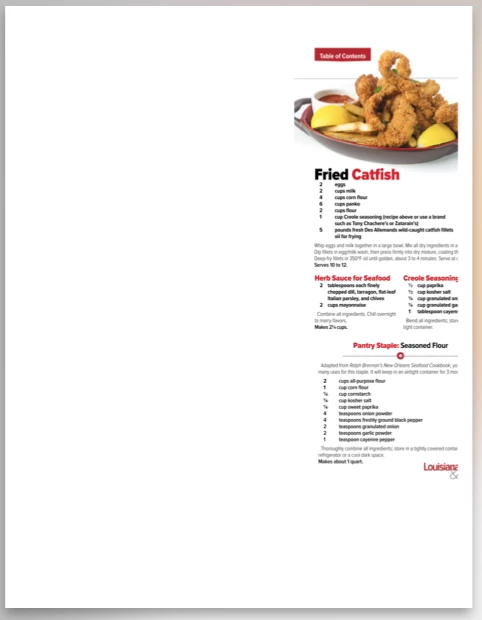


{Renamed by MOD}
This topic has been closed for replies.
Correct answer Diane Burns

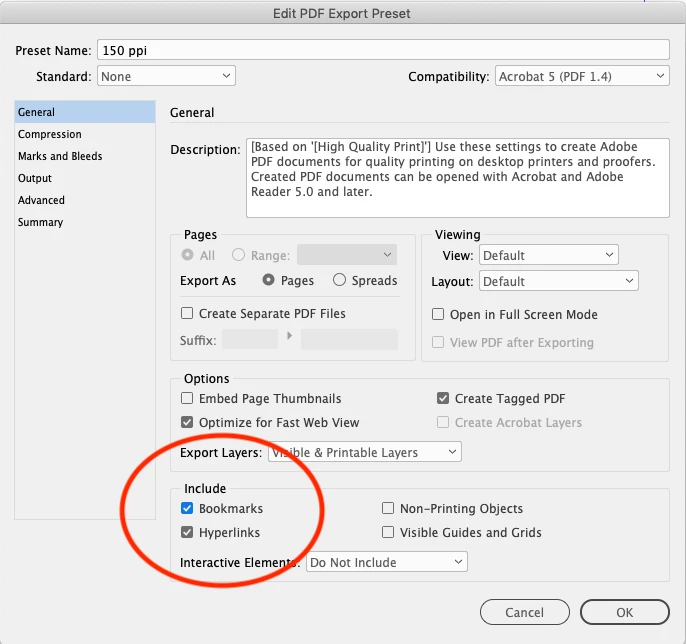
Create a PDF for readers to download. To keep the links active, you need to create a custom PDF preset (File > PDF Presets > Define). Since Publish Online can only upload PDFs that use Print presets, make one that includes hyperlinks. Then, when publishing your document, choose that custom preset from the Publish Online Advanced settings. The PDF will then have links. 


You can see this in the PDF that downloads from this Publish Online document: http://bit.ly/PubOnCollection

3 replies

Ashutosh_Mishra
Inspiring
June 23, 2020

Hi there,


Thanks for reaching out. I hope your issue is resolved now. If it is, we'd appreciate if you can mark the appropriate response correct. You may share any other method you used to fix this issue. It'll help other community users having similar concern.

If you still have issues, let us know. We'll be happy to assist.


Regards,

Ashutosh

Diane Burns
Diane BurnsCorrect answer
Inspiring
June 10, 2020

Create a PDF for readers to download. To keep the links active, you need to create a custom PDF preset (File > PDF Presets > Define). Since Publish Online can only upload PDFs that use Print presets, make one that includes hyperlinks. Then, when publishing your document, choose that custom preset from the Publish Online Advanced settings. The PDF will then have links. 


You can see this in the PDF that downloads from this Publish Online document: http://bit.ly/PubOnCollection

BobLevine
Community Expert
Community Expert
June 9, 2020
You should upload a PDF for them to download.
susanfordnola
Participant
June 9, 2020

Enabling download strips the links off my in-house and advertiser ads. That is not an option; if I'm going to give the content away for free, I have to have advertising revenue. Gotta eat...

Community Expert
June 9, 2020

There will be no way to control how various browsers will print html content.

The reason a person is printing a page is for the recipe, correct? Here's my suggestion: have a cta link on the recipes. User goes to a request form, and exchange for email address, receives the PDF of a recipe card (that also contains advertiser's logos).