

Om Nath Jha
Legend
September 12, 2019
Answered

How to downsave an InDesign file to open it in an older version

  • September 12, 2019
  • 2 replies
  • 76377 views

Follow these simple steps in order to open an InDesign file in an older version of the app (CS6) which was created in a newer version:

  1. Open the file in the newer version.
  2. Select Save As or Save a Copy (in case you need to keep a newer version as well).
  3. Choose IDML file format (compatible with CS4 or later) and save.
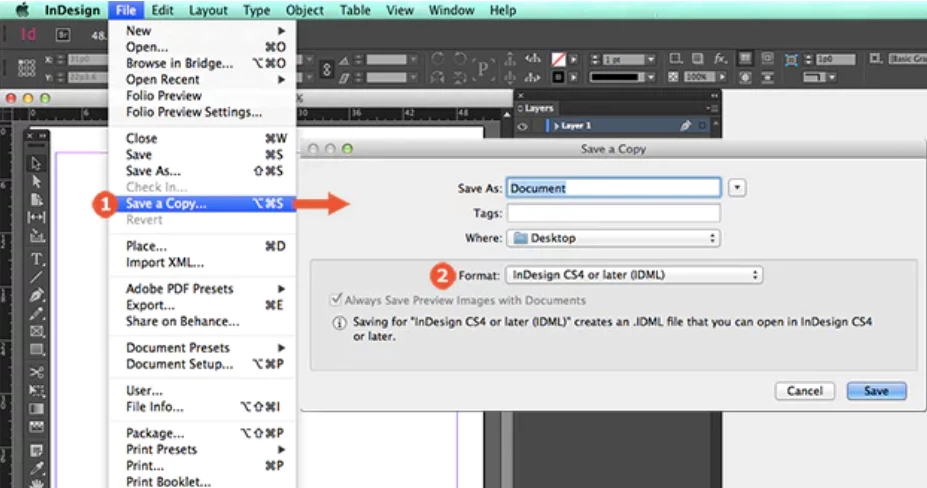


Note – Packaging the InDesign file also include an IDML version of the file.

Check this help article for more details: https://helpx.adobe.com/in/indesign/using/saving-documents.html#save_backwards_to_the_previous_indesign_version

This topic has been closed for replies.
Correct answer Bill Silbert

As Om Nath Jha and Jeff have pointed out IDMLs can be very useful when used the right way. However, there are situations when their use should be avoided. For a full explanation of this please see: https://community.adobe.com/t5/InDesign/IDMLs-A-Cautionary-Tale/td-p/9854908.

2 replies

Bill Silbert
Community Expert
Bill SilbertCommunity ExpertCorrect answer
Community Expert
September 16, 2019

As Om Nath Jha and Jeff have pointed out IDMLs can be very useful when used the right way. However, there are situations when their use should be avoided. For a full explanation of this please see: https://community.adobe.com/t5/InDesign/IDMLs-A-Cautionary-Tale/td-p/9854908.

Jeff Witchel, ACI
Community Expert
Community Expert
September 12, 2019

Saving to IDML is also great for InDesign files that seem to be acting wonky. If while you're working on a file, everything is coming to a standstill, or there's a swatch you can't delete for no apparent reason, or the file size has become enormous, your file might be getting corrupted. When an InDesign file seems to be acting strangely, simply Save As an IDML and reopen your layout in InDesign. Most of the time this will fix the issue like the file is new again. 

Om Nath Jha
Legend
September 16, 2019
I do agree with you Jeff. It's indeed a handy troubleshooting step too.