Known Participant
May 21, 2017
Answered

How to enable Middle East in InDesign CC 2017?

  • May 21, 2017
  • 3 replies
  • 21036 views

Hello.

I installed Adobe InDesign CC 2017 but I can't write Middle East language. How can I enable it? Adobe Photoshop CC 2017 has an option about it but how about Adobe InDesign?

Thank you.

    This topic has been closed for replies.
    Correct answer Zaid Al Hilali

    In order to access all Right-to-Left features, you must have InDesign copy with Arabic support.

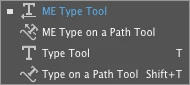
    Check first if you have the "ME Type Tool" in your InDesign copy
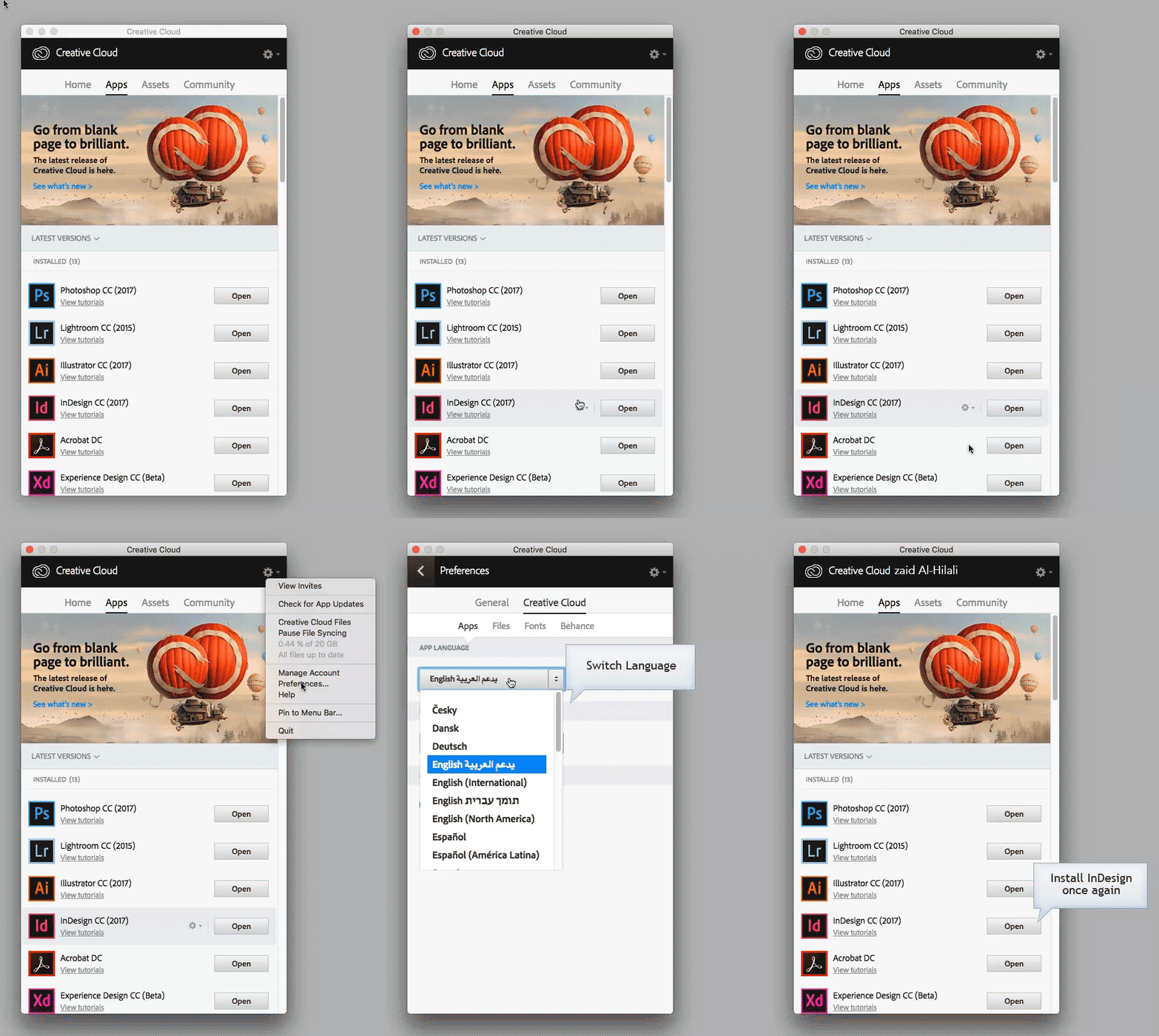
    If you don't have "ME Type Tool" then you need to follow below steps in order to access ME features…
    3 replies

    Zaid Al Hilali
    Community Expert
    Zaid Al HilaliCommunity ExpertCorrect answer
    Community Expert
    May 21, 2017

    In order to access all Right-to-Left features, you must have InDesign copy with Arabic support.

    Check first if you have the "ME Type Tool" in your InDesign copy

    If you don't have "ME Type Tool" then you need to follow below steps in order to access ME features…

    hack3rconAuthor
    Known Participant
    May 21, 2017

    I don't like Creative Cloud because it need internet. I have Adobe InDesign, Photoshop and...Separate.

    Willi Adelberger
    Community Expert
    Community Expert
    May 21, 2017

    You need it only for the installation process and for activation. (And all 30 Days once for reactivation).

    hack3rconAuthor
    Known Participant
    May 21, 2017

    Uninstall?

    amaarora
    Inspiring
    May 21, 2017

    Hi,

    I would say reinstall after choosing the appropriate preference from the Creative Cloud..

    -Aman

    amaarora
    Inspiring
    May 21, 2017

    Hi,

    Can you see if the below thread also has the solution for your problem?

    InDesign CC 2017 Arabic features gone after update (12.1.0)

    -Aman