TestriteVisual
Inspiring
February 5, 2024
Answered

How to export PDF without "Guides and Grids" Layer?

  • February 5, 2024
  • 3 replies
  • 1716 views

Greetings,


Is there a way to export a PDF without the "Guides and Grids" Layer?


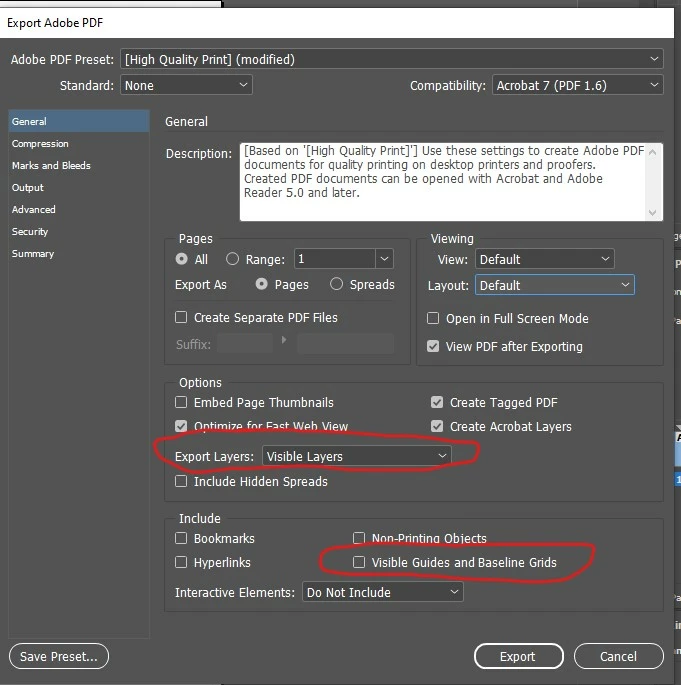
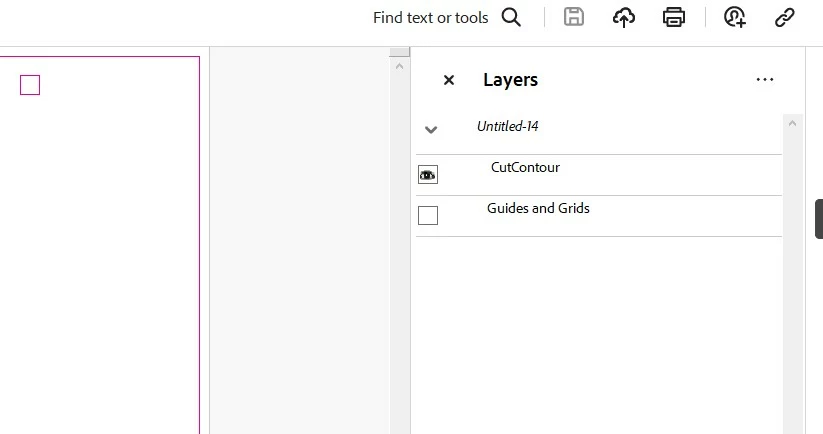
I believe I have all the proper export settings set and unchecked, and I have the guide turned off in the actual file before exporting, but no matter what settings I have it seems to still include the "Guides and Grids" Layers. Please let me know if there is a setting I'm over-looking.


Thanks for you help 🙂

InDesign PDF Export Window
 

Acrobat window
 

This topic has been closed for replies.
Correct answer JR Boulay

You cannot export without this layer, but you can easily remove it with Acrobat Pro (or Acrobat Standard) by using this free script: https://www.uvsar.com/projects/acrobat/indesignfixups/

It can remove the nest structure too.


3 replies

JR Boulay
Community Expert
JR BoulayCommunity ExpertCorrect answer
Community Expert
February 6, 2024

You cannot export without this layer, but you can easily remove it with Acrobat Pro (or Acrobat Standard) by using this free script: https://www.uvsar.com/projects/acrobat/indesignfixups/

It can remove the nest structure too.


Acrobate du PDF, InDesigner et Photoshopographe
Steve Werner
Community Expert
Community Expert
February 6, 2024

Thanks, @JR Boulay ! I'm glad there is a script to do this. I've never seen that before.

Luke Jennings3
Community Expert
Community Expert
February 6, 2024

In addition to the good information above, the Guides and Grids layer can be removed in Acrobat using an existing preflight profile.


Steve Werner
Community Expert
Community Expert
February 5, 2024

I've seen that before (over a very long time) for Acrobat 7 (PDF 1.6) PDF export.


Unless someone has found some fancy scripting way of deleting it, I think you'll have to live with it.

TestriteVisual
Inspiring
February 5, 2024

ok thank you for letting me know.

BobLevine
Community Expert
Community Expert
February 5, 2024

AFAIK, there's no way to choose the layers. It's all of them or a flattened PDF; and by flattened, I mean the layers, not transparency which is maintained.


The only thing that choice does, IIRC, is maintaining the same visibility as the InDesign document.

TestriteVisual
Inspiring
February 5, 2024

Thanks I appreciate the info.